Translate + bulk send in Chrome
Best WhatsApp Chrome Extension — Translate & Bulk
Install MSG.AI when you need one WhatsApp Chrome extension for business: translate chats on WhatsApp Web, pace bulk sends, reuse scripts, and export—without a Business API setup.
Quick answer
Which is the best WhatsApp Chrome extension for business?
There is no single "best" extension—the right choice depends on your job-to-be-done. If you need paced bulk sending with AI translation and knowledge-base reply drafts for cross-border sales or multilingual customer service, MSG.AI embeds these features into WhatsApp Web with local-first storage. If you only need quick-reply scripts or contact export, simpler extensions may suffice. If you require a shared team inbox, CRM webhooks, or guaranteed template delivery, you need the WhatsApp Business Platform API instead.
Core trade-off: Chrome extensions work inside your existing WhatsApp Web session (lower cost, faster setup, solo or small-team workflow) but lack enterprise shared-inbox features. Business API requires Meta verification, template approvals, and provider fees but supports multi-agent collaboration and CRM integration.
List your daily tasks (bulk outreach, translation, scripts, archival, CRM sync), privacy requirements (local vs cloud storage), team size (solo vs shared inbox), and budget. Match these to extension capabilities rather than choosing by popularity alone.
Decision criteria
How to compare WhatsApp Chrome extensions for business
Before evaluating individual extension brands, understand these four dimensions that shape daily workflow, account safety, and long-term fit.
1. Privacy and data storage: local vs cloud
Local-first extensions (like MSG.AI default mode) store task queues, scripts, and settings in browser local storage. Your chat content stays in WhatsApp Web; the extension does not relay messages through its servers for bulk send or export. This reduces data-sharing risk but means settings do not sync across devices.
Cloud-sync extensions upload your contact lists, message templates, or chat archives to vendor servers for cross-device access, analytics dashboards, or team collaboration. This provides convenience but requires reviewing the vendor's data retention, encryption, and third-party sharing policies.
Practical test: Check the extension's privacy policy. If it mentions "storing your messages on our servers" or "analyzing your conversations for insights," your chat content leaves your device. If it only mentions "license verification" or "optional Drive upload," content typically stays local.
2. Pacing and consent: speed vs account safety
WhatsApp restricts accounts based on recipient reports, unexpected message volume, and policy violations—not the brand of the tool. Extensions that let you "send 1000 messages per hour" increase ban risk because human sending patterns are slower and recipients are more likely to report unsolicited messages.
Paced sending (e.g., MSG.AI default 20–60 second intervals) mimics human behavior, gives you time to monitor early replies for errors or complaints, and reduces the likelihood of triggering automated restrictions. Fast bulk sending completes campaigns quickly but raises risk if your list quality is poor.
Consent reminder: No extension, no matter how slow or sophisticated, can bypass the requirement for opt-in consent. Always send only to people who agreed to receive messages from you, and pause or stop if you receive block or report signals.
3. AI honesty: drafts vs unattended bots
Extensions advertising "AI auto-reply" fall into two categories:
- AI draft assistants (like MSG.AI knowledge-base reply) generate editable response suggestions using recent conversation context and your business knowledge. You review and edit before sending. Best for customer service where accuracy and tone matter.
- Unattended chatbots send replies automatically without human review. These are faster but risk wrong answers, inappropriate tone, or compliance issues. Most are not "AI" in the LLM sense—they use keyword triggers and fixed templates.
If the extension does not show you the AI-generated text before it is sent, you are using an unattended bot. Make sure your use case (e.g., appointment confirmations, FAQ answers) tolerates occasional errors.
4. Extension vs Business API: when does the platform make sense?
Chrome extensions work with your personal or Business App WhatsApp account via WhatsApp Web. The WhatsApp Business Platform (API) is Meta's official enterprise solution requiring verification, template approvals, and a Business Solution Provider.
| Feature | Chrome extension (Web) | Business Platform (API) |
|---|---|---|
| Setup | Install extension, sign in to WhatsApp Web (5 minutes) | Meta Business verification, BSP onboarding, template approvals (2–4 weeks) |
| Cost | $0–$50/month, no per-message fees | $0.005–$0.10/conversation + $50–$500/month BSP fees |
| Shared inbox | No (one phone number per session) | Yes (10+ agents on one number) |
| CRM integration | Manual CSV export, no webhooks | Real-time sync with HubSpot, Salesforce, Zendesk |
| Message templates | Local scripts, no approval required | Meta-approved templates for broadcast messages |
| Best for | Solo or small teams (1–5 people), fast iteration | Mid-to-large teams (10+ agents), compliance-heavy industries |
Use an extension if you are testing a new market, have a small team, or need fast setup without developer resources. Upgrade to the API when you need shared inbox, CRM webhooks, or guaranteed template delivery.
Match tool to task
Job-based buyer guide: which WhatsApp extension for which job?
Here are five common jobs and the extension features that matter most for each. Links point to detailed guides—use them to avoid cannibalizing existing keyword-focused content.
Job 1: Paced bulk outreach to a customer list
Need: Send promotional messages, product updates, or event invitations to 50–500 contacts from an Excel/CSV list without saving each number in your phone.
Key features: CSV import, message templates with variables (name, order number), random delay intervals, progress tracking, media attachment (images, videos, PDFs).
MSG.AI fit: Yes. Supports bulk send without saving contacts, Drive media library, paced queue with configurable delays, and personalized variables from Excel.
Alternative: Dedicated WhatsApp sender extensions on Chrome Web Store focus only on bulk send without translation or AI features. Lower cost, simpler UI, but less versatile.
Job 2: Multilingual customer service
Need: Respond to customer inquiries in multiple languages (English, Spanish, Chinese, Arabic, etc.) without copy-pasting into Google Translate.
Key features: Inline incoming translation, outgoing language selector with draft preview, Live Translate mode for continuous conversations, support for 15+ languages.
MSG.AI fit: Yes. Automatic translation on Web for incoming messages, outgoing draft preview before sending, and 20-language support. See translator extension comparison for privacy and accuracy considerations.
Alternative: Standalone translator extensions exist but typically lack bulk send or CRM-adjacent features. If translation is your only need, check Chrome Web Store reviews and compare processing (local vs cloud AI).
Job 3: Quick-reply scripts and templates
Need: Save and reuse common replies (order confirmation, shipping status, return policy) with one-click insertion into WhatsApp Web composer.
Key features: Script library with folders, keyword shortcuts (type /shipping → full message), variable placeholders, team-shared templates.
MSG.AI fit: Yes. Built-in script library with folders, placeholders for dynamic content, and local storage by default. Optional Google Sign-In for cross-device sync.
Alternative: Lightweight "quick reply" extensions on Chrome Web Store focus only on templates without bulk send or AI. Good fit if you only need this one feature.
Job 4: Contact and chat export for CRM or compliance
Need: Export WhatsApp contacts, group members, or chat history to CSV/Excel for import into CRM, compliance archival, or analysis.
Key features: Contact export to CSV/Excel/vCard, group member export, chat history export to HTML, optional Google Drive upload.
MSG.AI fit: Yes. Exports contacts, groups, and chats to readable formats (CSV, HTML) with local save or Drive upload. See backup vs export clarity to understand that exports are not restore-capable backups.
Alternative: Dedicated export extensions exist. Check if they support the exact format (CSV vs vCard, HTML vs PDF) your CRM or compliance system requires.
Job 5: CRM-adjacent workflow (notes, labels, reminders)
Need: Add contact notes, deal stages, follow-up reminders, or pipeline tracking to WhatsApp Web without full CRM integration.
Key features: Contact notes, custom labels, reminder notifications, deal pipeline or stage tracking.
MSG.AI fit: Partial. MSG.AI is a CRM-adjacent workflow assistant with bulk send, translation, AI drafts, scripts, and export—but no deal pipeline or team inbox. If you need full CRM features (shared inbox, HubSpot sync, pipeline management), see the CRM extension guide or consider Business Platform integration.
Alternative: Extensions labeled "WhatsApp CRM" on Chrome Web Store vary widely. Some add notes and labels; others are just bulk senders. Read descriptions carefully to match your workflow.
Evaluation criteria
Checklist for choosing a WhatsApp Chrome extension for business
Use this checklist to evaluate any extension, including MSG.AI. No tool is perfect; prioritize the criteria that matter most for your daily workflow.
Does the extension solve your primary job-to-be-done (bulk send, translation, scripts, export, CRM)?
Does the extension store your chat content, contact lists, or messages on vendor servers? Check the privacy policy.
Can you configure random delay intervals (e.g., 20–60 seconds) to reduce ban risk, or only fixed fast sending?
If AI features exist, do you review drafts before sending, or are replies sent automatically?
Does the extension remind you to use opt-in lists, or does marketing copy imply "unlimited sending"?
Check recent reviews (last 3 months) for ban reports, bugs, or customer support issues.
Are limits (messages per day, contacts per list) clear, or hidden behind vague "fair use" policies?
If you need shared inbox or multi-agent collaboration, does the extension support it, or do you need Business API?
If exporting contacts or chats, does the extension output the format (CSV, vCard, HTML, PDF) you need?
Check Chrome Web Store listing: when was the last update? Extensions that break with WhatsApp Web UI changes need active maintenance.
No extension passes all ten criteria perfectly. Prioritize the top three that matter most for your business, then choose the best available match.
Platform timing
When should you use WhatsApp Business API instead of a Chrome extension?
Chrome extensions are faster to start and cheaper to run, but the WhatsApp Business Platform becomes necessary when your workflow outgrows browser-based tools. Here are clear upgrade signals:
1. Shared team inbox (10+ agents on one WhatsApp number)
Chrome extensions work with your personal WhatsApp Web session (one phone number per browser profile). If you need multiple agents logged in simultaneously to the same business number with conversation assignment and internal notes, you need Business Platform integration with a CRM like HubSpot, Zendesk, or Salesforce.
2. CRM webhooks and real-time sync
Extensions can export contacts to CSV for manual CRM import. The API provides real-time webhooks that sync incoming messages, conversation status, and contact updates directly into your CRM database—no manual export or import steps.
3. Template approvals for broadcast messages
If you need to send promotional messages outside the 24-hour conversation window (messages not initiated by the customer), you need Meta-approved message templates via Business Platform. Extensions can only send within active conversations or to customers who messaged you first.
4. Guaranteed delivery and Meta support
Business Platform includes delivery receipts, error codes, and official Meta support channels. Extensions do not provide delivery guarantees—messages are sent via WhatsApp Web's interface, and you rely on WhatsApp Web's own reliability.
5. Compliance and audit trails for regulated industries
Financial services, healthcare, and other regulated industries may require server-side message logs, encryption standards, and audit trails that extensions cannot provide. Business Platform integrations offer these compliance features through BSP (Business Solution Provider) infrastructure.
Cost-benefit timing: Start with a Chrome extension to validate your WhatsApp channel (test messaging, measure reply rates, refine scripts). Upgrade to Business API when you hit team-size limits (5+ agents), need CRM webhooks, or face compliance requirements that browser extensions cannot meet. See the API alternative guide for detailed comparison.
Honest feature map
What MSG.AI actually does (and does not do)
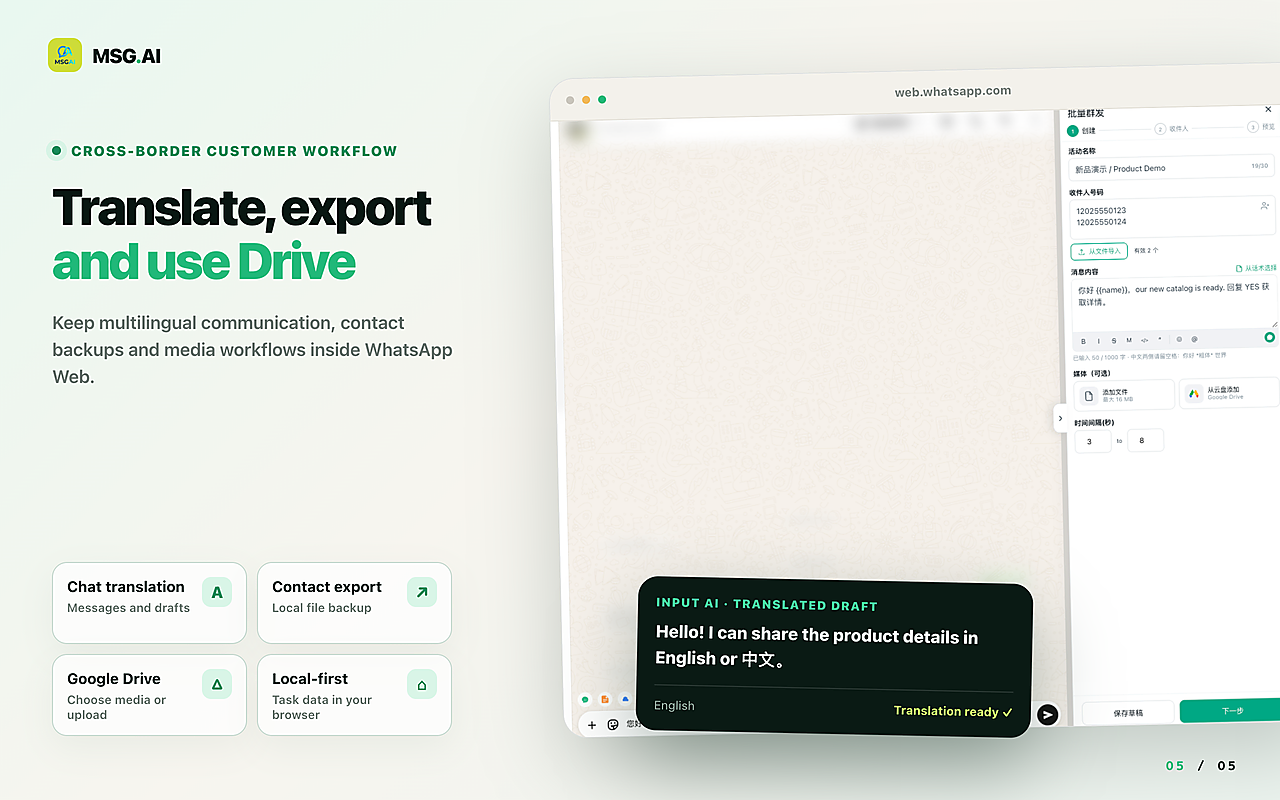
MSG.AI is a Chrome extension for WhatsApp Web that embeds paced bulk send, AI translation, knowledge-base reply drafts, script library, Google Drive media, and contact/group/chat export into the WhatsApp Web interface. It is designed for cross-border sellers, e-commerce support teams, and multilingual SMBs who need workflow automation without Business API setup.
Core features (what it does)
- Paced bulk send: Import contacts from CSV/Excel, configure 20–60 second delay intervals, send personalized messages with variables and media. No need to save contacts in your phone.
- AI translation: Translate incoming messages inline, write replies in your language with target-language preview, enable Live Translate mode for continuous conversations. 20 languages supported.
- Knowledge-base AI reply drafts: Generate editable response suggestions using recent conversation context and your business knowledge base. You review and edit before sending—not an unattended chatbot.
- Script library: Save and organize quick-reply templates with folders, placeholders, and keyword shortcuts. Local storage by default.
- Google Drive media library: Link your Drive account to access images and videos for bulk campaigns without downloading files locally.
- Contact and chat export: Export contacts to CSV/Excel/vCard, group members to CSV, and chat history to HTML with local save or Google Drive upload.
Honest limits (what it does NOT do)
- Not a shared team inbox: MSG.AI works with your personal WhatsApp Web session (one phone number per browser profile). For multi-agent collaboration on one number, use Business Platform.
- Not a full CRM: No deal pipeline, no HubSpot/Salesforce webhooks, no real-time sync. See the CRM extension guide for alternatives.
- Not calendar-based scheduling: MSG.AI supports delay intervals while an active queue runs, not future date/time scheduling. See the scheduling guide for dedicated send-later extensions.
- Not official phone backup: Exports are readable archives (HTML), not WhatsApp's encrypted restore format. See backup vs export clarity.
- Not ban-proof: No tool guarantees account safety. Restrictions follow recipient reports, unexpected volume, or policy violations. MSG.AI includes pacing and consent reminders to reduce risk, but you must follow WhatsApp policies.
Who MSG.AI fits
- Cross-border sellers (AliExpress, Amazon, Shopify) handling multilingual customer inquiries
- E-commerce support teams (1–5 agents) needing AI translation + bulk send + export
- SMBs testing WhatsApp channel before upgrading to Business API
- Solo entrepreneurs or small agencies managing multiple client accounts
Who should look elsewhere
- Teams needing shared inbox (10+ agents on one number) → Business Platform + CRM
- Regulated industries requiring server-side logs and compliance audits → Business Platform
- Companies needing guaranteed template delivery or 24h+ window messaging → Business Platform
- Users who only need one feature (e.g., only scripts, only export) → Simpler standalone extensions
Install MSG.AI on Chrome Web Store to test paced bulk send, AI translation, and export features in your own WhatsApp Web workflow.
Frequently asked questions
FAQ: Choosing the best WhatsApp Chrome extension for business
Frequently asked questions
FAQ
What is the best WhatsApp Chrome extension for business?
The "best" extension depends on your job: MSG.AI fits paced bulk send + AI translation + knowledge-base drafts + export for cross-border sellers and multilingual support teams. Simpler extensions work for single features (scripts only, export only). For shared inbox or CRM webhooks, you need WhatsApp Business Platform instead.
Can I use Chrome extensions instead of WhatsApp Business API?
Yes, if you are a solo or small team (1–5 people) and do not need shared inbox, CRM webhooks, or guaranteed template delivery. Extensions work with your personal WhatsApp Web session, are faster to set up, and cost $0–$50/month vs API's $50–$500/month plus per-conversation fees. Upgrade to API when team size or compliance requirements outgrow browser tools.
Are WhatsApp Chrome extensions safe to use?
Safety depends on the extension's data handling and your sending practices, not the extension brand alone. Check the privacy policy: does it store chat content on vendor servers? For sending, use opt-in lists, configure paced delays (20–60 seconds), and monitor replies for complaints. No extension—whether simple or sophisticated—can bypass WhatsApp policies or guarantee account safety.
What features should I look for in a WhatsApp business extension?
Prioritize features that match your daily job: (1) Bulk send: CSV import, pacing, media support; (2) Translation: inline incoming, outgoing preview, 15+ languages; (3) Scripts: folder organization, placeholders, shortcuts; (4) Export: CSV/Excel/vCard/HTML formats; (5) Privacy: local storage vs cloud sync. Secondary: AI draft assistance, Drive media, team features.
How much do WhatsApp Chrome extensions cost?
Free extensions exist but often have strict limits (10–50 messages/day). Paid extensions range from $10–$50/month with higher or unlimited message quotas. MSG.AI pricing includes paced bulk send, AI translation, knowledge-base drafts, scripts, Drive media, and export—no per-message fees. Check Chrome Web Store listings for current pricing and trial availability.
Can Chrome extensions send bulk WhatsApp messages?
Yes. Extensions like MSG.AI import contacts from CSV/Excel and send messages with paced delays. Unlike native Broadcast Lists (which require saved contacts who have your number), extensions can send to unsaved numbers from customer lists. Always use opt-in lists and configure delays to reduce ban risk. See the bulk sender guide for detailed workflow.
Do WhatsApp Chrome extensions work with WhatsApp Business App?
Yes. Most extensions (including MSG.AI) work with both personal WhatsApp and WhatsApp Business App accounts via WhatsApp Web. Business App users can combine extension features (bulk send, translation, export) with native Business App features (catalog, labels, quick replies). Extensions do not replace Business App; they add capabilities on top of it.
Extension capabilities and market comparison verified September 29, 2026. MSG.AI provides paced bulk send, AI translation, knowledge-base reply drafts, script library, Drive media, and contact/group/chat export—not a shared team inbox or full CRM. Always review each extension's privacy policy, Chrome Web Store reviews, and pricing before installation.