Business messaging buyer guide
WhatsApp Business API Alternative: When a WhatsApp Web Chrome Extension Is Enough (2026)
Many SMBs search for WhatsApp Business API alternatives because the official platform requires Meta verification, template approvals, developer integration, and ongoing conversation fees. This guide explains what the Business API (WABA) actually does, when a simpler Chrome extension like MSG.AI is sufficient, and when you truly need the official API's enterprise features.
Quick answer
Do I need WhatsApp Business API, or is a Chrome extension alternative enough?
You do not need WhatsApp Business API (also called WhatsApp Business Platform or WABA) if you're a small team (1–10 people) who wants paced bulk messaging, AI-powered replies, translation, or contact management on WhatsApp Web. A Chrome extension like MSG.AI provides these features directly in your browser without Meta verification, template approvals, or conversation fees.
You do need the official API if you require: shared team inboxes with 10+ agents, real-time CRM integration (HubSpot, Salesforce), template-approved broadcast messages outside the 24-hour conversation window, webhook automation triggered by external events, or guaranteed delivery with official Meta support.
Cross-border sellers, multilingual support teams (1–10 people), and SMBs with opt-in customer lists who need paced outreach, AI translation, knowledge-base reply drafts, and local data control—but don't need enterprise shared inbox, CRM webhooks, or template approvals.
Understanding the official platform
What is WhatsApp Business API (WABA)?
WhatsApp Business API—officially rebranded as WhatsApp Business Platform—is Meta's enterprise messaging solution that allows businesses to integrate WhatsApp into their backend systems via REST API. Unlike the free WhatsApp Business App (a standalone mobile app for small businesses), the API is designed for medium-to-large companies that need programmatic messaging, shared team inboxes, and CRM integration.
Key characteristics of the official API
- Meta Business verification required: You must verify your business with Meta (ID documents, business registration, address proof) before accessing the API.
- Template approvals: Broadcast messages outside the 24-hour conversation window must use pre-approved message templates. Meta reviews templates in 24–48 hours; rejections require resubmission.
- Business Solution Provider (BSP) or self-hosted: You either pay a BSP (like Twilio, MessageBird, 360dialog) for managed API access, or build your own integration using Meta's Cloud API or on-premises deployment.
- Conversation-based pricing: Costs range from $0.005 to $0.10 per conversation (24-hour window) depending on country. User-initiated conversations within 24 hours are typically free or lower cost; business-initiated conversations cost more.
- Shared inbox and webhooks: Multiple agents can access the same WhatsApp number with role-based permissions. Webhooks notify your CRM when messages arrive, status changes, or conversations end.
- Rich features: Interactive buttons, list messages, product catalogs, order management, click-to-WhatsApp ads, and QR codes with tracking parameters.
Official documentation: WhatsApp Business Platform overview
Who uses WhatsApp Business API?
The API is commonly used by:
- Mid-size to enterprise companies (50+ employees) with dedicated IT or customer service teams
- E-commerce platforms sending order confirmations, shipping updates, and abandoned cart reminders
- Banks and financial services providing transaction alerts and authentication codes
- Travel and hospitality brands sending booking confirmations and flight updates
- Support teams using CRMs like HubSpot, Salesforce, or Zendesk with 10+ agents sharing one WhatsApp inbox
The SMB pain points
Why small businesses look for WhatsApp Business API alternatives
Despite the API's powerful features, many small and medium businesses find it impractical due to setup complexity, cost, and technical requirements. Common reasons SMBs search for "WhatsApp Business API alternative" include:
1. High setup complexity and time investment
- Meta Business verification: The verification process can take 1–4 weeks and may require resubmissions if documents are rejected or business details don't match.
- BSP selection and contracts: Choosing a Business Solution Provider requires comparing pricing models, features, and support quality—then signing contracts with minimum monthly commits.
- Developer integration: Connecting the API to your CRM, customer database, or backend requires developer time (estimate $500–$5,000 for custom integration depending on complexity).
- Template creation and approvals: Every broadcast message template must follow Meta's rules (no promotional language in certain categories, clear opt-out instructions) and wait for approval before use.
Reality check: From signup to first message, API setup typically takes 2–6 weeks and $1,000–$10,000 (BSP fees + developer time + testing). Many SMBs need to send messages this week, not next quarter.
2. Ongoing costs add up fast for small volumes
- BSP monthly fees: Managed API access costs $50–$500/month depending on message volume and features (shared inbox, chatbot builder, analytics).
- Conversation fees: Each 24-hour conversation window costs $0.005–$0.10 per customer. Sending 1,000 messages/month to different customers = $5–$100/month in Meta conversation fees (varies by country).
- Template rejections waste time: If Meta rejects a template, you must revise and resubmit—delaying your campaign and potentially missing seasonal windows.
Cost comparison example: A small business sending 500 paced bulk messages/month pays $0–$20/month with a Chrome extension like MSG.AI (one-time setup, flat subscription). The same volume via API costs $50–$150/month (BSP + conversation fees) plus initial setup costs.
3. Feature mismatch: "I don't need shared inbox or CRM webhooks"
Many SMBs searching for API alternatives actually just want:
- Paced bulk messaging to customer lists without saving every contact manually
- AI-powered translation for multilingual conversations
- Quick reply templates and script libraries for common questions
- Media library access (Google Drive) to send product images without downloading
- Contact and chat export for backup or analysis
These workflow features don't require API integration, Meta verification, or template approvals—they can be delivered via a browser extension working directly in WhatsApp Web.
4. Business model doesn't fit API conversation windows
The API's 24-hour conversation window and template restrictions are designed for transactional messaging (order updates, appointment reminders). They're less practical for:
- Permissioned outreach: Sending product launches or promotions to customers who opted in months ago (outside the 24-hour window) requires template approvals—but promotional templates face stricter review and rejection risk.
- Consultative sales: Long-tail sales cycles (B2B, high-ticket items) where you follow up weeks later require new template approvals each time.
- Community engagement: Informal check-ins or relationship-building messages don't fit template structures and may be rejected as "not transactional."
Chrome extension advantage: Tools like MSG.AI work within your existing WhatsApp session and conversation windows—no template approvals needed. You simply pace your sends and respect WhatsApp's general policies.
Three approaches compared
Chrome extension vs WhatsApp Business App vs WhatsApp Business API
There are three main ways to use WhatsApp for business. Here's an honest comparison to help you choose:
| Feature | Chrome Extension (e.g., MSG.AI) |
WhatsApp Business App (free mobile app) |
WhatsApp Business API (official platform) |
|---|---|---|---|
| Setup time | 5–10 minutes (install extension) | 5 minutes (download app) | 2–6 weeks (verification + integration) |
| Setup cost | $0 (free tier available) | $0 | $500–$5,000 (BSP + dev integration) |
| Monthly cost | $0–$50 (flat subscription) | $0 | $50–$500 (BSP) + per-conversation fees |
| Bulk messaging | ✅ Paced bulk send with CSV import, merge tags, media | ❌ Manual broadcasts only (up to 256 contacts) | ✅ API-driven bulk send with template approvals |
| AI translation | ✅ Inline translation in WhatsApp Web | ❌ Not available | ⚠️ Custom integration required |
| AI reply drafts | ✅ Knowledge base + AI suggestions | ❌ Not available | ⚠️ Custom chatbot required |
| Script / template library | ✅ Save and insert templates | ✅ Quick replies (up to 50) | ✅ Template manager with approvals |
| Media library (Drive) | ✅ Browse and send from Drive | ❌ Not available | ⚠️ Custom integration required |
| Shared team inbox | ❌ One user per browser session | ❌ One device per number | ✅ Multi-agent with assignment |
| CRM integration | ⚠️ Export to CSV only (manual import) | ❌ Not available | ✅ Real-time sync via webhooks |
| Template approvals | ❌ Not required | ❌ Not required | ✅ Required for broadcasts outside 24h window |
| Meta verification | ❌ Not required | ❌ Not required | ✅ Required (business documents) |
| Works with | WhatsApp Web (regular or Business App account) | Mobile only (Business App number) | Separate verified API number |
| Best for | SMBs (1–10 people) needing bulk send + AI tools | Solo freelancers or micro businesses | Mid-to-large teams (10+ agents) with CRM needs |
Learn more about the Business App vs API distinction: WhatsApp Business App vs Platform vs Web Extension
Decision framework
When you actually need the official WhatsApp Business API
Despite the setup complexity and cost, the official API is the right choice for certain business requirements. Choose the API over a Chrome extension alternative if:
✅ You need shared team inbox with 10+ agents
API advantage: Multiple agents access the same WhatsApp number simultaneously with role-based permissions, chat assignment, collision detection, and supervisor monitoring.
Chrome extension limitation: Tools like MSG.AI work in your personal WhatsApp Web session (one browser profile = one phone number). Multiple people cannot share the same number via extension.
When to use API: Customer support teams, call centers, or sales teams where 10+ people need to collaborate on WhatsApp conversations in real-time.
✅ You need real-time CRM integration (HubSpot, Salesforce, Zendesk)
API advantage: Webhooks notify your CRM instantly when messages arrive, conversations end, or statuses change. Contact data, conversation history, and deal stages sync bidirectionally between WhatsApp and your CRM database.
Chrome extension limitation: Extensions can export contacts and chats to CSV, but you must manually import them into your CRM. No real-time sync or automated workflow triggers.
When to use API: You already use a CRM heavily and need WhatsApp conversations automatically logged, assigned to deals, and triggering workflows (e.g., "send follow-up email when WhatsApp conversation is marked resolved").
✅ You need template-approved broadcast messages outside 24-hour windows
API advantage: After template approval, you can send messages to customers who haven't messaged you recently (outside the 24-hour conversation window)—such as order updates, appointment reminders, or payment confirmations.
Chrome extension limitation: You can only message contacts within active WhatsApp conversations (respecting WhatsApp's general policies). Initiating conversations outside the app's normal flow may risk restrictions.
When to use API: Transactional notifications (shipping updates, booking confirmations, two-factor authentication codes) sent to customers who haven't initiated recent contact.
✅ You need webhook automation triggered by external events
API advantage: Trigger WhatsApp messages automatically when external events occur in your systems—e.g., "send WhatsApp reminder when calendar appointment is 1 hour away" or "send abandoned cart message when checkout incomplete for 2 hours."
Chrome extension limitation: Extensions provide workflow helpers for messages you send manually or from CSV lists. They don't monitor external systems or trigger messages based on backend events.
When to use API: Complex automation workflows where WhatsApp is one step in a multi-system process (e.g., CRM → payment gateway → shipping tracker → WhatsApp notification).
✅ You need guaranteed delivery and official Meta support
API advantage: The API includes delivery receipts, read receipts, and error codes. Meta provides official technical support for API issues. Business Solution Providers offer SLAs and uptime guarantees.
Chrome extension limitation: Extensions depend on WhatsApp Web's browser interface. No guaranteed delivery, no official Meta support for extension functionality. Account restrictions or feature changes by WhatsApp may affect extension features.
When to use API: Mission-critical messaging (authentication codes, urgent alerts) where delivery confirmation and support escalation paths are required.
✅ You send 1,000+ messages per day to different customers
API advantage: The API is designed for high volume with rate limits of 80–1,000 messages per second (depending on quality rating and BSP). Conversation-based pricing becomes cost-effective at scale.
Chrome extension limitation: Paced bulk send with random delays (10–60 seconds) means 1,000 messages takes 3–17 hours. Practical limit ~200–500 messages/day for SMBs using browser-based tools.
When to use API: High-volume transactional messaging (order confirmations for large e-commerce, shipping updates for logistics companies, alerts for financial services).
No tool guarantees account safety
Whether you use the official API, a Chrome extension, or the free Business App, account restrictions can occur due to recipient reports, aggressive sending patterns, or policy violations. The API provides official support channels for appeals, but cannot prevent bans caused by policy non-compliance. Always obtain opt-in consent, pace your messages, and follow WhatsApp's Business Messaging Policy regardless of the tool you choose.
Lightweight alternative for SMBs
MSG.AI as a practical WhatsApp Business API alternative
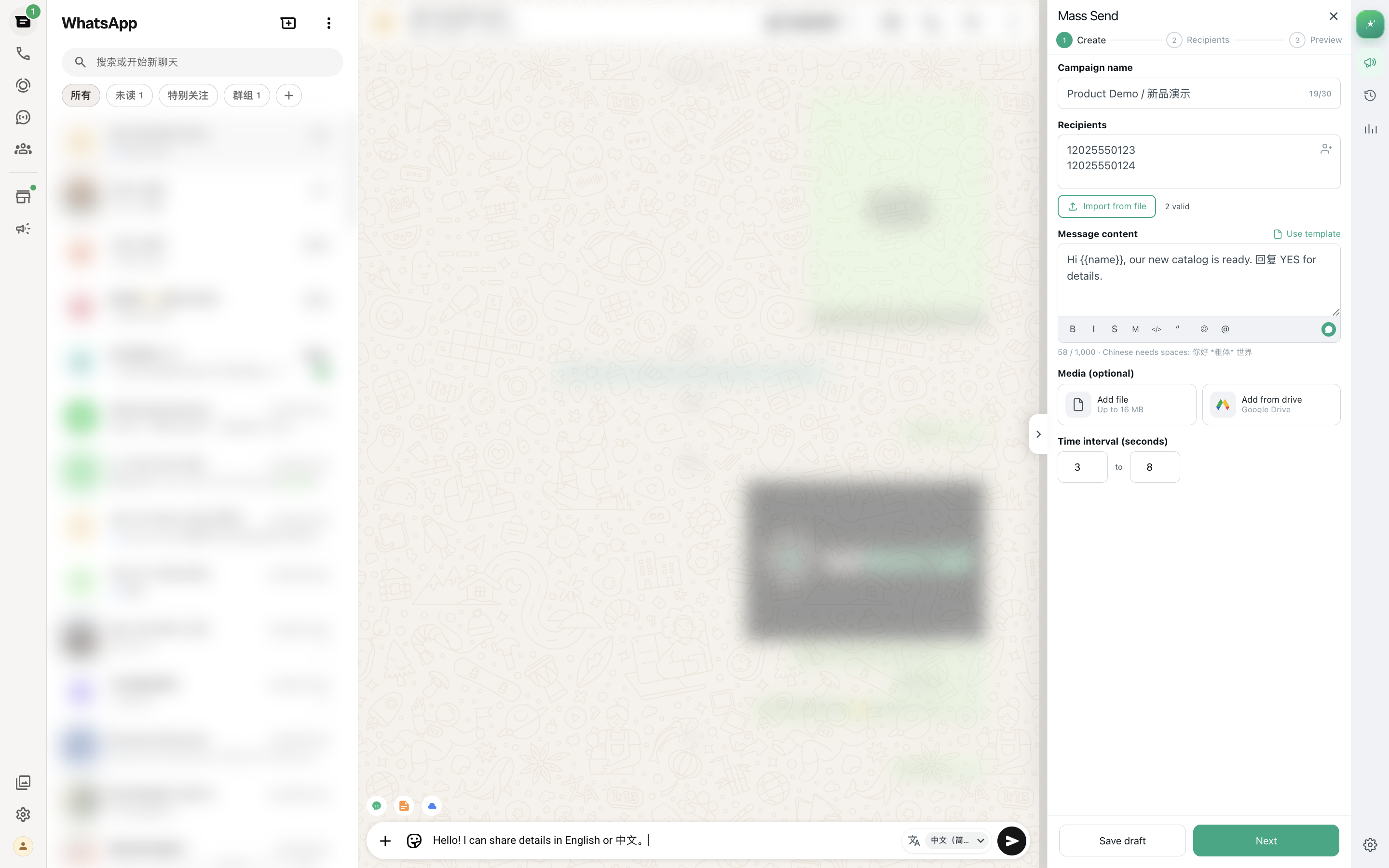
MSG.AI is a Chrome extension for WhatsApp Web that provides many business messaging features SMBs need—without API setup, Meta verification, or template approvals. Here's what it offers and who it's for:
✅ What MSG.AI provides (no API required)
- Paced bulk messaging: Import CSV/Excel lists with phone numbers, names, and custom fields. Send personalized messages with {{merge tags}} and media attachments. Random delays (10–60 seconds) reduce ban risk.
- AI translation: Translate incoming messages directly next to WhatsApp Web bubbles. Translate your replies before sending. Supports 100+ languages via Google Translate or custom AI models.
- AI knowledge base reply drafts: Upload product catalogs, FAQ documents, or company policies. When customers ask questions, click AI reply draft—MSG.AI searches your knowledge base and generates contextually accurate replies.
- Script library: Save reusable message templates for greetings, order confirmations, FAQ answers, and follow-ups. Insert with one click and personalize before sending.
- Google Drive media library: Connect your Drive account and browse folders directly in MSG.AI. Send product images, brochures, or videos without downloading to your computer first.
- Contact, group, and chat export: Export contacts (name, phone, profile pic URL, last message time), groups (members, admins), or full chat history to CSV/JSON for backup, analysis, or CRM import.
- Local storage by default: Task queues, scripts, and settings stored in browser local storage—no cloud relay for bulk send workflow. (AI features use cloud APIs for translation/generation only.)
Install: MSG.AI on Chrome Web Store
❌ What MSG.AI does NOT provide (API-only features)
- No shared team inbox: MSG.AI works in your personal WhatsApp Web session. It does not create a multi-agent shared inbox or assignment system.
- No real-time CRM sync: No webhooks or bidirectional sync with HubSpot, Salesforce, or Zoho. You can export data to CSV and manually import into your CRM.
- No template approvals: MSG.AI does not submit message templates to Meta for approval—it works within your normal WhatsApp conversation flows.
- No webhook automation: Cannot trigger messages based on external system events (e.g., "send WhatsApp when CRM deal stage changes"). You manually create bulk tasks or reply to incoming messages.
- No guaranteed delivery: Relies on WhatsApp Web's standard message delivery (same as manual typing). No official delivery receipts or Meta support for extension functionality.
Who MSG.AI is for
MSG.AI fits best for:
- Cross-border ecommerce sellers who need paced outreach to international customers with AI translation and Drive product catalogs.
- Multilingual customer support teams (1–10 people) handling diverse languages who want AI reply drafts from a knowledge base without building a custom chatbot.
- SMBs with permissioned opt-in lists who already work in WhatsApp Web daily and want bulk send + workflow tools without API complexity.
- Teams prioritizing local data control who prefer browser local storage over cloud CRM databases for privacy or compliance reasons.
- Businesses validating demand before API investment who want to test WhatsApp workflows with a low-cost tool before committing to full API setup.
Not for: Teams needing shared inboxes with 10+ agents, HubSpot/Salesforce real-time sync, template-approved broadcasts outside conversation windows, or webhook-driven automation (use WhatsApp Business API instead).
Related: WhatsApp Sender Chrome Extension buyer guide, How to pace bulk sends with smart delays
Making the decision
Evaluation checklist: Do you need the API or is an alternative enough?
Use this checklist to decide whether to invest in WhatsApp Business API or start with a simpler Chrome extension alternative:
✓ Choose WhatsApp Business API if:
- You have 10+ agents who need to share one WhatsApp inbox with role-based permissions and chat assignment
- You already use a CRM platform (HubSpot, Salesforce, Zendesk) and need real-time bidirectional sync via webhooks
- You send transactional messages (order updates, appointment reminders) to customers outside the 24-hour conversation window and need template approvals
- You require webhook automation triggered by external events (e.g., "send WhatsApp when payment received in payment gateway")
- You send 1,000+ messages per day to different customers and need higher throughput than browser-based pacing allows
- You need guaranteed delivery with official Meta support, SLAs, and technical escalation paths
- You have budget and timeline for 2–6 weeks setup, $1,000–$10,000 initial integration cost, and $50–$500/month ongoing fees
- You have developer resources to build and maintain custom CRM integrations or API workflows
✓ Choose a Chrome extension alternative (like MSG.AI) if:
- You have 1–10 people who work in WhatsApp Web individually (no need for one shared inbox)
- You need paced bulk messaging to opt-in customer lists (200–500 messages/day range) with CSV import and merge tags
- You want AI translation and reply drafts for multilingual conversations without building a custom chatbot
- You need quick setup (5–10 minutes) and want to start messaging this week, not next quarter
- You prefer lower cost ($0–$50/month flat subscription vs $100–$500+/month API fees)
- You don't need real-time CRM sync—manual CSV export and import into your CRM is acceptable
- You work within WhatsApp's normal conversation flows and don't need template-approved broadcasts outside 24-hour windows
- You want to test and validate WhatsApp workflows before committing to full API setup
✓ Hybrid approach: Start with extension, upgrade to API later
Many SMBs follow this path:
- Phase 1 (Months 1–6): Install MSG.AI or similar extension. Test bulk messaging workflows, validate customer response rates, build opt-in list. Cost: ~$20/month.
- Phase 2 (Month 6 checkpoint): Evaluate results. If sending 500+ messages/day and need shared inbox or CRM sync, start API application process.
- Phase 3 (Months 7–9): Complete Meta Business verification, choose BSP, integrate API with CRM. Export contacts from extension to seed CRM database.
- Phase 4 (Month 10+): Migrate to API for main workflows. Keep extension as backup or for personal/ad-hoc messages.
This approach minimizes upfront risk, validates demand before API investment, and provides continuity if API verification is delayed or rejected.
Ready to start without the API overhead?
Test MSG.AI with a small permissioned list first
If the evaluation checklist above suggests a Chrome extension fits your current needs, install MSG.AI and run a 5–10 message test campaign to a small opt-in list. Verify pacing, translation, and AI reply draft quality before scaling. No Meta verification, no template approvals, no developer required—start messaging in 10 minutes.
Frequently asked questions
FAQ
What is WhatsApp Business API (WABA)?
WhatsApp Business API (also called WhatsApp Business Platform or WABA) is Meta's official enterprise messaging solution that lets businesses integrate WhatsApp into their systems via API. It requires Meta Business verification, template approvals, and typically a Business Solution Provider (BSP). Best for mid-to-large teams needing shared inboxes, CRM integration, and guaranteed delivery.
Do I need WhatsApp Business API to send bulk messages?
No. You can send bulk messages using WhatsApp Web with a Chrome extension like MSG.AI without the Business API. The API is required only if you need template approvals, guaranteed delivery, CRM webhooks, or messaging outside a 24-hour conversation window without user initiation.
What's the difference between WhatsApp Business App and WhatsApp Business API?
WhatsApp Business App is a free mobile app for small businesses with basic features (labels, quick replies, catalog). WhatsApp Business API is an enterprise platform requiring verification, template approvals, and developer integration—used for CRM sync, shared team inboxes, and high-volume messaging. Chrome extensions like MSG.AI work with either the App or regular WhatsApp via WhatsApp Web.
Is MSG.AI a WhatsApp Business API alternative?
Yes, for specific use cases. MSG.AI is a Chrome extension providing paced bulk send, AI translation, knowledge-base reply drafts, script library, Drive media, and contact export—without API setup, Meta verification, or template approvals. It works directly in WhatsApp Web. Not suitable for enterprise shared inboxes, CRM webhooks, or guaranteed template delivery.
How much does WhatsApp Business API cost compared to Chrome extensions?
WhatsApp Business API costs $0.005–$0.10 per conversation (varies by country) plus BSP fees ($50–$500/month) and setup costs ($500–$5,000). Chrome extensions like MSG.AI cost $0–$50/month with no per-message fees. Extensions are cheaper for small teams but lack enterprise features like shared inbox and CRM sync.
Can I use a WhatsApp Business API alternative without getting banned?
No tool—whether official API or browser extension—guarantees account safety. Restrictions typically result from recipient reports, aggressive sending, or policy violations. Chrome extensions like MSG.AI include pacing and consent reminders to reduce risk, but you must follow WhatsApp policies, obtain opt-in consent, and respect volume limits regardless of the tool used.
When do I actually need the official WhatsApp Business API?
Use the official API when you need: (1) Shared team inbox with 10+ agents, (2) Real-time CRM integration with HubSpot/Salesforce, (3) Template approvals for broadcast messages, (4) Messaging outside 24-hour windows, (5) Guaranteed delivery and Meta support, or (6) Webhook automation triggered by external events.
Can I upgrade from a Chrome extension to WhatsApp Business API later?
Yes. Start with a Chrome extension like MSG.AI to validate demand and workflows. When you outgrow browser tools (need shared inbox, CRM sync, or higher volume), apply for WhatsApp Business API. You cannot migrate message history, but you can export contacts from MSG.AI to CSV and import them into your new API-connected CRM.
Product capabilities and positioning verified as of September 24, 2026. MSG.AI is independently developed and not affiliated with Meta, WhatsApp, or Business Solution Providers mentioned. WhatsApp Business API features, pricing, and verification requirements may change. Evaluate current API offerings and extension capabilities before making a decision. No tool guarantees account safety—always comply with WhatsApp Business Messaging Policy.