Product workflow · MSG.AI
WhatsApp AI Auto Reply with a Business Knowledge Base: A Practical Guide
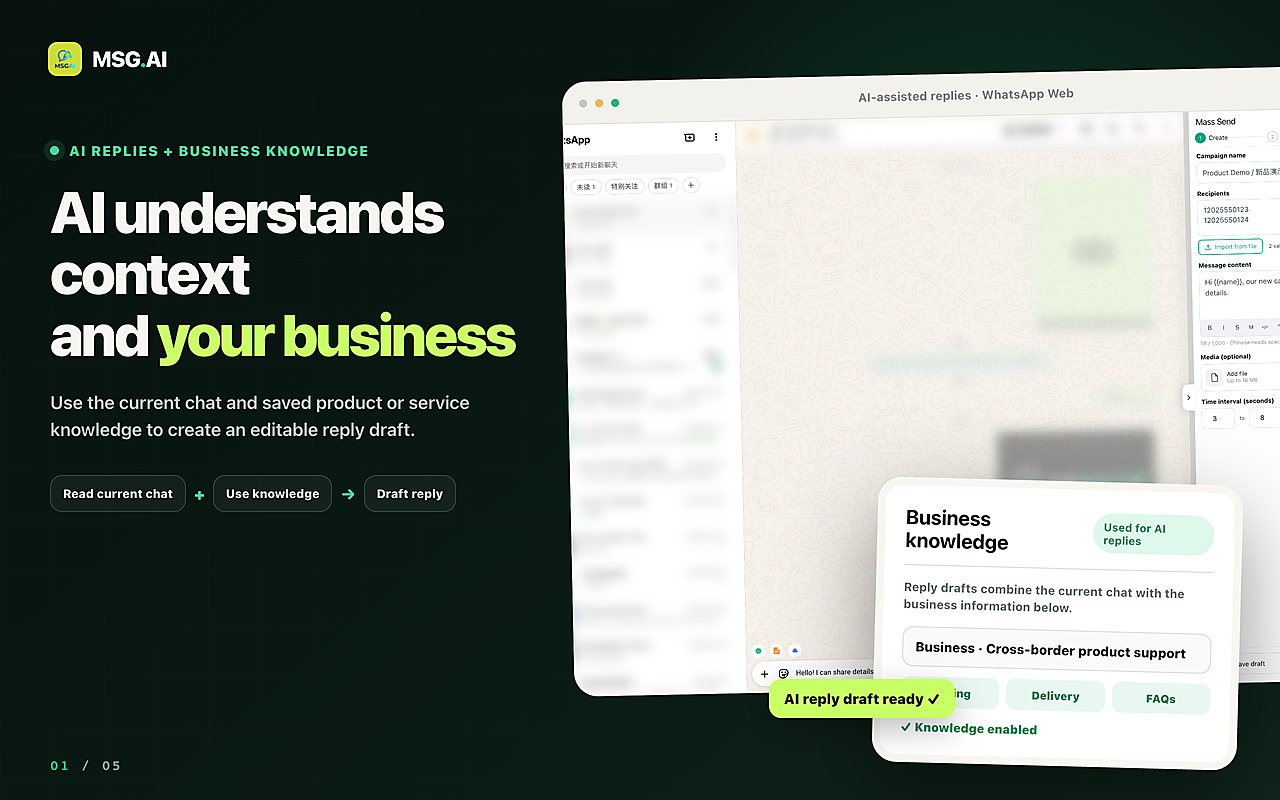
A useful AI reply should know what the customer just asked, what your business actually offers, and where it must stop. Here is how MSG.AI turns those three requirements into an editable WhatsApp reply draft.
Quick answer
What is a WhatsApp AI auto reply with a business knowledge base?
A WhatsApp AI auto reply uses the active conversation to draft an answer. A business knowledge base adds the facts the model cannot safely infer: your products, service scope, prices, minimum order quantities, lead times, payment terms, exclusions and escalation rules.
MSG.AI combines both inputs inside WhatsApp Web. When you choose AI Reply, the extension gathers recent text from the active chat, includes the knowledge base only if you have enabled it, asks the AI service for a response in the selected or detected language, and places the result in the composer. The customer does not receive anything until you review and send it.
MSG.AI generates a reply draft; it does not run an unattended customer-service bot. This human review step helps catch outdated prices, special-case requests and promises that require approval.
The business problem
Why a fluent generic AI reply can still be wrong
Conversation context tells an AI what the customer is discussing, but not what your company is authorized to sell or promise. A customer may ask, “Can you deliver 200 units next Friday?” A generic assistant can write a polished answer, yet it does not know your inventory, production schedule, freight terms or approval process.
A useful business reply therefore needs three layers:
What did the customer ask, what has already been answered, and which language are they using?
Which products, prices, terms, timelines and limitations have you explicitly approved?
Can a person edit the draft and decide whether it is safe and appropriate to send?
MSG.AI is designed around this sequence. The knowledge base narrows the factual space; the current chat supplies relevance; the editable composer keeps the user accountable for the final message. Use the free WhatsApp business knowledge-base template to structure those facts before adding them.
Inside the product
How MSG.AI turns knowledge into a WhatsApp reply draft
- 01
You create a business profile
Open the MSG.AI knowledge-base panel and add your business name, introduction, services and extra operating rules. The profile is saved in the extension so it can be reused across customer chats.
- 02
You enable it for AI replies
The “Use for AI replies” switch is explicit. When it is off, reply requests ignore the saved knowledge. This makes it possible to separate casual chats from business-grounded responses.
- 03
You request a reply in the active chat
MSG.AI collects up to the latest 20 text messages from the selected conversation. It uses those messages to understand the immediate question and the direction of the dialogue.
- 04
AI combines context and approved facts
The request includes the enabled knowledge text and the target reply language. The result should follow the conversation while staying closer to your defined offerings and boundaries.
- 05
The draft returns to the composer
MSG.AI inserts the generated text into WhatsApp’s input area. You can edit wording, verify numbers, add a personal detail or discard it. Sending remains a separate user action.
Knowledge design
What should you put in the MSG.AI business knowledge base?
The current product interface is intentionally structured. It is not a folder where you upload everything. It asks for the information most likely to determine a customer-service answer.
| Field | What to include | Why it matters |
|---|---|---|
| Business name | Your public brand or operating name | Keeps introductions and identity consistent |
| Business introduction | Who you serve, what you do, markets, strengths and commercial model | Gives the AI a concise picture of your position |
| Services | Up to 20 named offers, each with coverage, price guidance, turnaround, MOQ and exclusions | Separates one product or service rule from another |
| Extra notes | FAQs, working hours, payment terms, warranty, unsupported requests and escalation instructions | Defines the boundaries that often prevent a costly answer |
Write facts as operational rules, not marketing slogans. “Fast delivery” is vague. “Stock models usually take 7–15 days; confirm current inventory before promising a date” gives the AI a usable answer and a safety condition.
Real interface pattern
Example: an office-chair exporter answering product questions
Consider an exporter that sells ergonomic, executive, mesh and conference chairs to overseas wholesalers and project buyers. Its knowledge base can define two distinct offers: stocked wholesale models and OEM/ODM customization.
Example knowledge entry
Ergonomic-chair wholesale: available headrest, lumbar support, 4D armrest and seat options; price depends on configuration; stock MOQ and lead time must be confirmed before order acceptance. The quote excludes destination charges.
OEM/ODM: logo, packaging, upholstery and structural changes are available; sampling and production start only after drawings, materials and target-market certification requirements are confirmed.
If a customer asks, “What products do you have?”, MSG.AI can draft a concise answer covering the approved chair categories and customization options. If the next question is, “Can you guarantee delivery next Friday?”, the extra reply rule should tell the AI to say that inventory and production must be checked, instead of inventing a commitment.
This is the practical value of a knowledge base: it does not merely make the answer longer. It helps the draft choose the right facts and recognize when a human needs to verify something.
Implementation
A 10-minute setup for your first reliable AI reply
- 01
Choose one high-frequency question
Start with product availability, service scope, minimum order, delivery or appointment hours. Do not try to encode the whole company on day one.
- 02
Add only verified information
Use the latest approved price range, timeline and terms. If a number changes often, write the verification rule instead of a hard promise.
- 03
Record exclusions
State what you do not provide, which regions are unsupported, what the quote excludes and when a colleague must take over.
- 04
Test with a chat you control
Ask the same question in direct, vague and multilingual forms. Check whether each draft remains accurate and asks for missing details.
- 05
Review every generated draft
For prices, certifications, delivery dates, refunds and contractual terms, verify against the source of truth before sending.
Trust and control
Accuracy, privacy and automation boundaries
Knowledge improves grounding; it does not guarantee correctness. An AI can misunderstand a question, combine rules incorrectly or use information that your team has not updated. The final draft must still be checked by a person.
Saved knowledge and AI processing are different stages. The business profile is stored through the extension’s local browser storage. When you actively request an AI reply, the recent conversation and the enabled knowledge text are sent to the configured AI service so it can generate the draft. Do not place passwords, payment-card data or unnecessary personal information in the knowledge base.
AI Reply is not auto-send. MSG.AI fills the composer; it does not press Send for you. That separation is especially important for quotes, warranties, compliance statements and exceptions.
“If the knowledge base does not contain a confirmed price, certification number, capacity, availability or delivery date, say that it must be checked and do not invent a number or promise.”
Where it fits
Best use cases for knowledge-grounded WhatsApp AI replies
Product categories, MOQ, Incoterms, customization, samples and lead-time qualification.
Working hours, service coverage, troubleshooting steps, warranties and escalation paths.
Service packages, required documents, typical timelines, exclusions and consultation intake.
Use the detected or selected language while keeping the underlying business facts consistent.
It is less suitable for decisions that depend on live inventory, private account records, medical or legal judgment, or binding approval—unless a human verifies the relevant system and takes responsibility for the final answer.
Buyer checklist
How to evaluate a WhatsApp AI auto-reply tool
- Context: Does it understand recent messages instead of answering one line in isolation?
- Business grounding: Can you define products, services, prices, exclusions and reply rules?
- Control: Is the result editable, and is sending a separate action?
- Multilingual workflow: Can the reply follow the customer’s language without losing business meaning?
- Transparency: Is it clear when conversation and knowledge text leave the browser for AI processing?
- Maintenance: Can non-technical staff update the source information without rewriting prompts?
The best system is not the one that sounds most human in a demo. It is the one your team can keep accurate, review quickly and stop from overpromising.
Frequently asked questions
FAQ
Does MSG.AI send AI replies automatically?
No. It generates an editable draft and places it in the WhatsApp composer. You review, change or discard the text, then decide whether to send it.
What information can I add to the MSG.AI knowledge base?
You can add a business name, an introduction, up to 20 services, and extra notes such as FAQs, pricing guidance, working hours, exclusions and escalation rules.
Does the AI use the whole WhatsApp chat history?
The current implementation uses up to the latest 20 text messages from the active chat when you request an AI reply.
Can it reply in another language?
Yes. MSG.AI can use the selected outgoing language or detect the conversation language, then draft a reply using the same business knowledge.
Does a knowledge base prevent every AI mistake?
No. It gives the AI better facts and boundaries, but a person should still verify prices, dates, certifications, policies and other consequential claims before sending.
Product workflow verified against the MSG.AI interface and implementation on August 26, 2026. Features, limits, pricing and interfaces may change. MSG.AI is independently developed and is not affiliated with or endorsed by WhatsApp or Meta.