Chrome extension for WhatsApp Web
WhatsApp Translator Extension — Install on Chrome
Install MSG.AI to translate WhatsApp Web in Chrome. Read incoming chats in your language, write replies as you normally do, and preview the outgoing translation before you send.
The short answer
What is the best WhatsApp translator extension for business?
For an occasional foreign-language message, copying text into Google Translate is still adequate. For daily cross-border sales or support, look for a WhatsApp Web translator that works in both directions: it should translate an incoming message where you read it, help you compose in your own language, show what will be sent, and let you inspect the original at any time.
MSG.AI goes one step further. Translation helps you understand and write; its separate AI Reply action reads the recent conversation and can use a business knowledge base containing your company description, services, prices, delivery times, exclusions and FAQs. It then places an editable draft in the WhatsApp composer. Nothing is sent until you review and send it.
Choose an on-device translator if local processing and unlimited pure translation are your overriding priorities. Choose MSG.AI when the harder problem is not merely changing languages, but producing a useful, business-aware reply without inventing prices or promises.
Translation and AI reply are not the same feature
A translator converts a message into another language. An AI reply decides what to say next. MSG.AI keeps these actions separate so you can translate a customer’s words without generating a response, or draft a response from your approved business information without sending it automatically.
Buying criteria
Do not compare WhatsApp translators by language count alone
“Supports 100+ languages” is easy to scan on a store listing, but it says little about the quality of the working loop. A business user should test the moments where costly mistakes happen.
Is the translation shown next to the message, or do you have to copy text into another tab? Can you reveal the original instantly?
Can you see the translated draft before it leaves? What happens when you press Enter or click WhatsApp’s send arrow?
Can the system use nearby messages to interpret short, ambiguous phrases instead of translating each line in isolation?
Can an AI draft use your real products, prices, lead times and boundaries—and admit when the knowledge base has no answer?
Does AI fill an editable composer, or can it send autonomously? For sales and support, a visible review step is a feature.
Is translation on-device or cloud-based? Which message text, context or business information leaves the browser when you request AI?
2026 comparison
MSG.AI vs other ways to translate WhatsApp Web
The table compares workflows, not just feature counts. Competitor details come from their public Chrome Web Store descriptions checked on August 21, 2026; test the current version and privacy disclosure yourself before installing.
| Option | Best for | Translation workflow | Context and business knowledge | Main trade-off |
|---|---|---|---|---|
| Copy and paste into a general translator | One-off personal messages | Leave WhatsApp, paste incoming text, translate a reply, paste it back | No automatic chat context or business knowledge | Maximum friction and more opportunities to paste or send the wrong text |
| WA Translator for WhatsApp Web – Private AI | Privacy-first, pure translation | Its listing describes inline incoming translation, auto-translate and translation before send | Translation-focused; no business knowledge-base reply workflow is described | Requires Chrome’s supported on-device language packs and desktop environment |
| WhatsApp Message Translator | Language tools such as voice, phrasebook and bilingual export | Its listing advertises real-time incoming/outgoing translation and bilingual display | Smart glossary and phrasebook are described; not a company-services knowledge base for grounded AI replies | More features do not remove the need to inspect data handling and test reliability |
| MSG.AI | Cross-border sales and customer support | Inline incoming translation, manual or global live mode, outgoing preview, auto language choice and translate-before-send | Recent chat context for translation; separate AI Reply uses conversation history plus an optional business knowledge base | Cloud AI requests require a network connection and are subject to plan quotas |
Chrome’s official Translator API documentation says the built-in Translator and Language Detector APIs are available from Chrome 138 on desktop. That makes on-device extensions a compelling choice for supported language pairs. Cloud AI remains useful when you value broader contextual reasoning and knowledge-grounded drafting over fully local translation.
Inside the chat
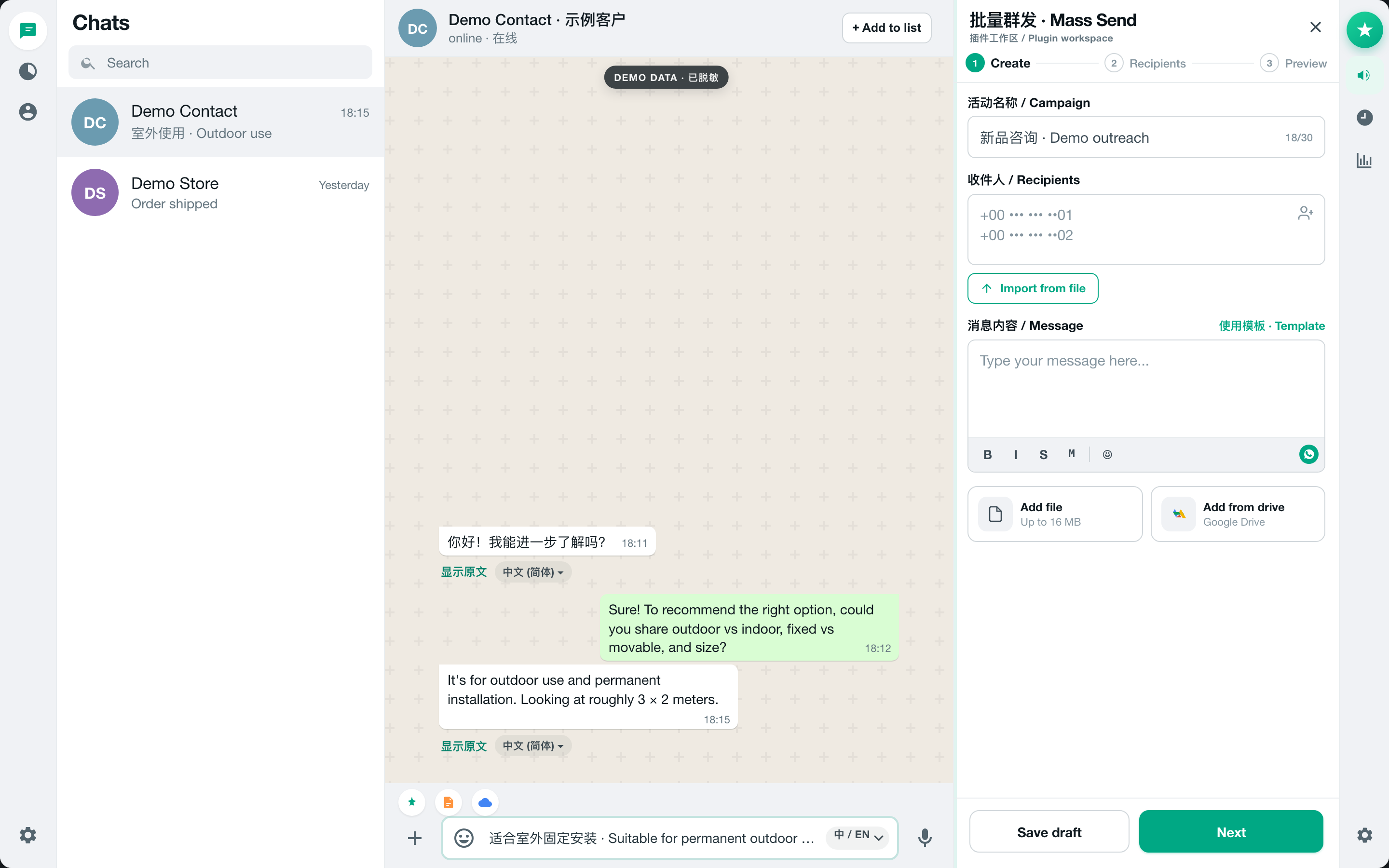
How MSG.AI translates incoming and outgoing WhatsApp messages
MSG.AI currently exposes 20 translation targets, including Simplified and Traditional Chinese, English, Spanish, Portuguese, French, German, Arabic, Russian, Japanese, Korean, Hindi, Indonesian, Vietnamese, Thai, Turkish, Italian, Dutch, Polish and Czech.
Incoming: translate beside the message bubble
- 1Set the language you want to read in under the translation settings. MSG.AI can fall back to the extension or browser language.
- 2For occasional use, click Translate on a text bubble. The result appears below the message rather than in a new tab.
- 3Use Show original and Show translation to verify names, numbers, product codes and tone without losing either version.
- 4Turn on Live Translate to translate visible incoming messages automatically across chats. Messages already written in your reading language are skipped where the extension can identify that safely.
Outgoing: preview first, then send the translated message
- 1Write in your preferred language in the normal WhatsApp composer.
- 2Choose a sending language or leave it on Auto. Auto mode estimates the other person’s language from recent incoming messages.
- 3With Live Translate enabled, a compact translated preview appears while you type. Click the preview to put that version into the composer if you want to inspect or edit it directly.
- 4If the composer still contains your original text when you press Enter or click Send, MSG.AI pauses the native send, translates the current draft, inserts the translated version and then triggers the WhatsApp send action.
MSG.AI does not merely place a language dropdown beside the composer. It preserves an original/translation pair, invalidates stale previews when you edit the draft, and uses the same translation-before-send guard for both Enter and the send button.
Beyond sentence swapping
Why conversation-aware translation matters
Short chat messages are full of omitted subjects and local shorthand. “That one is fine,” “can you move it?” or “same as before” can be grammatically easy and commercially ambiguous. A line-by-line translator sees only the sentence; MSG.AI can send a small window of recent messages with the requested text so the AI can resolve what “it” or “before” refers to.
The context is used as reference, not as extra content to translate. Incoming bubble translation typically includes recent messages from both sides. Outgoing translation also includes the latest conversation so the wording can match what the customer is discussing. The system still returns only the translated message, with cleanup rules designed to remove model explanations or labels before anything reaches the composer.
Repeated short phrases are stored in a local translation cache. The cache includes a context fingerprint for very short text, reducing the chance that the same two-word phrase is reused under a different conversational meaning. Cached translations can also reduce latency and do not consume another translation request under the current quota system.
The real differentiator
A WhatsApp translator reads words; the AI knowledge base helps answer the customer
Translation does not know whether your company offers installation, what a service costs, how long delivery takes or which requests you refuse. Asking a generic chatbot to answer anyway creates a predictable failure: fluent language wrapped around invented business facts.
MSG.AI’s Knowledge section lets you maintain a compact, structured business profile in the extension:
The brand or operation the draft should speak for.
Who you serve, what you do and the advantages that should shape an answer.
Each service has a name and description for scope, price, cycle, inclusions or unsuitable scenarios.
Working hours, delivery constraints, exclusions, contact methods and frequently asked questions.
When you click AI Reply, the extension reads the latest text messages in the active conversation, identifies the requested reply language, attaches the enabled knowledge-base content and asks the model for one natural reply. The system prompt explicitly tells the model not to invent a price, service or promise. If the knowledge base does not cover the question, the draft should say that the detail needs confirmation.
The generated reply is inserted into the WhatsApp input box as a draft. You can edit it, switch to a translation in your own browser language to check its meaning, switch back to the sendable version, and only then press Send.
A realistic workflow
From Spanish inquiry to a grounded reply in four steps
Imagine a Spanish-speaking buyer asks whether a 3 × 2 meter display can be used outdoors and moved between events. Your knowledge base says the permanent outdoor model is weather-resistant but fixed after installation, while the portable event model has a different size limit. No final freight price is stored.
- 1Understand: Live Translate displays the buyer’s Spanish message in your reading language below the original bubble.
- 2Ground: AI Reply combines the recent size/use discussion with the two service descriptions in your knowledge base.
- 3Draft: The reply explains that the permanent outdoor option is not designed to be moved, suggests the portable alternative, and asks for the destination before confirming freight—without fabricating a price.
- 4Verify: The Spanish draft appears in the composer. Use the original/translation toggle to inspect it in your language, edit any commercial detail, then send.
Be precise about privacy
Local storage and cloud AI are different questions
MSG.AI stores extension settings, the knowledge base, translation cache, campaign tasks and related operational data in Chrome local storage. Bulk messages are sent through your active WhatsApp Web session rather than relayed through an MSG.AI messaging server.
AI features have a separate data path. When you request a translation, the requested text and a limited recent context are sent to the hosted AI endpoint for processing. When you request an AI reply, the selected conversation history and enabled knowledge-base content are included in that AI request. These features require a network connection. Do not use cloud AI on conversations your organization is not permitted to process this way.
WhatsApp encryption does not evaluate a browser extension for you
In its explanation of Code Verify for WhatsApp Web, Meta noted that browser extensions are one of the factors that can weaken the security of a web environment. Before installing any WhatsApp translator, verify the extension ID, publisher, requested permissions, privacy disclosure and current reviews. Remove extensions you no longer use.
If no cloud processing is acceptable, an on-device option is the clearer fit. Chrome documents that its Translator API can translate supported text before it leaves the device; compatibility depends on desktop Chrome, API availability and downloaded language packs.
Decision guide
Which WhatsApp translation option should you choose?
Choose copy-and-paste translation when…
You translate only a few messages per month, do not want another extension and can tolerate switching tabs. Always double-check that you paste the translation—not your internal note—back into WhatsApp.
Choose an on-device translator when…
Your main need is two-way translation, your language pairs are supported and keeping translation text off a remote AI service is more important than business-aware reply generation.
Choose a feature-heavy language extension when…
You specifically need voice transcription, a phrasebook, bilingual export, learning tools or per-contact language memory. Test each advertised feature with non-sensitive demo text before trusting it in production.
Choose MSG.AI when…
You handle cross-border sales or support in WhatsApp Web and want incoming/outgoing translation, contextual AI reply drafts, a business knowledge base, reusable scripts, media tools, exports and controlled bulk messaging in the same workspace. Start the script library with these 25 WhatsApp customer-service reply templates.
Five-minute evaluation checklist
Test the complete loop
Read, draft, verify—then send
Install MSG.AI and test with a conversation and business facts you control. Translation should reduce friction; the knowledge base should reduce guesswork.
Frequently asked questions
FAQ
Can WhatsApp translate messages automatically?
WhatsApp Web does not provide the same translation workflow in every environment, but Chrome extensions can add inline and automatic translation. With MSG.AI Live Translate enabled, visible incoming text messages can be translated automatically and outgoing drafts can be translated before send.
Does MSG.AI translate both incoming and outgoing WhatsApp messages?
Yes. Incoming messages can be translated inline manually or through global Live Translate. Outgoing text can be translated from the composer using a selected language or Auto mode, previewed, and translated before Enter or the send button completes the send.
How many languages does MSG.AI support?
The current extension exposes 20 translation targets: Simplified and Traditional Chinese, English, Japanese, Korean, French, German, Spanish, Russian, Arabic, Portuguese, Italian, Dutch, Polish, Turkish, Vietnamese, Thai, Indonesian, Hindi and Czech.
What is the difference between AI translation and AI Reply?
AI translation converts an existing message or draft into another language. AI Reply creates a new response from recent conversation context and, when enabled, your business knowledge base. The reply is placed in the composer for review; it is not sent automatically.
What can I put in the MSG.AI knowledge base?
You can add a business name and introduction, up to 20 named services with descriptions, and extra FAQs, limits, working hours, contact information or exclusions. Clear prices, lead times and non-supported scenarios make drafts safer.
Is MSG.AI translation processed on the device?
Extension settings, the knowledge base and translation cache are stored locally, but MSG.AI AI translation and reply requests use a hosted AI endpoint. Requested text, limited context and applicable knowledge-base content are sent for processing. Choose an on-device translator if remote AI processing is not acceptable.
Is MSG.AI affiliated with WhatsApp or Meta?
No. MSG.AI is an independently developed Chrome extension for WhatsApp Web and is not affiliated with, authorized by or endorsed by WhatsApp or Meta.
Comparison checked August 21, 2026 against public Chrome Web Store descriptions and Chrome documentation. MSG.AI is independently developed and is not affiliated with, authorized by or endorsed by WhatsApp or Meta. Features, permissions, pricing, quotas and browser APIs can change; verify each live listing before installing.