WhatsApp Web sender for Chrome
WhatsApp Sender Chrome Extension — Install MSG.AI
Install MSG.AI to send paced WhatsApp messages from WhatsApp Web. Chrome sender extension with bulk queues, translation, scripts, and honest limits—no ban guarantees.
Quick answer
What is a WhatsApp sender Chrome extension?
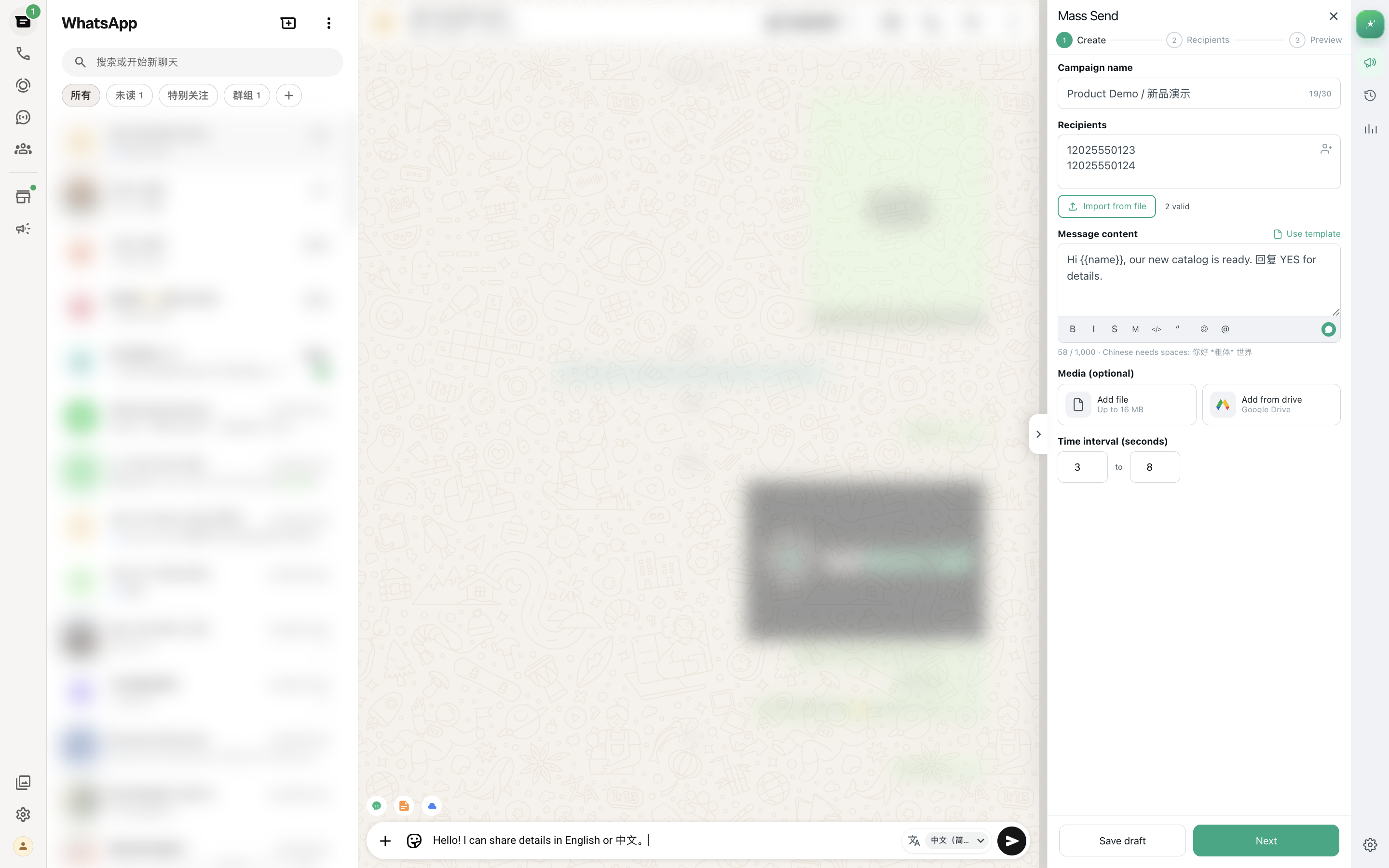
A WhatsApp sender Chrome extension is a browser add-on that works with WhatsApp Web to help you send messages to many phone numbers from a queue—often with delays, templates, media attachments, and progress tracking—while you stay signed in to web.whatsapp.com. Unlike native Broadcast Lists that only reach saved contacts who saved you back, a sender extension can message numbers from Excel or CSV, pace sends with random intervals, personalize text with merge tags, and add tools like AI translation or reply drafts inside the WhatsApp Web interface.
These tools do not replace WhatsApp Business Platform API or guarantee account safety. They automate or assist the sending workflow in your browser; actual message delivery and account behavior still follow WhatsApp\'s normal rules and policies.
Use a WhatsApp sender Chrome extension when you already work inside WhatsApp Web daily, need paced outreach with personalization or media, want AI translation or drafting help for multilingual support, and are not yet ready for the formal setup and template approval required by the WhatsApp Business Platform.
Core functions
What does a WhatsApp sender extension actually do?
A sender extension runs in Chrome (or another Chromium browser like Edge or Brave) and connects to the active WhatsApp Web session. When installed, it typically adds a sidebar panel, task creator, or overlay interface that lets you:
- Import recipient lists – Upload CSV or Excel files with phone numbers, names, and custom fields; or paste numbers from a spreadsheet.
- Compose once, personalize many – Write a message template with {{name}}, {{orderId}}, or other merge tags that pull data from your spreadsheet columns.
- Queue and pace sends – Instead of sending instantly, the extension can wait 10–60 seconds (or a random range) between each message to reduce the risk of triggering rate limits or automated-behavior detection.
- Attach media per campaign – Add one image, video, or document that goes to every recipient in that task, avoiding the need to manually attach files one by one.
- Track progress – View real-time counts of sent, failed, and remaining messages; pause, resume, or cancel the queue at any time.
- Add-on features (tool-dependent) – Some extensions include AI translation for incoming/outgoing messages, knowledge-base-driven reply drafts, script libraries for reusable templates, Google Drive media browsing, or chat/contact export.
The extension does not send messages through its own server or API. It opens each recipient\'s WhatsApp Web chat in the browser, pastes the personalized message into the composer, and triggers the send action just as if you typed and clicked manually—but automated and paced.
Extension limits vs official API
Browser-based sender extensions depend on the active WhatsApp Web session and your personal or Business App account. They do not bypass WhatsApp\'s sending policies, daily volume norms, or restriction triggers. If your use case requires guaranteed delivery, webhook integrations, or daily volumes above several hundred messages, evaluate the WhatsApp Business Platform instead.
Three approaches compared
WhatsApp Broadcast List vs Web sender extension vs Business Platform
There are three main ways to send one message to many WhatsApp users. Each serves different needs, and understanding the tradeoffs helps you choose the right tool.
| Method | Setup | Recipient source | Personalization | Pacing control | Best for |
|---|---|---|---|---|---|
| Broadcast List (native) | Built into WhatsApp; no install | Only saved contacts who saved you back | None—same message to all | Instant send; no queue | Announcements to existing mutual contacts |
| Web sender extension | Install Chrome extension; authorize WhatsApp Web | CSV/Excel import; any phone number | Merge tags for name, order ID, custom fields | Configurable random delays between sends | Paced outreach with personalization; multilingual support; AI drafts |
| Business Platform (API) | Meta Business verification; developer integration or BSP | Any opted-in number; CRM/system triggers | Pre-approved template variables only | Instant API delivery at scale | Transactional messaging > 500/day; compliance audit logs; webhook integration |
Broadcast Lists are free and simple but limited to mutual contacts. The Business Platform offers the highest scale and formal compliance support but requires API setup, template pre-approval, and often a Business Solution Provider contract. A sender extension sits in between: you control the wording, work inside your familiar WhatsApp Web interface, and add productivity features like translation or Drive media—without needing developer resources or formal Meta verification.
For a detailed comparison of Broadcast Lists and bulk senders, see the Broadcast vs bulk sender guide. For choosing between the WhatsApp Business App, Business Platform, and Web extensions, read this decision framework.
Evaluation criteria
Checklist before you install a WhatsApp sender Chrome extension
Not all sender extensions are built the same way or serve the same workflows. Use this checklist to evaluate whether a tool matches your actual business needs—not just the longest feature list.
1. Queue and pacing controls
- Can you configure delay ranges between messages? (e.g., random 20–60 seconds)
- Can you pause, resume, or cancel a running queue?
- Does the tool show real-time progress: sent count, failed count, remaining?
- Can you review or edit the next message before it sends?
Pacing is not a ban-prevention guarantee, but it lets you monitor early replies and stop a campaign if recipients are confused or complaining. For pacing best practices, see the bulk message delay guide.
2. Personalization and merge tags
- Can you map CSV columns to {{variables}} in the message template?
- Does the preview show actual merged messages before you send?
- What happens if a merge field is blank—does it leave {{variable}} or use a fallback?
Personalization improves relevance and reduces the "spam" feel. Generic blasts—"Dear customer"—work poorly when recipients expect you to know their name or order number. For spreadsheet prep and merge-tag workflows, read how to send personalized messages from Excel.
3. Media and attachment workflow
- Can you attach one image, video, or document per campaign?
- Does the tool support browsing Google Drive or another cloud library, or must you upload locally?
- Can you add a caption to the media, or is it attachment-only?
Product catalogs, tutorial videos, and invoice PDFs often live on Drive. If you need quick access without downloading files first, check for Drive integration.
4. AI translation and multilingual support
- Can the tool translate incoming messages inline, so you read them without copy-paste?
- Can you write a reply in your own language and preview the outgoing translation before sending?
- How many target languages are supported?
- Where is translation processed—on-device or via a hosted endpoint?
Cross-border sellers and multilingual support teams need translation where the conversation happens. For WhatsApp Web translation workflows, see the automatic translation guide.
5. AI reply drafts and business knowledge
- Can the tool generate a reply draft from recent chat context?
- Can you add a business knowledge base (services, prices, policies) to ground the draft?
- Is the draft editable before you send, or does it auto-send?
AI Reply is different from translation: translation converts existing text, while AI Reply decides what to say next. For knowledge-grounded reply workflows, read the business knowledge base guide.
6. Scripts and reusable templates
- Can you save frequently used messages (greetings, payment instructions, FAQs) as quick-reply scripts?
- Can you organize scripts by category or search by keyword?
Scripts are for stable wording that should not change; AI Reply is for context-sensitive drafts. Keeping them separate prevents a creative AI suggestion from replacing an approved policy statement. See the script library guide.
7. Export and record-keeping
- Can you export chat transcripts as readable HTML or PDF?
- Can you export contacts or group members to CSV, Excel, or vCard?
- Can exports be saved to Google Drive, or only downloaded locally?
Readable archives are useful for project handoffs, customer-service review, and compliance audits. For export workflows, see chat export, contact export, and group member export guides.
8. Data storage and privacy
- Where are task settings and sending logs stored—browser local storage or a remote server?
- Does the tool relay chat content through its own servers for bulk send, or does it work directly with WhatsApp Web?
- What permissions does the extension request (Drive access, clipboard, tabs)?
- Is there a clear privacy policy explaining data handling?
Local-first tools keep task data in your browser by default and only send specific requests (like translation or Drive uploads) to external endpoints when you use those features. Always review permissions before installing any extension.
9. Pricing and limits
- Is there a free tier, and what are its message or feature limits?
- Does the paid plan charge per message, per month, or per user?
- Are there hidden quotas (translation credits, AI reply tokens, export limits)?
Evaluate cost against your actual monthly volume and feature use, not just the lowest headline price.
10. Support and documentation
- Is there step-by-step documentation or video tutorials?
- Can you reach support via email, chat, or a help center?
- Are there user reviews or case studies from similar businesses?
A powerful tool with poor docs and no support becomes a time sink. Check the Chrome Web Store reviews, Product Hunt discussions, or Reddit threads for honest feedback.
Product positioning
How MSG.AI fits the WhatsApp sender extension landscape
MSG.AI is a Chrome extension designed for cross-border sellers, ecommerce support, and multilingual SMBs who live in WhatsApp Web and need more than a pure bulk blaster. It combines paced bulk send with AI translation, knowledge-grounded reply drafts, a script library, Google Drive media access, and contact/group/chat export—all inside the browser.
Core capabilities (honest boundaries included)
| Feature | What it does | What it does not do |
|---|---|---|
| Paced bulk send | Import CSV, merge tags, random delays, pause/resume queue | Does not schedule campaigns for a future date/time; requires active browser session |
| AI translation | Translate incoming messages inline; write in your language, preview outgoing translation | Translations use a hosted endpoint; not on-device; 20 target languages currently |
| AI Reply drafts | Generate editable reply from chat context + optional business knowledge base | Drafts require review; does not auto-send; knowledge base is user-entered, not pre-filled |
| Script library | Save and categorize reusable templates; quick insert into composer | No conditional logic or dynamic variables beyond manual editing |
| Drive media | Browse, upload, and send images/videos from Google Drive folders | Requires Google Sign-In and Drive authorization; one media per bulk task |
| Export | Chat HTML, contacts CSV/XLSX/vCard, group members XLSX/CSV; local or Drive | Chat export limited to 5,000 messages per chat; depends on WhatsApp Web session data |
| Local storage | Task settings and logs stay in browser local storage by default | Does not relay chat content through MSG.AI servers for bulk send |
Who MSG.AI is built for
- Cross-border ecommerce sellers – Need AI translation for customer inquiries in multiple languages; Drive media library for product photos; personalized order updates from Excel.
- Small multilingual support teams – Want knowledge-base-driven reply drafts that reduce guessing; reusable scripts for payment/shipping FAQs; chat export for handoffs.
- Businesses not ready for Business Platform – Sending 50–300 messages/day; want flexibility to write any message template; do not yet need API webhooks or formal BSP contract.
What MSG.AI explicitly does not claim
No ban guarantees
MSG.AI cannot guarantee your account will never be restricted. WhatsApp\'s enforcement depends on recipient behavior, message quality, account history, and policy compliance—not just which tool you use. Pace sends, review consent, and stop immediately if recipients complain.
Not official Meta Business API
MSG.AI is a browser extension that works with WhatsApp Web. It is not the WhatsApp Business Platform (the official API). Choose the Platform if you need guaranteed delivery SLAs, webhook integrations, or daily volumes > 500 messages.
No future scheduling
MSG.AI supports delay intervals while a queue runs. It does not schedule a campaign to start at a specific future date and time. You must be present to start the task.
For the full feature overview, pricing, and Chrome Web Store link, visit MSG.AI on the Chrome Web Store.
Practical workflow
A realistic day-to-day workflow with a WhatsApp sender extension
Here is how a cross-border seller or support agent might use MSG.AI (or a similar tool) during a typical workday. This is not a sales pitch—it is a description of actual steps and checkpoints.
Morning: Handle multilingual customer inquiries
-
01
Open WhatsApp Web and enable Live Translate
Incoming messages from Spanish, Portuguese, and Chinese customers are translated inline. You read the question in English without copy-paste.
-
02
Use AI Reply draft for a complex question
A customer asks about your return policy for cross-border orders. You open AI Reply, which pulls the return-policy rule from your business knowledge base and drafts: "Hi [name], we accept returns within 30 days if the item is unused. For international orders, you cover return shipping; we refund the item price once received." You edit to add the customer\'s specific SKU and send.
-
03
Insert a saved script for a common question
Another customer asks for payment instructions. You open the script library, select "Payment Instructions - PayPal," and insert the pre-approved text. No retyping.
Midday: Send personalized order-shipped notifications
-
04
Export today\'s shipped orders from your system as CSV
Columns: phone, name, orderId, sku, trackingCode. 87 rows.
-
05
Import the CSV into MSG.AI Mass Send
Map columns to {{name}}, {{orderId}}, {{sku}}, {{trackingCode}}. Write the template: "Hi {{name}}, your order #{{orderId}} ({{sku}}) shipped via DHL. Track: dhl.com/{{trackingCode}}". Preview the first 5 messages to confirm merge accuracy.
-
06
Attach product image from Google Drive
Open Drive media library, browse to "Product Photos," select the SKU image, add caption "Thank you for your order!" Attach to the campaign.
-
07
Configure pacing: 25–50 seconds random delay
Estimated completion time: ~60 minutes. Start the queue. Monitor progress in the History tab. Pause after the first 10 sends to check for any replies indicating confusion or wrong numbers. No issues—resume queue.
Afternoon: Export chat for customer-service handoff
-
08
A customer escalates a complaint
You need to hand the conversation to a senior agent. Open Bulk Export, select that chat, export as HTML, upload to Google Drive, and share the Drive link with your colleague. The HTML preserves sender names, timestamps, and message sequence.
Evening: Review task history and update knowledge base
-
09
Check sent/failed counts for the day
87 shipped notifications: 85 sent successfully, 2 failed (invalid numbers). Export the task log as CSV and reconcile with your order system.
-
10
Update business knowledge base
A policy changed today: international return shipping is now free for orders > $100. Add that rule to the knowledge base so tomorrow\'s AI Reply drafts reflect the new policy.
This workflow uses bulk send, translation, AI drafts, scripts, Drive media, and export in one day—without switching between multiple tabs or services. That is the productivity gain a well-designed sender extension can offer.
Risk and responsibility
Consent, pacing, and what a sender extension cannot guarantee
Installing a sender extension does not grant permission to message anyone, bypass WhatsApp\'s policies, or guarantee your account will never be restricted. The tool automates the workflow; you remain responsible for recipient consent, message quality, and policy compliance.
Consent is not implied by technical capability
Just because you can import 500 phone numbers from a lead-generation service and send them all a promotional message does not mean you should. WhatsApp\'s Business Messaging Policy requires that messages be expected, relevant, and compliant with local laws. Recipients who did not opt in or have no prior relationship with you are likely to report your message as spam—triggering restrictions regardless of which tool you used or how slowly you paced the sends.
Pacing reduces operational risk, not policy risk
Random delays between messages help you monitor early replies, catch formatting errors, and avoid sudden volume spikes that might look like automated spam. But pacing alone does not make an unpermitted list compliant or prevent account bans. WhatsApp\'s enforcement considers:
- How many recipients block you or report spam
- Whether recipients have your number saved
- Account age, verification status, and historical behavior
- Message content quality and link destinations
A slowly paced campaign of irrelevant, unwanted messages is still a policy violation. For pacing best practices, see the bulk message delay guide, but remember that pacing is a workflow control, not a permission substitute.
Review before you send; stop if recipients complain
Always test first
Before sending to 200 customers, send to 2–5 numbers you control. Verify formatting, merge-tag accuracy, media attachments, and links. Check how the message looks on iOS and Android. Fix errors before committing to the full list.
Monitor the first 10%
Watch replies closely during the first 10% of sends. If multiple recipients reply with "Who is this?" or "Remove me," pause the queue immediately and investigate list source, message clarity, and consent documentation.
Honor opt-outs instantly
If someone asks to be removed, remove them from your list and do not contact them again. Continuing to message someone who opted out violates WhatsApp\'s policies and many countries\' privacy laws (GDPR, CCPA, LGPD).
When to use the WhatsApp Business Platform instead
If your daily volume exceeds 300–500 messages, you need webhook delivery receipts, you integrate messaging with CRM/order systems, or you require formal compliance audit logs, consider migrating to the WhatsApp Business Platform. The Platform requires Meta Business verification and uses pre-approved message templates, but it offers higher sending limits, official support, and API infrastructure designed for scale.
A browser extension is a productivity tool for manual workflows; the Business Platform is enterprise messaging infrastructure. Choose based on your volume, compliance requirements, and technical resources.
Scaling decision
When to move from a sender extension to the WhatsApp Business Platform
The WhatsApp Business Platform (formerly WhatsApp Business API) is Meta\'s official channel for operational messaging at scale. It is not a browser extension or a higher-priced tier of an extension—it is a different technology stack.
Consider the Platform when:
- Daily volume exceeds manual supervision – You need to send 500+ messages per day and cannot manually monitor every queue.
- Messages are system-triggered – Order confirmations, shipping updates, appointment reminders, and password resets should be automated via API, not queued manually in a browser.
- You need webhook delivery receipts – Your CRM or ticketing system must know when a message was delivered, read, or failed.
- Multiple team members share one number – The Platform supports multi-agent routing and shared inbox workflows; browser extensions typically work with one active session.
- Compliance requires audit logs – Regulated industries (finance, healthcare, legal) need formal message logs, template approval trails, and data-residency controls.
- You want pre-approved templates – The Platform uses template messages reviewed and approved by Meta. Once approved, you can send them at scale without risking policy violations for wording issues.
Platform setup requirements:
- Meta Business Manager account with verification
- WhatsApp Business Account linked to a phone number
- Developer integration (Cloud API or On-Premises) or contract with a Business Solution Provider (BSP)
- Template message submission and approval process
- Webhook endpoint to receive delivery receipts and incoming messages
The Platform is more complex to set up and less flexible in message wording (you cannot freestyle templates like you can in a browser extension), but it provides scale, reliability, and formal Meta support. For a detailed breakdown of the Business App, Business Platform, and Web extensions, see the decision framework.
If you are currently using a sender extension and hitting its limits, start researching the Platform and BSP options 3–6 months before you expect to need the migration. Setup takes time.
Frequently asked questions
WhatsApp sender Chrome extension FAQ
What is a WhatsApp sender Chrome extension?
It is a browser extension that works with WhatsApp Web to help you send messages to many numbers from a queue—often with delays, templates, media, and progress tracking—while you stay signed in to web.whatsapp.com.
Is a Chrome sender the same as the WhatsApp Business API?
No. Chrome senders automate or assist WhatsApp Web in your browser. The WhatsApp Business Platform (API) is Meta\'s official channel with templates, webhooks, and provider setup. MSG.AI is a Web extension, not the official API.
Can I use a sender extension instead of Broadcast Lists?
Broadcast Lists are native and free for saved contacts who have your number. A sender extension is useful when you need Excel/CSV lists, paced queues, media from Drive, scripts, or AI translation. It is not a substitute for consent or platform policy compliance.
Will a WhatsApp sender Chrome extension get my account banned?
No tool can guarantee that. Restrictions usually follow recipient reports, unexpected messages, aggressive volume, and policy issues—not the brand of the extension alone. Pace sends, use permissioned lists, and review before sending.
Does MSG.AI store my chats on a server?
Task settings and sending logs stay in browser local storage by default. MSG.AI does not relay chat content through its servers for bulk send. Google Sign-In is used for license linking and optional Drive media access.
Does MSG.AI schedule messages for a future date?
No. MSG.AI supports delay intervals while an active queue runs in an open WhatsApp Web session. It does not currently schedule a campaign to start at a future date and time.
Who is a WhatsApp Web sender best for?
Cross-border sellers, ecommerce support, and small multilingual teams who already live in WhatsApp Web and need paced outreach plus AI translation or reply drafts—without building an API stack yet.
How is MSG.AI different from a pure bulk blaster?
Beyond paced bulk send, MSG.AI includes AI translation next to bubbles/composer, AI reply drafts from chat context, a script library, Google Drive media library, and contact/group/chat export—aimed at day-to-day business work on Web.
Ready to evaluate sender extensions?
Start with the checklist and a small test campaign
Use the evaluation checklist above to compare tools, install your chosen extension, and run a 5–10 message test to a list you control before committing to a full campaign. Always prioritize consent, message quality, and real business need over feature count or speed.
Frequently asked questions
FAQ
What is a WhatsApp sender Chrome extension?
It is a browser extension that works with WhatsApp Web to help you send messages to many numbers from a queue—often with delays, templates, media, and progress tracking—while you stay signed in to web.whatsapp.com.
Is a Chrome sender the same as the WhatsApp Business API?
No. Chrome senders automate or assist WhatsApp Web in your browser. The WhatsApp Business Platform (API) is Meta's official channel with templates, webhooks, and provider setup. MSG.AI is a Web extension, not the official API.
Can I use a sender extension instead of Broadcast Lists?
Broadcast Lists are native and free for saved contacts who have your number. A sender extension is useful when you need Excel/CSV lists, paced queues, media from Drive, scripts, or AI translation. It is not a substitute for consent or platform policy compliance.
Will a WhatsApp sender Chrome extension get my account banned?
No tool can guarantee that. Restrictions usually follow recipient reports, unexpected messages, aggressive volume, and policy issues—not the brand of the extension alone. Pace sends, use permissioned lists, and review before sending.
Does MSG.AI store my chats on a server?
Task settings and sending logs stay in browser local storage by default. MSG.AI does not relay chat content through its servers for bulk send. Google Sign-In is used for license linking and optional Drive media access.
Does MSG.AI schedule messages for a future date?
No. MSG.AI supports delay intervals while an active queue runs in an open WhatsApp Web session. It does not currently schedule a campaign to start at a future date and time.
Who is a WhatsApp Web sender best for?
Cross-border sellers, ecommerce support, and small multilingual teams who already live in WhatsApp Web and need paced outreach plus AI translation or reply drafts—without building an API stack yet.
How is MSG.AI different from a pure bulk blaster?
Beyond paced bulk send, MSG.AI includes AI translation next to bubbles/composer, AI reply drafts from chat context, a script library, Google Drive media library, and contact/group/chat export—aimed at day-to-day business work on Web.
Product capabilities and interfaces verified as of September 22, 2026. MSG.AI is independently developed and not affiliated with Meta. WhatsApp policies, Chrome Web Store requirements, and extension capabilities may change. Evaluate current product state and policy compliance before use.