CRM tools buyer guide
WhatsApp CRM Chrome Extension: What SMB Teams Actually Need on WhatsApp Web (2026)
When SMBs search for a "WhatsApp CRM Chrome extension," they often want notes, labels, reminders, and pipeline visibility on WhatsApp Web—not a full Salesforce setup. This guide explains the CRM spectrum from native Business labels to Web extensions to official Platform integrations, and where MSG.AI fits as CRM-adjacent workflow tools for cross-border sellers and support teams.
Quick answer
What is a WhatsApp CRM Chrome extension?
A WhatsApp CRM Chrome extension is a browser add-on that adds CRM-like features—contact notes, labels, deal stages, reminders, or pipeline views—to WhatsApp Web, or assists with CRM-adjacent workflows like paced bulk messaging, AI-powered replies, script templates, and contact exports. Unlike full CRM platforms such as HubSpot or Salesforce that sync with WhatsApp through the Business Platform API, these extensions work directly inside the WhatsApp Web interface in your browser.
The term "WhatsApp CRM extension" covers a spectrum: some tools focus on true CRM functions (tracking leads through sales stages, shared team inboxes, deal values), while others—like MSG.AI—provide CRM-adjacent workflow helpers (paced bulk send, AI translation, knowledge-base reply drafts, script library, Drive media, contact/group/chat export) without claiming to be a complete CRM replacement.
Use a WhatsApp CRM Chrome extension when you need lightweight contact management, notes, or workflow automation on WhatsApp Web without the cost and complexity of a full CRM platform. Choose MSG.AI if your priority is paced outreach, multilingual AI support, and local data control for cross-border sales or customer service—not shared team inboxes or HubSpot sync.
Understanding the search intent
What people mean when they search "WhatsApp CRM Chrome extension"
Search data shows roughly 10,000 monthly queries for "WhatsApp CRM" and related terms like "WhatsApp Web CRM," "WhatsApp CRM for small business," and "best WhatsApp CRM extension." When SMB teams search these terms, they usually want one or more of these capabilities:
- Contact notes and labels – Tag customers as "Lead," "Hot," "Follow-up," or add private notes visible only to your team, not the customer.
- Deal or pipeline tracking – Move contacts through stages like "Inquiry → Quote Sent → Negotiation → Won/Lost" and see totals or conversion rates.
- Reminders and tasks – Set follow-up reminders for individual chats so you don't forget to reply or send a quote.
- Shared team inbox – Let multiple agents see the same WhatsApp conversations, assign chats, and collaborate on replies without sharing a phone.
- Bulk messaging with CRM data – Send paced campaigns to segmented lists (e.g., all leads tagged "Hot" or customers who bought in Q3) with personalized merge tags.
- AI-powered replies – Get reply suggestions or translations based on chat context, company knowledge base, or product catalog.
- Analytics and reporting – Track response times, message volumes, conversion rates, and agent performance.
- Integration with other tools – Sync contacts, deals, or conversation history with HubSpot, Salesforce, Google Sheets, or Zapier.
Not every tool labeled "WhatsApp CRM extension" offers all of these. Some focus on true CRM functions (pipeline, shared inbox, integrations), while others provide workflow automation and AI assistance without full CRM infrastructure.
Three levels of CRM on WhatsApp
The CRM spectrum: native labels, Web extensions, and Platform integrations
There are three main ways to add CRM-like features to WhatsApp, each with different setup requirements, feature sets, and costs.
1. Native WhatsApp Business labels
Built into WhatsApp Business App (mobile) and WhatsApp Business Platform (API). Free and simple, but limited:
- What you get: Five color-coded labels (customizable names: "New customer," "Paid," "Pending," etc.) that you manually apply to chats or contacts.
- Pros: No cost, no installation, works offline on mobile.
- Cons: No notes, no pipeline stages, no reminders, no bulk actions, no reporting. Labels are local to your device (unless synced via Platform API).
- Best for: Solo freelancers or very small teams who only need basic segmentation.
Learn more: WhatsApp Business App vs Platform vs Web Extension
2. WhatsApp Web CRM Chrome extensions
Browser extensions that add CRM features or workflow tools directly to WhatsApp Web. Capabilities vary widely:
- True CRM extensions: Some tools inject notes, deal stages, shared inboxes, and assignment features into the WhatsApp Web UI. Data may sync to a cloud backend for team collaboration and reporting.
- CRM-adjacent workflow tools (like MSG.AI): Focus on paced bulk send, AI translation, knowledge-base reply drafts, script templates, Drive media library, and contact/group/chat export—but no deal pipeline or shared team inbox.
- Pros: Lower cost than full Platform CRM, faster setup, works in browser, local data storage options.
- Cons: Limited team collaboration compared to Platform solutions, dependent on active browser session, may not integrate with Salesforce/HubSpot directly.
- Best for: Small teams (1–10 people) who live in WhatsApp Web daily and need practical workflow helpers without building an API integration.
Related: WhatsApp Sender Chrome Extension buyer guide
3. Full CRM platforms with WhatsApp Business Platform API
Enterprise CRM systems (HubSpot, Salesforce, Zoho, Bitrix24) that connect to WhatsApp via the official WhatsApp Business Platform (formerly Business API):
- What you get: Full CRM features (contacts, deals, tasks, pipelines, reporting) plus WhatsApp messaging inside the CRM. Shared team inbox, template approvals, webhooks, and analytics. Conversations sync to the CRM database.
- Pros: True multi-agent collaboration, advanced automation (e.g., send template after deal stage change), official Meta support, guaranteed message delivery (when template approved).
- Cons: Requires Meta Business verification, template approval process, BSP (Business Solution Provider) setup or in-house developer, and ongoing API costs (conversation-based pricing).
- Best for: Mid-size to enterprise teams (10+ agents), high daily volumes (500+ messages/day), or businesses that already use a CRM and need official WhatsApp integration.
Official info: WhatsApp Business Platform
Before you install
Evaluation checklist: what to look for in a WhatsApp CRM Chrome extension
If you've decided a Web extension fits your needs better than native labels or a full Platform CRM, use this checklist to compare tools:
✓ Core CRM features (if you need true CRM)
- Contact notes and tags: Can you add private notes to each chat? Are tags searchable and filterable?
- Pipeline or deal stages: Does the tool let you move contacts through a sales funnel and track conversion?
- Reminders and tasks: Can you set follow-up reminders or to-do items per chat?
- Shared team inbox: Can multiple people access the same WhatsApp conversations with assignment and collision detection?
- Reporting: Do you get analytics on message volumes, response times, or deal values?
✓ Bulk messaging and automation
- Paced bulk send: Can you queue messages to many numbers with random delays to reduce ban risk?
- Personalization: Merge tags for {{name}}, {{orderId}}, or custom CSV columns?
- Media attachments: Can you attach images, videos, or documents to bulk campaigns?
- Script or template library: Reusable message templates for common replies (greetings, FAQs, order confirmations)?
- Segmentation: Send only to contacts with specific tags or stages?
See also: How to send personalized WhatsApp messages from Excel
✓ AI and multilingual support
- AI translation: Translate incoming or outgoing messages directly in WhatsApp Web?
- AI reply drafts: Get reply suggestions based on chat context and your knowledge base?
- Knowledge base integration: Upload product catalogs, FAQ docs, or policy files so AI can draft accurate replies?
Related: WhatsApp AI translation guide, WhatsApp AI knowledge base setup
✓ Data privacy and storage
- Local vs cloud storage: Are notes, tags, and chat exports stored in browser local storage or on a vendor server? (Local = more privacy, cloud = team sync.)
- End-to-end encryption: Does the extension access decrypted message content? (All Web extensions must, since they run inside WhatsApp Web after decryption.)
- Data retention policy: How long does the vendor keep your data? Can you delete it?
- Compliance: GDPR, CCPA, or other data protection certifications?
✓ Integration and export
- Contact/chat export: Can you export chats, contacts, or groups to CSV/JSON for backup or migration?
- CRM sync: Does the extension integrate with HubSpot, Salesforce, Zoho, or Google Sheets?
- Zapier or API: Can you trigger workflows in other tools when a WhatsApp event happens?
Export guides: Export WhatsApp contacts, Export WhatsApp groups
✓ Cost and support
- Pricing model: Free, freemium, or subscription? Per-user or per-message pricing?
- Trial period: Can you test all features before paying?
- Customer support: Email, chat, or community forum? Response time?
- Chrome Web Store reviews: Check recent reviews for bugs, ban reports, or support complaints.
No extension can guarantee account safety
All WhatsApp Web extensions—whether labeled "CRM," "sender," or "automation"—depend on your active WhatsApp account and session. Restrictions or bans typically result from recipient reports, aggressive sending patterns, or policy violations, not the brand of the extension. Always obtain consent, pace your sends, and review WhatsApp's Business Messaging Policy before bulk campaigns.
MSG.AI positioning
How MSG.AI fits: CRM-adjacent workflow tools, not a full CRM
MSG.AI is a Chrome extension for WhatsApp Web that focuses on CRM-adjacent workflow automation rather than full CRM features. Here's what it does and doesn't do:
✅ What MSG.AI provides
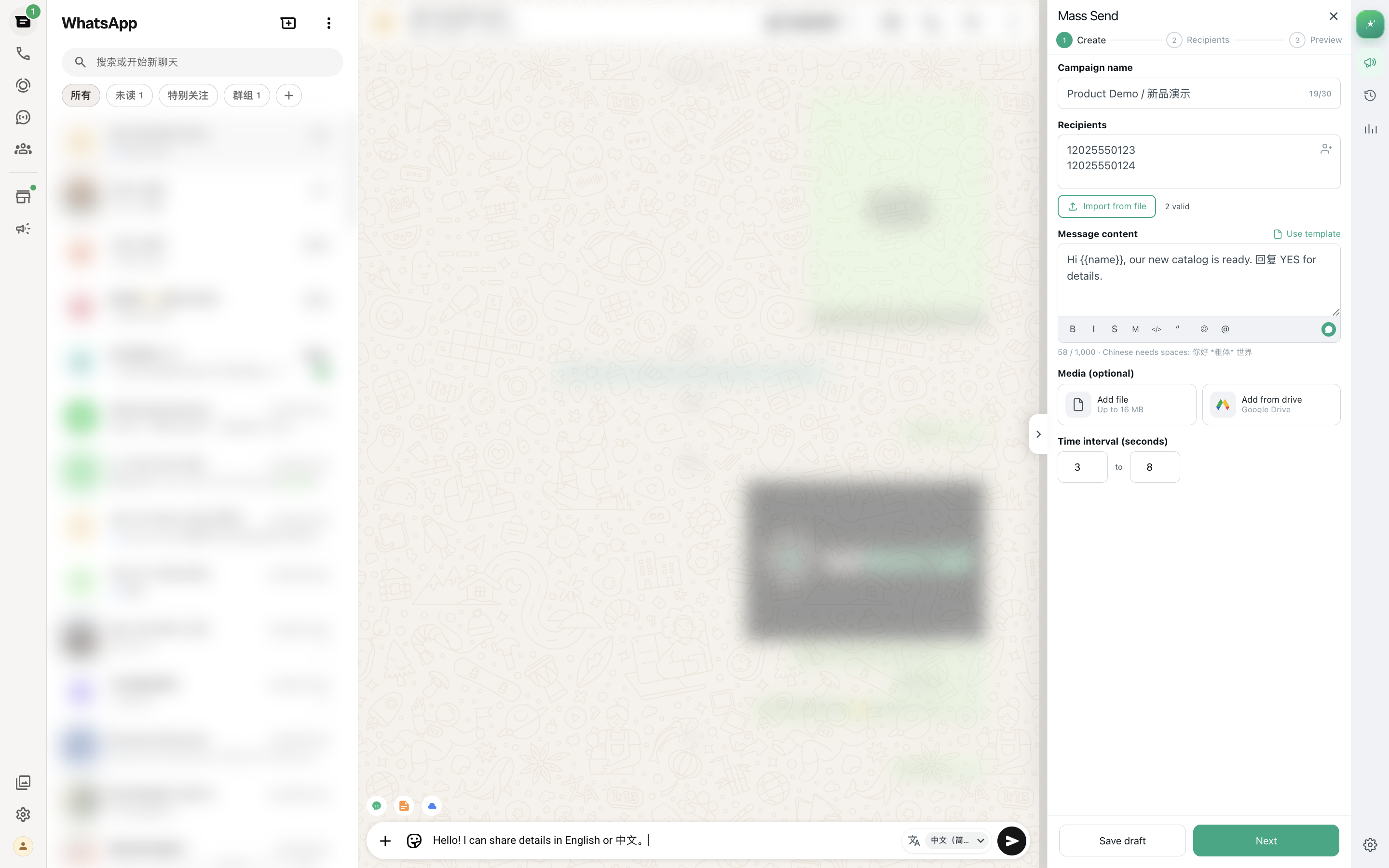
- Paced bulk messaging: Queue messages to CSV/Excel lists with random delays (10–60 seconds), personalized merge tags, and media attachments per campaign.
- AI translation: Translate incoming or outgoing messages directly next to WhatsApp Web message bubbles and composer—no copy-paste to external tools.
- AI knowledge base reply drafts: Upload your product catalog, FAQ docs, or company policies; get AI-generated reply drafts based on customer questions and your knowledge base.
- Script library: Save reusable message templates (greetings, order confirmations, FAQ answers) and insert them with one click.
- Google Drive media library: Browse and send images or videos from Drive folders without downloading to your computer—ideal for product catalogs.
- Contact, group, and chat export: Export contacts (name, phone, tags, last message time), groups (name, members, admin status), or full chat history to CSV/JSON for backup or analysis.
- Local storage by default: Task settings, scripts, and export data stay in browser local storage; no server relay for bulk send workflow.
Install: MSG.AI on Chrome Web Store
❌ What MSG.AI does NOT provide
- No shared team inbox: MSG.AI works in your personal WhatsApp Web session. It does not create a multi-agent shared inbox or assignment system.
- No deal pipeline or stages: No visual sales funnel or drag-and-drop deal tracking.
- No CRM sync: No direct integration with HubSpot, Salesforce, or Zoho CRM. (You can export data to CSV and import manually.)
- No automated reminders: No calendar-based follow-up reminders or task management system.
- No analytics dashboard: No built-in charts for conversion rates, response times, or agent performance. (You can analyze exported data in Excel or BI tools.)
Who MSG.AI is for
MSG.AI fits best for:
- Cross-border ecommerce sellers who need paced outreach to international customers with AI translation and Drive product images.
- Multilingual customer support teams (1–5 people) who handle diverse languages and want AI reply drafts from a knowledge base.
- SMBs with permissioned lists who already work in WhatsApp Web daily and want bulk send + workflow helpers without paying for full CRM Platform setup.
- Teams prioritizing local data control who prefer browser local storage over cloud CRM databases for privacy or compliance reasons.
Not for: Teams needing shared inboxes, HubSpot sync, deal stage automation, or guaranteed message delivery (use WhatsApp Business Platform CRM integrations instead).
Comparison: WhatsApp Web customer service tools for small business
Practical examples
How SMB teams use MSG.AI for CRM-adjacent workflows
Example 1: Cross-border seller with product catalog
- Setup: Upload product images and specs to Google Drive. Connect Drive to MSG.AI Cloud Media Library. Upload product catalog PDF to MSG.AI knowledge base.
- Inbound inquiry: Customer asks "Do you have blue size M shirts?" in Spanish. Click AI translate to read in English. Click AI reply draft; MSG.AI searches knowledge base and suggests "Yes, we have blue M shirts, $25, ships in 3 days."
- Send quote with media: Edit draft, open Drive media library, attach product image from "Shirts/Blue" folder, send.
- Follow-up campaign: Export recent "Inquiry" chats to CSV. Create bulk send task with "Hi {{name}}, still interested in {{product}}? 10% off this week." Send paced (30–60 sec delays).
- Post-sale: Save order confirmation message in script library. Next order: insert script, personalize {{orderId}}, send.
Example 2: Multilingual support team
- Knowledge base: Upload FAQ doc, return policy, warranty terms. MSG.AI indexes for AI reply drafts.
- Customer question: "Can I return after 30 days?" Click AI reply draft → MSG.AI cites return policy and drafts "Returns accepted within 30 days with receipt. After 30 days, we can offer store credit."
- Translation: Customer replies in French. Click translate next to bubble. Type English reply, click translate outgoing message, send in French.
- Export for review: Export last week's chats to CSV. Analyze common questions in Excel. Update knowledge base and script library.
Decision framework
When you need a full CRM platform instead of a Web extension
Consider investing in a full CRM platform with WhatsApp Business Platform API if:
- Team size: You have 10+ agents who need to share WhatsApp conversations, assign chats, and avoid reply collisions.
- Volume: You send 500+ messages per day or run campaigns to tens of thousands of contacts regularly.
- Integration needs: You already use HubSpot, Salesforce, or Zoho CRM and need WhatsApp conversations synced to the CRM database in real-time.
- Advanced automation: You want to trigger WhatsApp messages automatically when a deal stage changes, a form is submitted, or a payment is received—without manual action.
- Analytics requirements: You need built-in dashboards for conversion rates, agent performance, response times, and revenue attribution.
- Compliance and SLA: You need guaranteed message delivery, official Meta support, and contractual uptime SLAs.
- Template approvals: You're willing to submit message templates for Meta review and wait 24–48 hours for approval before sending campaigns.
Platform CRM examples: HubSpot + WhatsApp (via BSP), Salesforce Service Cloud + WhatsApp, Zendesk + WhatsApp API, Bitrix24 + WhatsApp connector.
Cost estimate: $50–$500/month per agent (CRM license) + WhatsApp API conversation fees (varies by country, ~$0.005–$0.10 per conversation) + BSP setup/management fees if applicable.
Official guide: WhatsApp Business Platform
Ready to add CRM-adjacent workflow tools?
Start with MSG.AI's free trial and a small test
Use the evaluation checklist above to confirm which CRM features you actually need. If paced bulk send, AI translation, knowledge-base reply drafts, and local data control fit your workflow better than a full Platform CRM, install MSG.AI and run a 5–10 message test campaign to a permissioned list before committing to full use.
Frequently asked questions
FAQ
What is a WhatsApp CRM Chrome extension?
A WhatsApp CRM Chrome extension is a browser add-on that adds CRM-like features (contact notes, labels, pipeline tracking, reminders) or CRM-adjacent workflow tools (paced bulk send, AI translation, reply drafts) to WhatsApp Web. MSG.AI is the latter: it provides workflow automation without full CRM features like shared team inbox or HubSpot sync.
Is MSG.AI a full CRM for WhatsApp?
No. MSG.AI is a CRM-adjacent workflow assistant. It offers paced bulk send, AI translation, knowledge-base reply drafts, script library, Drive media, and contact export—but no deal pipeline, shared team inbox, or CRM platform sync. For those features, use WhatsApp Business Platform with HubSpot, Salesforce, or Zendesk.
Can I use a WhatsApp CRM extension instead of HubSpot or Salesforce?
Only if your needs are simple. Web extensions work for solo or small teams (1–5 people) who need notes, bulk send, and AI help on WhatsApp Web. For multi-agent collaboration, advanced automation, or CRM database sync, you need a full Platform CRM integration.
Does MSG.AI sync with my CRM (HubSpot, Salesforce, Zoho)?
No. MSG.AI does not have direct CRM integrations. You can export contacts, groups, or chats to CSV and import them into your CRM manually. For real-time sync, use a WhatsApp Business Platform integration with your CRM provider.
Will using a WhatsApp CRM Chrome extension get my account banned?
No extension—whether labeled "CRM," "sender," or "automation"—can guarantee account safety. Restrictions typically follow recipient reports, aggressive sending, or policy violations. MSG.AI includes pacing and local storage to reduce risk, but you must still obtain consent, follow volume norms, and comply with WhatsApp policies.
What's the difference between WhatsApp Web CRM and WhatsApp Business Platform CRM?
Web CRM extensions work inside your browser with your personal or Business App account—lower cost, faster setup, but limited team features. Platform CRM integrations connect to WhatsApp via official API with Meta verification, template approvals, shared inbox, webhooks, and guaranteed delivery—higher cost, more complexity, better for enterprise.
Can multiple team members use MSG.AI on the same WhatsApp number?
No. MSG.AI works in your personal WhatsApp Web session (one phone number per browser profile). For multi-agent shared inbox on one number, you need WhatsApp Business Platform with a CRM like HubSpot or Zendesk.
Does MSG.AI offer pipeline tracking or deal stages?
No. MSG.AI does not include visual sales pipeline, deal stages, or funnel reporting. It focuses on bulk send workflow, AI translation/reply drafts, and data export. For pipeline CRM features, use a Platform CRM integration or a dedicated Web CRM extension that offers those functions.
Product capabilities and positioning verified as of September 23, 2026. MSG.AI is independently developed and not affiliated with Meta, HubSpot, Salesforce, or other CRM platforms mentioned. WhatsApp policies, Chrome Web Store requirements, and CRM integration capabilities may change. Evaluate current product features and compliance before use.