WhatsApp scheduling guide
Schedule WhatsApp Messages on Web: Chrome Extension Options Without Business API (2026)
When people search for "schedule WhatsApp messages," they want control over when messages go out—whether that's a future date/time or paced intervals during a campaign. This guide covers native WhatsApp Business App scheduling, Chrome send-later extensions, Business Platform API options, and when a paced bulk queue like MSG.AI is the better fit for permissioned outreach to customer lists without claiming to be a clock-based scheduler.
Quick answer
Can I schedule WhatsApp messages to send later on Web?
Yes, but the method depends on your account type and use case. WhatsApp Business App offers native scheduling for individual messages where the feature is available (not all regions). Chrome extensions labeled "send later" or "message scheduler" can schedule messages on WhatsApp Web but require the browser to stay open until the scheduled time. WhatsApp Business Platform API supports server-side scheduled template sends via approved message templates.
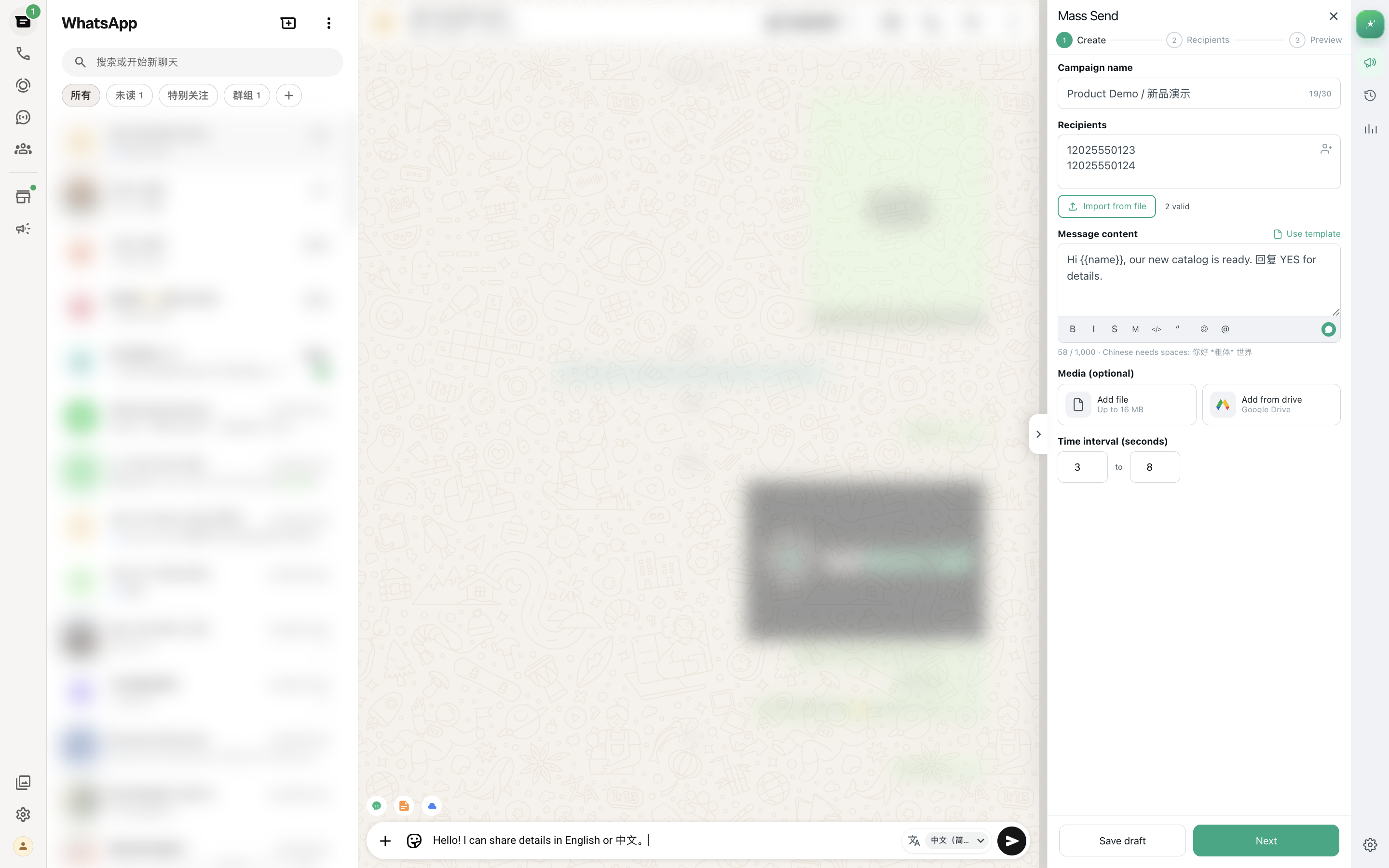
MSG.AI is a different tool category: it provides paced bulk sending with configurable delay intervals (e.g., 20-60 seconds between messages) during an active work session—not calendar-based future scheduling. If your actual need is permissioned campaign outreach to a customer list with human-like delays, AI translation, and reply drafts, paced bulk sending is more practical than clock scheduling.
You need one or a few messages to send at a specific future date/time without manual triggering (e.g., "send appointment reminder tomorrow at 2 PM"). Use native Business App scheduling, a Chrome send-later extension (browser must stay open), or Business Platform API scheduled templates.
You need to message a permissioned customer list (50-500 contacts) during a work session with personalized content, media attachments, and smart delays to monitor replies and avoid rate limits. Tools like MSG.AI queue messages with random intervals and pause/resume controls—no future calendar date, but better workflow for campaign outreach.
Terminology clarity
What "schedule WhatsApp messages" actually means
The term "schedule WhatsApp messages" covers two different workflows that people often conflate. Understanding the distinction helps you choose the right tool.
1. Calendar scheduling (future date/time)
Definition: Setting a message to send at a specific future date and time without manual triggering—for example, "send this message tomorrow at 9:00 AM" or "send appointment reminder on Friday at 2:00 PM."
Use cases:
- Appointment reminders scheduled for 24 hours before the appointment
- Birthday or holiday greetings scheduled for the exact date
- Follow-up messages scheduled for a specific time after an event
- Marketing announcements timed for product launches or sales start times
Tools that support this: WhatsApp Business App native scheduling (where available), Chrome send-later extensions (browser must stay open), WhatsApp Business Platform API with scheduled template sends.
2. Paced/interval sending (smart delays during active queue)
Definition: Controlling the time interval between messages in an active bulk campaign queue—for example, "wait 20-60 seconds (random) between each message" or "send 10 messages per hour."
Use cases:
- Bulk campaign outreach to customer lists with personalization and media
- Order-shipped notifications sent with delays to avoid rate limit triggers
- Product launch announcements to segmented groups with monitoring between batches
- Support follow-ups to many customers with human-like timing patterns
Tools that support this: WhatsApp sender Chrome extensions like MSG.AI, bulk messaging platforms, WhatsApp Business Platform API with custom rate-limiting logic.
Why the distinction matters
If you search "schedule WhatsApp messages" expecting a tool to queue 200 customer messages for delivery tomorrow at 10 AM while you sleep, but install a paced sender extension, you will be disappointed—because paced senders require an active browser session and start when you click Start, not at a future calendar time.
Conversely, if you need to send 200 personalized order confirmations right now with 30-second delays between each to monitor replies and avoid spam flags, a single-message "send later" scheduler is not the right tool—you need a bulk sender with pacing controls.
This guide covers both workflows honestly so you can choose the tool that matches your actual need.
Official WhatsApp features
Native WhatsApp Business App scheduling
WhatsApp Business App (the free mobile app for small businesses) includes a native message scheduling feature where available. Not all regions or accounts have access yet—Meta rolls out features gradually and may restrict certain accounts based on verification status or usage patterns.
How native scheduling works (when available)
- Compose your message in a chat as usual (text, media, emoji, links)
- Long-press the send button (or tap a clock icon if visible)
- Select a date and time from the scheduler picker
- Confirm scheduling—the message saves locally and sends at the scheduled time
- Device must stay online—your phone needs connectivity at the scheduled time for delivery
Key limitation: Native scheduling sends from the Business App on your phone. You cannot schedule via WhatsApp Web or Desktop unless you start the scheduler on mobile first. If your phone is off or WhatsApp app is force-closed at the scheduled time, the message may fail to send.
Checking if you have native scheduling
Open WhatsApp Business App → go to any chat → type a message → long-press the send button. If you see a schedule option or clock icon, you have access. If not, the feature may not be available for your region or account yet. Meta has not published a comprehensive rollout timeline or region list as of September 2026.
When native scheduling is enough
- You send individual or small-batch scheduled messages (1-10 per day)
- You already use WhatsApp Business App as your primary messaging tool
- Your device stays online and charged during scheduled send times
- You don't need bulk CSV import, merge tags, or pacing controls
When it's not enough: If you need to schedule 50+ messages with personalization from a spreadsheet, pacing controls, or AI translation, use a Chrome extension or Business Platform instead.
Browser automation options
Chrome send-later extensions for WhatsApp Web
Several Chrome extensions on the Chrome Web Store are designed specifically for scheduling WhatsApp messages on WhatsApp Web. These tools automate the send action at a future time you specify—but they have important constraints.
How Chrome send-later extensions work
- Install the extension and authorize it to access WhatsApp Web
- Open a chat on web.whatsapp.com and compose your message
- Click the extension icon (usually beside the send button or in the extension panel)
- Set the future date and time for scheduled delivery
- Confirm—the extension saves the task locally
- Keep WhatsApp Web open in the browser until the scheduled time
- At the scheduled time, the extension pastes the message into the composer and triggers send automatically
Critical constraint: browser must stay open
Chrome extensions cannot send messages if the browser is closed, the tab is closed, or WhatsApp Web is logged out. The extension runs in your browser environment and relies on the active WhatsApp Web session. This means:
- Your computer must be on and connected to the internet at the scheduled time
- Chrome (or your Chromium browser) must be running with WhatsApp Web open
- If you close the browser or log out of WhatsApp Web, scheduled messages fail
Practical workaround: Some users keep a dedicated laptop or desktop running 24/7 with WhatsApp Web logged in just for scheduled sends. This works but adds complexity and power costs.
Finding send-later extensions on Chrome Web Store
As of September 2026, Extension Ranker data (English, global) shows:
- ~8,000 monthly searches for "schedule WhatsApp messages" (primary keyword)
- ~4,000 monthly searches for "WhatsApp message scheduler" (secondary)
- ~21 extensions in the WhatsApp scheduling niche on Chrome Web Store
- Conversion rate ~0.124 (niche is fragmented; no dominant leader)
Search Chrome Web Store for "WhatsApp schedule" or "WhatsApp send later" and sort by ratings. Check:
- User reviews for reliability and scheduling accuracy
- Permissions requested (some extensions request broad access; review privacy policy)
- Update frequency (WhatsApp Web UI changes regularly; outdated extensions break)
- Support availability (can you contact the developer if scheduling fails?)
When Chrome send-later extensions are practical
- You schedule 1-10 messages per day at specific future times
- You already keep a device running 24/7 (home server, always-on laptop)
- You prefer WhatsApp Web over mobile Business App for typing and media management
- You don't need bulk CSV import or pacing for multiple recipients
When they are not practical
- You want messages to send while you sleep or travel (device must stay on)
- You need to schedule bulk campaigns to 50+ recipients with merge tags
- You rely on a laptop that you close/suspend daily (scheduling breaks)
- You need guaranteed delivery with server-side infrastructure
For server-side scheduling without browser dependency, evaluate WhatsApp Business Platform API instead.
Enterprise API option
WhatsApp Business Platform API scheduled templates
The WhatsApp Business Platform (formerly WhatsApp Business API) supports scheduling via server-side infrastructure—no browser or device needs to stay open. This is the most reliable method for scheduled WhatsApp messages at scale, but it requires Meta Business verification, template pre-approval, and developer integration.
How Business Platform scheduling works
- Create and submit message templates to Meta for approval (e.g., "Hi {{1}}, your appointment is tomorrow at {{2}}. Reply YES to confirm.")
- Wait for template approval (typically 24-48 hours; promotional templates face stricter review)
- Integrate the API into your backend system or use a Business Solution Provider (BSP) like Twilio, 360dialog, or MessageBird
- Schedule API calls using cron jobs, workflow automation (Zapier, Make), or your BSP's built-in scheduler
- API sends messages server-side at the scheduled time—no browser or manual triggering required
When Business Platform scheduling makes sense
- High-volume transactional messages: Order confirmations, shipping updates, appointment reminders (500+ messages/day)
- System-triggered scheduling: "Send WhatsApp reminder when calendar event is 24 hours away" via CRM webhooks
- Guaranteed delivery requirements: Delivery receipts, read receipts, error codes, and official Meta support
- Multi-agent shared inbox: 10+ team members need access to the same WhatsApp number
- Compliance audit trails: Formal logs of who sent what message when, required by regulated industries
Setup requirements and costs
Time investment: 2-6 weeks from signup to first scheduled message (Meta verification + BSP contract + template approvals + developer integration)
Initial cost: $500-$5,000 for developer integration (varies by complexity and whether you use BSP's managed service or custom build)
Ongoing cost:
- BSP monthly fees: $50-$500/month depending on message volume and features
- Conversation fees: $0.005-$0.10 per 24-hour conversation window (varies by country; user-initiated conversations often free or cheaper)
Template restrictions: All scheduled messages must use pre-approved templates. You cannot freestyle wording like you can with browser extensions—Meta reviews and must approve template language, variables, and structure before use.
When NOT to use Business Platform
- You send fewer than 200 messages/day and don't need shared inbox or CRM integration (overhead too high for small volume)
- You need flexible message wording without template approval delays (promotional or creative campaigns)
- You don't have developer resources or budget for $1,000+ setup costs
- You prefer local data control and don't want messages logged by a BSP or Meta
For a detailed comparison of Chrome extensions vs Business Platform, see the Business API alternative guide.
Campaign workflow alternative
When paced bulk sending is better than clock scheduling
Many people search "schedule WhatsApp messages" not because they need a specific future date/time, but because they want control over when and how fast messages go out during a campaign. For this use case, paced bulk sending is more practical than calendar scheduling.
What is paced bulk sending?
Paced bulk sending means importing a list of recipients (CSV/Excel), composing one message template with personalization merge tags, and sending to all recipients in a queue with configurable delay intervals between each message—all during an active work session you monitor in real-time.
Example workflow:
- Import 150 customers who ordered this week (columns: phone, name, orderId, trackingCode)
- Write message: "Hi {{name}}, your order #{{orderId}} shipped! Track: dhl.com/{{trackingCode}}"
- Configure pacing: random 20-60 seconds between each send
- Start queue at 10:00 AM; monitor progress in real-time
- Pause after first 20 sends to check for any confused replies or errors
- Resume queue; all 150 messages complete by ~12:30 PM with delays
Advantages over clock scheduling for bulk campaigns
| Feature | Paced bulk sending | Clock scheduling |
|---|---|---|
| CSV import | ✅ Native; merge tags for personalization | ❌ Manual; must schedule each individually |
| Real-time monitoring | ✅ Watch progress, pause/resume mid-campaign | ⚠️ Set and forget; no mid-flight control |
| Error catching | ✅ Catch merge errors, wrong numbers early | ❌ All scheduled sends execute; errors discovered later |
| Recipient reply monitoring | ✅ See replies during campaign; adjust if needed | ⚠️ Replies come after all sends; no adjustment window |
| Pacing control | ✅ Random delays (e.g., 20-60s) per message | ⚠️ All sent at exact scheduled time (rate spike) |
| Device/browser requirement | ⚠️ Must stay open during queue run (~2-4 hours for 200 msgs) | ⚠️ Must stay open until scheduled time (could be hours or days) |
| Best for | Bulk campaigns during work session | Single/small-batch at specific future time |
When to choose paced bulk sending
- You send 50-500 messages per campaign to a permissioned customer list
- You want personalization (name, order ID, custom fields) from a spreadsheet
- You need to monitor replies and errors mid-campaign and adjust before completing
- You prefer human-like timing (random delays) over sending all at once
- Your schedule allows 2-4 hour campaign windows during business hours
When clock scheduling is still better
- You send 1-10 individual messages at specific future times (appointment reminders, follow-ups)
- Timing is critical: "must send exactly at 9:00 AM" (paced queues start when you click, not at a clock time)
- You want messages to send while you sleep or are offline (requires Business Platform API or always-on device)
- You don't need personalization or bulk CSV import
For pacing best practices and delay configuration, see the bulk message delay guide.
Product positioning
How MSG.AI fits (and what it does NOT do)
MSG.AI is a Chrome extension for WhatsApp Web designed for cross-border sellers, ecommerce support, and multilingual SMBs. It provides paced bulk sending with AI translation, knowledge-base reply drafts, script library, Google Drive media access, and contact/group/chat export—all inside the browser during an active work session.
✅ What MSG.AI provides
- Paced bulk messaging: Import CSV/Excel lists, use {{merge tags}} for personalization, configure random delay intervals (e.g., 20-60 seconds), attach media, pause/resume queue in real-time.
- AI translation: Translate incoming messages inline; write replies in your language and preview outgoing translation before sending. Supports 20+ languages via hosted endpoint.
- AI reply drafts: Generate editable reply suggestions from chat context + optional business knowledge base (product info, policies, FAQs). Review before sending.
- Script library: Save reusable message templates (greetings, payment instructions, shipping FAQs) and insert with one click.
- Google Drive media: Browse Drive folders and send images/videos/documents without downloading locally first (requires Drive authorization).
- Contact/group/chat export: Export contacts to CSV/XLSX/vCard, group members to XLSX/CSV, or full chat history to readable HTML (up to 5,000 messages per chat). Save locally or upload to Drive.
- Local storage by default: Task settings and sending logs stay in browser local storage. MSG.AI does not relay chat content through its servers for bulk send workflow.
Install: MSG.AI on Chrome Web Store
❌ What MSG.AI does NOT do (honest boundaries)
No calendar-based future scheduling
MSG.AI does not schedule a campaign to start at a future date and time (e.g., "send tomorrow at 10 AM"). It supports delay intervals during an active queue run in an open WhatsApp Web session. You must be present to start the task and keep the browser open while it runs.
No offline or background sending
If you close the browser, log out of WhatsApp Web, or suspend your device, the queue stops. MSG.AI works in your active browser session—not server-side. For true offline scheduling, use WhatsApp Business Platform API.
No ban guarantees
MSG.AI cannot guarantee your account will never be restricted. Account safety depends on recipient consent, message quality, account history, and WhatsApp policy compliance—not the tool brand. Always test with small volumes, obtain opt-in consent, and monitor recipient feedback.
Who MSG.AI is built for
- Cross-border sellers who need AI translation for multilingual customers, Drive product catalogs, and personalized order updates from Excel lists.
- Small support teams (1-10 people) who want AI reply drafts from a business knowledge base, reusable script templates, and chat export for handoffs.
- Businesses needing paced campaign workflows during business hours with real-time monitoring—not overnight scheduled sends.
- Teams not ready for Business Platform who send 50-300 messages/day and want flexibility to write any message template without Meta approval delays.
When MSG.AI is NOT the right tool
- You need calendar-based future scheduling ("send tomorrow at 9 AM") → Use native Business App scheduling or a Chrome send-later extension
- You need offline scheduled sends while you sleep → Use WhatsApp Business Platform API
- You send 500+ messages/day with guaranteed delivery requirements → Use Business Platform API
- You need shared team inbox with 10+ agents → Use Business Platform API
For a detailed comparison of sender extensions vs Business Platform, see the sender extension buyer guide.
Practical example
Realistic workflow: paced bulk sending vs clock scheduling
Here's how a cross-border seller might use paced bulk sending (MSG.AI) for a shipping-notification campaign versus how they would use clock scheduling for individual appointment reminders.
Use case 1: Bulk shipping notifications (paced sending)
Goal: Notify 120 customers that their orders shipped today with tracking codes.
-
01
Export shipped orders from your ecommerce system
CSV with columns: phone, name, orderId, sku, trackingCode. 120 rows.
-
02
Import CSV into MSG.AI Mass Send
Map columns to {{name}}, {{orderId}}, {{sku}}, {{trackingCode}}. Write template: "Hi {{name}}, your order #{{orderId}} ({{sku}}) shipped via DHL. Track here: dhl.com/{{trackingCode}}. Thank you!"
-
03
Attach product image from Google Drive
Open Drive media library, select product photo, add caption "Your order is on the way!"
-
04
Configure pacing: 25-50 seconds random delay
Estimated completion: ~75 minutes. Start queue at 10:00 AM. Monitor progress—pause after first 15 sends to check for any wrong numbers or errors. No issues; resume.
-
05
Queue completes at 11:20 AM
118 sent successfully, 2 failed (invalid numbers). Export task log CSV and reconcile with order system.
Why paced sending won: 120 personalized messages with merge tags, media, real-time monitoring, mid-campaign error correction. Clock scheduling would require scheduling 120 individual messages at staggered times—impractical.
Use case 2: Appointment reminder (clock scheduling)
Goal: Remind a client about their consultation call tomorrow at 2:00 PM.
-
01
Open WhatsApp Business App on mobile
Navigate to the client's chat.
-
02
Compose reminder message
"Hi [name], this is a reminder that we have a consultation call scheduled for tomorrow at 2:00 PM. Please reply to confirm. Looking forward to speaking with you!"
-
03
Long-press send button → select "Schedule message"
Set date: tomorrow. Set time: 1:00 PM (1 hour before call). Confirm scheduling.
-
04
Ensure phone stays online
Phone connected to Wi-Fi, WhatsApp app not force-closed. Message sends automatically at 1:00 PM tomorrow.
Why clock scheduling won: Single message at specific future time without manual triggering. Paced bulk sending would require starting a queue tomorrow at 1 PM—unnecessary overhead for one message.
Decision framework summary
- 1-10 messages at specific future times → Use clock scheduling (native Business App or send-later extension)
- 50-500 personalized messages from CSV during work session → Use paced bulk sending (MSG.AI or similar)
- 500+ messages with guaranteed delivery, CRM integration, or offline scheduling → Use Business Platform API
Risk and responsibility
Consent, pacing, and scheduling risk factors
Whether you use clock scheduling or paced bulk sending—and whether you use native WhatsApp features, Chrome extensions, or Business Platform API—your responsibility for consent, message quality, and policy compliance remains the same.
Consent is required regardless of scheduling method
Just because you can schedule a message does not mean the recipient consented to receive it. WhatsApp's Business Messaging Policy requires that messages be expected, relevant, and compliant with local privacy laws (GDPR, CCPA, LGPD). Recipients who did not opt in are likely to report spam—triggering restrictions regardless of whether you scheduled via native app, extension, or API.
Scheduling does not bypass rate limits or policies
Scheduling spreads sends over time, but it does not give you permission to exceed normal volume limits or send to unpermissioned lists. WhatsApp's automated systems and recipient reports still enforce:
- How many recipients block you or report spam
- Whether recipients have your number saved and expect your messages
- Account age, verification status, and historical behavior patterns
- Message content quality, link destinations, and media appropriateness
A slowly scheduled campaign of irrelevant messages is still a policy violation.
Pacing vs scheduling for risk management
Pacing advantage: Real-time monitoring during an active queue lets you catch errors, wrong numbers, and confused replies early—then pause and fix before completing the campaign.
Scheduling risk: Set-and-forget scheduled sends execute without supervision. If recipients are confused or your merge tags broke, you discover the problem after all messages already sent. No mid-flight correction window.
Best practice: For bulk campaigns (50+ recipients), use paced sending with small test batches (5-10 messages) before scaling. For individual scheduled messages, double-check recipient details and message content before confirming the schedule.
Testing before you commit
Always test with your own numbers first
Before scheduling or pacing sends to customers, send test messages to 2-3 phone numbers you control. Verify formatting, merge-tag accuracy, media attachments, links, and how the message looks on iOS and Android. Fix errors before committing to the full list.
Monitor early sends closely
For bulk campaigns, watch the first 10-20 replies carefully. If multiple recipients reply "Who is this?" or "Remove me," stop immediately and investigate list source, message clarity, and consent documentation. Do not complete the campaign until you understand the issue.
Honor opt-outs instantly
If someone asks to unsubscribe or stop receiving messages, remove them from your list immediately and do not contact them again. Continuing to message opted-out recipients violates WhatsApp policies and privacy laws—regardless of how you schedule or pace sends.
When to use Business Platform for compliance
If your business operates in a regulated industry (finance, healthcare, legal) or requires formal audit trails of who sent what message when, use WhatsApp Business Platform instead of browser extensions. The API provides:
- Template pre-approval by Meta (reduces policy violation risk)
- Delivery receipts and error codes for every message
- Webhook logs for compliance audits
- Official Meta support for policy questions and appeals
Browser extensions and native Business App scheduling do not provide formal compliance infrastructure.
Ready to test paced bulk sending?
Start with a small permissioned list and real-time monitoring
If your actual need is campaign outreach to a customer list with personalization, AI translation, and human-like delays—not clock-based future scheduling—install MSG.AI and run a 5-10 message test campaign first. Monitor replies, verify formatting, and confirm consent quality before scaling to larger volumes.
Frequently asked questions
FAQ
Can I schedule WhatsApp messages to send later automatically?
Yes, but the method depends on your account type and needs. WhatsApp Business App offers native scheduling where available. Chrome extensions like dedicated 'send later' schedulers can schedule messages on WhatsApp Web but require the browser to stay open. WhatsApp Business Platform API supports server-side scheduled templates. MSG.AI provides paced bulk sending with delays during an active session, not calendar-based future scheduling.
What is the difference between scheduling and paced sending?
Scheduling means setting a message to send at a specific future date and time (e.g., 'send tomorrow at 9 AM'). Paced sending means controlling intervals between messages in an active queue (e.g., 'wait 20-60 seconds between each send'). Scheduling is for timing one message; paced sending is for controlling bulk campaign flow to avoid triggering rate limits.
Does MSG.AI schedule WhatsApp messages for a future date?
No. MSG.AI supports delay intervals while an active bulk queue runs in an open WhatsApp Web session. It does not schedule a campaign to start at a specific future date and time. You must be present to start the task. For true calendar scheduling, use a dedicated send-later extension or the WhatsApp Business Platform.
What are the best Chrome extensions for scheduling WhatsApp messages?
Dedicated 'send later' or 'message scheduler' extensions on the Chrome Web Store allow setting a future send time for individual or small batches of messages. They require WhatsApp Web to stay open until the scheduled time. Extension Ranker data (English, updated July 2026) shows ~21 scheduling extensions in this niche with conversion rate ~0.124. Always review permissions, privacy policy, and user ratings before installing.
Can I schedule WhatsApp Business messages without keeping my browser open?
No, not with Chrome extensions. Browser-based schedulers require WhatsApp Web to remain open and connected until the scheduled time. For true offline scheduling, use the WhatsApp Business Platform API which sends messages server-side via approved templates, or keep a device running WhatsApp Business App with native scheduling (where available).
Is scheduling WhatsApp messages allowed by WhatsApp policies?
Scheduling itself is not against policy if done through official methods (Business App native scheduling or Business Platform API templates). Browser automation for scheduling is a gray area—WhatsApp's terms discourage unofficial automation, but enforcement focuses on recipient complaints, volume abuse, and policy violations rather than the scheduling tool brand. Always obtain opt-in consent and follow Business Messaging Policy.
When should I use paced bulk sending instead of scheduling?
Use paced bulk sending (like MSG.AI) when your goal is permissioned campaign outreach to a customer list during a work session with human-like delays, not timing one message for a future moment. Pacing helps monitor replies, catch errors mid-campaign, and avoid rate limits. Scheduling is for single or small-batch messages you want delivered at a specific time without manual triggering.
How does WhatsApp Business Platform scheduling work?
The WhatsApp Business Platform (API) allows sending messages server-side via pre-approved message templates. You can schedule API calls to trigger at specific times using your own cron job, workflow automation, or a Business Solution Provider's scheduling feature. Templates must be approved by Meta before use. Best for transactional messages (order updates, reminders) at scale.
Can I schedule bulk WhatsApp campaigns to multiple recipients?
For bulk campaigns, paced sending is more practical than clock scheduling. Import your recipient list, configure delay ranges (e.g., 20-60 seconds), and monitor progress in real-time. If you need true calendar scheduling for bulk, use WhatsApp Business Platform API with scheduled template sends via a BSP or custom workflow. Chrome send-later extensions are designed for individual or small-batch scheduling, not bulk campaigns.
What are the risks of using unofficial scheduling tools for WhatsApp?
Unofficial browser automation (including some scheduler extensions) may trigger account restrictions if used aggressively or without consent. Risks include recipient spam reports, rate limit triggers, account temporary blocks, or permanent bans. No tool—official or third-party—guarantees account safety. Always test with small volumes, obtain opt-in consent, pace sends conservatively, and monitor recipient feedback.
Last checked September 25, 2026. Platform interfaces, policies, coverage and pricing can change. Follow the linked official sources before submitting an application or purchasing data.