Promotional message playbook
WhatsApp Marketing Messages: 20 Promotional Message Examples and Templates (2026)
A WhatsApp marketing message lands in the same inbox as a customer's family chat, so it has to earn its place. This guide gives you 20 promotional message examples you can adapt, a five-part formula for writing your own, the opt-in rules that keep your number healthy, what marketing messages cost on the Business Platform versus the app, and a practical way to send a campaign from WhatsApp Web.
Quick answer
What makes a good WhatsApp marketing message?
WhatsApp marketing messages are promotional messages a business sends to customers who agreed to hear from it: new arrivals, offers, coupons, restocks, seasonal sales and win-back offers. The ones that work are short (two to five lines), personal (the customer's name and something they care about), carry one offer with a real deadline, end with one clear action, and include an easy way to opt out.
Send promos only to opted-in contacts. Lead with the benefit, not your brand. One offer, one link or one reply keyword, one deadline. Add "Reply STOP to opt out." Send in the customer's language and time zone, at a steady pace, and no more often than you promised.
Below are 20 copy-ready WhatsApp marketing message templates grouped by campaign goal, a Q4 seasonal set, and a clear explanation of how sending from the WhatsApp app or WhatsApp Web differs from Meta's paid Business Platform templates.
Write your own
The 5-part formula for WhatsApp promotional messages
| Part | What it does | Example |
|---|---|---|
| 1. Personal opener | Shows it is for them, not a blast | "Hi Ana, since you ordered the linen shirts in May..." |
| 2. One benefit | The reason to read on | "...the new autumn colours are in." |
| 3. Proof or detail | Makes it concrete | A product photo, a price, a size range |
| 4. One action + deadline | Tells them what to do and by when | "Reply YES by Friday and I'll hold your size." |
| 5. Opt-out line | Keeps trust and reduces reports | "Reply STOP to stop these updates." |
Reply keywords beat links for many small sellers. "Reply YES" starts a conversation you can close by hand, and a reply from the customer is a stronger signal than a click. Use a link when the checkout really happens on your website.
Copy-ready scripts
20 WhatsApp marketing message templates by campaign goal
Replace the {{placeholders}}, cut anything that does not apply, and rewrite the wording so it sounds like your shop. Every template assumes the customer has opted in to updates.
New products and launches
1. New arrival for a past buyer
Hi {{name}}, you bought {{last_product}} from us last time, so you get first look:
{{new_product}} just arrived. Photo attached. Want me to send sizes and prices?
2. Product launch with early-bird price
Hi {{name}}, we're launching {{new_product}} this week.
Early-bird price {{price}} until {{date}}, then {{regular_price}}. Reply YES to reserve one.
3. Pre-order announcement
Hi {{name}}, pre-orders are open for {{product}}. Ships from {{ship_date}}.
Pre-order now and save {{discount}}. Reply PRE to book yours. Reply STOP to opt out.
Offers, coupons and discounts
4. Simple percentage offer
Hi {{name}}, {{discount}}% off {{category}} for our WhatsApp customers this week.
Use code {{code}} at checkout by {{date}}: {{link}}
5. Free shipping threshold
Hi {{name}}, free shipping on orders over {{amount}} until {{date}}.
Your favourite {{product}} plus one more item gets you there. Want a quick list?
6. Bundle offer
Hi {{name}}, people who buy {{product_a}} usually add {{product_b}}.
This week the pair is {{bundle_price}} instead of {{full_price}}. Reply BUNDLE to order.
7. Birthday or anniversary coupon
Happy birthday, {{name}}! Here's {{discount}} off anything in the shop, valid for 7 days.
Code: {{code}}. Enjoy your day!
Urgency that is true
8. Flash sale
Hi {{name}}, 24-hour flash sale starts now: {{discount}} off {{category}}.
Ends {{end_time}} ({{timezone}}). Shop here: {{link}}. Reply STOP to opt out.
9. Last chance reminder (only to people who showed interest)
Hi {{name}}, the {{offer}} you asked about ends tonight at {{time}}.
Should I place the order for you before it closes?
10. Low stock, real numbers
Hi {{name}}, we have {{units_left}} units of {{product}} left in {{size_or_colour}}.
We won't restock this batch. Want me to hold one until {{date}}?
Restock and waitlist
11. Back in stock
Good news, {{name}}: {{product}} is back in stock today.
You asked us to let you know. Reply HOLD and I'll keep one for 48 hours.
12. Waitlist early access
Hi {{name}}, you're on the waitlist for {{product}}, so you can order before
we announce it publicly. Early access is open until {{date}}: {{link}}
Loyalty, referral and win-back
13. VIP early access to a sale
Hi {{name}}, as one of our regular customers you get the sale 24 hours early.
{{discount}} off from now until {{date}}. Reply VIP for the private link.
14. Referral offer
Hi {{name}}, thanks for being a customer. Share this code with a friend: {{code}}.
They get {{friend_reward}} on their first order and you get {{your_reward}}.
15. Win-back for a lapsed customer
Hi {{name}}, it's been a while since your last order. We'd love to have you back:
{{discount}} off your next order until {{date}}. Anything new you're looking for?
B2B and wholesale (cross-border sellers)
16. New price list for distributors
Hi {{name}}, our {{season}} wholesale price list is ready (PDF attached).
MOQ {{moq}} units, lead time {{lead_time}}. Prices valid until {{date}}. Any models you want samples of?
17. Trade show or catalogue follow-on
Hi {{name}}, great to meet you at {{event}}. As promised, here's our new catalogue.
Three models buyers in {{country}} ask for most: {{models}}. Shall I quote them?
18. Container or shipment space offer
Hi {{name}}, we have space in a shipment to {{port}} leaving {{date}}.
If you confirm by {{deadline}}, we can add your order at {{price}} per unit. Interested?
Content and events
19. Useful tip with a soft offer
Hi {{name}}, quick tip: {{tip_about_product}}.
If you need a refill, reply REFILL and we'll send the usual order.
20. Live session or store event invite
Hi {{name}}, we're showing the new {{collection}} live on {{date}} at {{time}} ({{timezone}}).
Reply JOIN and we'll send the link an hour before. Reply STOP to opt out.
Following up on a specific quote, sample or invoice is a different job. Use the WhatsApp follow-up message templates for that, and the customer service reply templates for support chats.
Plan ahead
Q4 seasonal WhatsApp promotional message ideas
October is the time to write your fourth-quarter promos, translate them and get them approved internally, before the rush. Adapt these to the holidays your customers actually celebrate.
11.11 / Singles' Day (Asian marketplaces and sellers)
Hi {{name}}, our 11.11 deals go live at midnight {{timezone}}.
{{discount}} off {{category}} for 24 hours only. Reply 11 to get the link first.
Diwali or other festive greeting with an offer
Happy {{festival}}, {{name}}! Thank you for shopping with us this year.
Enjoy {{discount}} off festive gifts until {{date}} with code {{code}}.
Black Friday / Cyber Monday
Hi {{name}}, our Black Friday prices are live until Cyber Monday night.
Your wishlist item {{product}} is {{sale_price}} (was {{price}}). Want me to reserve it?
Christmas shipping cut-off
Hi {{name}}, last day to order for delivery before Christmas in {{country}} is {{date}}.
Gift wrapping is free this week. Reply GIFT and tell me who it's for.
New Year thank-you (no hard sell)
Happy New Year, {{name}}! Thanks for your orders in {{year}}.
Our new range lands in {{month}}. Want us to send you the first photos?
Cost and platform rules
How much do WhatsApp marketing messages cost?
It depends on how you send them.
- WhatsApp Business Platform (API): promotional messages are sent as pre-approved marketing templates. Since July 1, 2025, Meta charges per delivered template message, and the rate depends on the template category and the recipient's country code. Marketing is the most expensive category, and Meta updates rates on a schedule (its rate card changed again on October 1, 2026). Business solution providers often add their own fees. Check Meta's official pricing page for current rates rather than relying on numbers in blog posts.
- WhatsApp app, Business app and WhatsApp Web: Meta does not charge per message. You type or send from your own number. The trade-offs: no template approval, no buttons or carousels, no delivery analytics dashboard, and every message still falls under WhatsApp's Terms and anti-spam systems. Too many blocks or reports can get a number restricted.
- Broadcast lists (in the app) only reach people who saved your number. See broadcast list vs bulk sender for how they compare.
Whether you use the API or WhatsApp Web, only send promotional messages to people who agreed to receive them, say who you are, and honour opt-outs immediately. "Free" sending from the app is not free if it costs you your number. No tool can guarantee an account won't be banned.
Choosing between these setups? Read WhatsApp Business app vs Platform vs web extension and WhatsApp Business API alternative.
Cross-border sellers
Promotional messages in your customer's language
A promo in the buyer's own language reads like a message from a shop they know. A promo in a language they have to translate reads like spam. Write the master version once, translate it for each market, and have a native speaker check the two or three campaigns you send most often.
- Localize the offer, not just the words. Currency, date format (07/10 vs 10/07), sizes and the local holiday all matter.
- Check numbers after translation. Prices, discount codes, quantities and deadlines are where machine translation mistakes cost money.
- Send in their time zone. A 9 a.m. promo in Shenzhen lands at 2 a.m. in São Paulo.
For tools and workflow, see how to translate WhatsApp messages on Web and the best WhatsApp translator extension for business.
How-to
How to send WhatsApp marketing messages from WhatsApp Web
- Build an opted-in list. Use customers who bought from you, asked to join your updates, or messaged you first. Export contacts or group members you already have (see export WhatsApp contacts) and keep a column for consent and opt-outs.
- Segment before you write. Past buyers of one category, waitlist members, wholesale buyers by country. Ten relevant messages beat 500 generic ones.
- Save each template as a script. Keep your approved promo copy in a quick-reply script library so the whole team uses the same wording and the same opt-out line.
- Personalize with merge fields. Put name, product, size and city in spreadsheet columns and merge them in. See personalized WhatsApp messages from Excel.
- Attach one strong image or short video. Keep product media in a Google Drive media library so you are not hunting for files mid-campaign.
- Send in small, paced batches. Random delays between messages and breaks between batches look more like a person and give you time to watch replies. See WhatsApp Web bulk message delay.
- Answer replies by hand and clean the list. Every "YES" is a sale to close. Every "STOP" comes off the list before the next campaign.
Comparing tools for this? The WhatsApp marketing Chrome extension guide covers what to look for, and the bulk message sender guide covers sending mechanics.
Avoid these
WhatsApp marketing message mistakes to avoid
- Messaging people who never opted in. Bought lists and scraped numbers generate blocks and reports fast.
- Three offers in one message. Pick one. If you have more, that is a catalogue, so send a link.
- Walls of emoji and capitals. "🔥🔥 MEGA SALE!!! 🔥🔥" looks like spam because spam looks like that.
- Fake urgency. A "last chance" that comes back next week teaches customers to ignore you.
- Sending too often. Agree on a frequency (for example, new arrivals and one sale a month) and keep to it.
- No opt-out. If customers can't easily say stop, they press block or report instead.
- Identical text to everyone. Without a name or product it reads like a blast, and it is less likely to get a reply.
- Wrong hour, wrong language. Check time zone and language per segment before you send.
Product-honest fit
Where MSG.AI fits for WhatsApp marketing messages
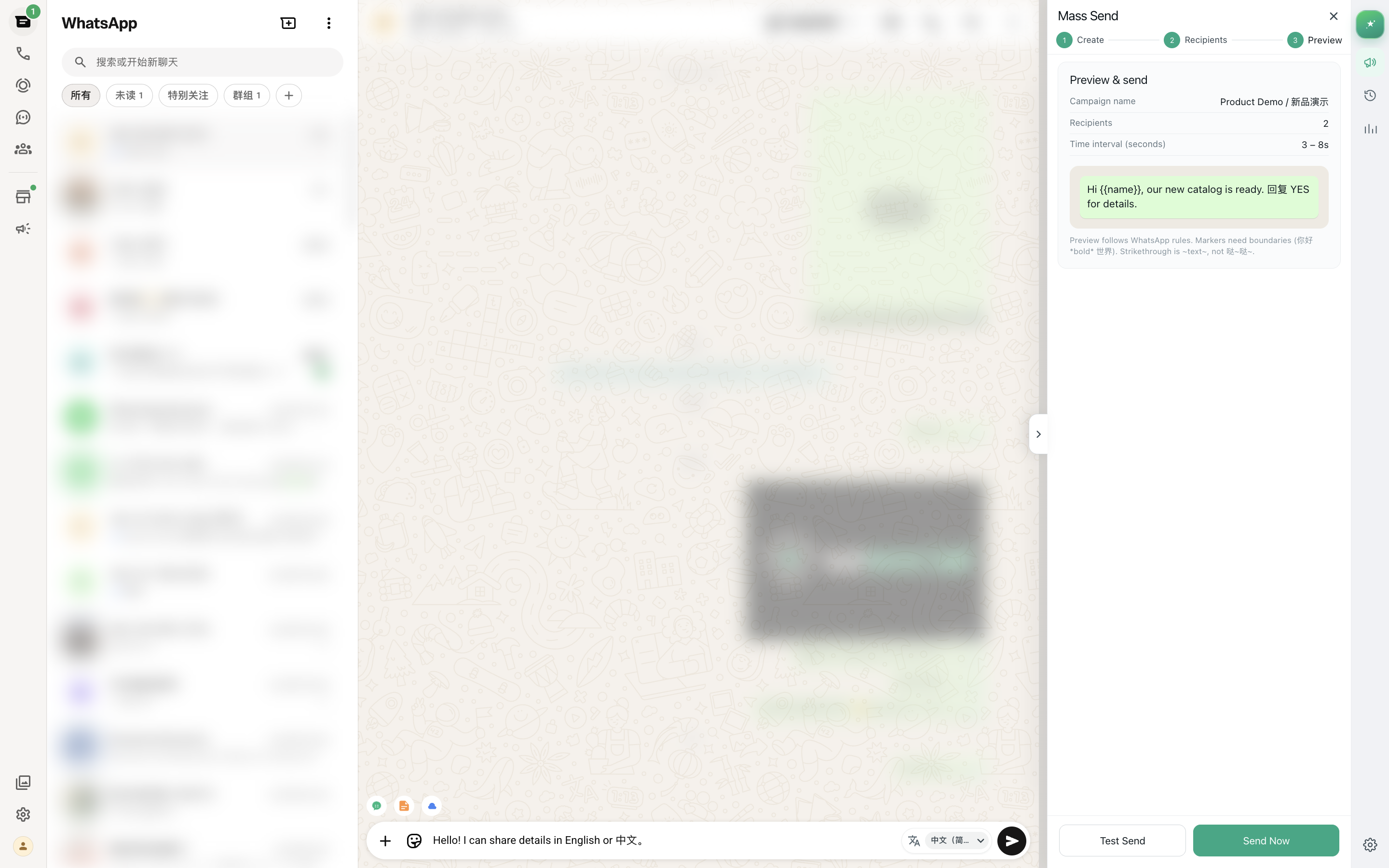
MSG.AI is a Chrome extension that runs inside WhatsApp Web. It is built for cross-border sellers, ecommerce teams and multilingual small businesses. It is not the WhatsApp Business API and is not affiliated with Meta or WhatsApp. For promotional campaigns to opted-in customers it helps with:
- Paced bulk sending of text, images and video, with delays between messages.
- Personalization from spreadsheet columns such as name, product and city.
- AI translation so each market gets the promo in its own language, and incoming replies are easy to read.
- Script library for your approved marketing message templates and opt-out wording.
- Knowledge-base AI reply drafts for the questions a campaign brings in. You review and edit every draft before it is sent.
- Google Drive media for product photos, catalogues and videos.
- Contact, group and chat export to build and clean your lists.
- Local storage by default for workspace data in your own browser profile.
Honest limits: MSG.AI needs an open WhatsApp Web session on your computer. It does not submit Meta-approved templates, add buttons or carousels, or track link clicks, and it is not a campaign analytics suite. It cannot make unsolicited messaging acceptable, and it cannot promise your number won't be restricted.
Common questions
Frequently asked questions
What is a WhatsApp marketing message?
It is a promotional message a business sends to customers, such as a new product, an offer, a coupon, a restock alert or a seasonal sale. On the WhatsApp Business Platform it must be a pre-approved marketing template. From the WhatsApp app or WhatsApp Web it is a normal message, but it should still only go to people who opted in.
How do I write a promotional message for WhatsApp?
Open with the customer's name and a reason it is relevant to them, state one benefit, add one concrete detail or image, give one action with a deadline, and end with an opt-out line. Keep it to two to five lines.
How much does a WhatsApp marketing message cost?
On the WhatsApp Business Platform, Meta charges per delivered marketing template, with rates that depend on the recipient's country, and providers may add fees. Sending from the WhatsApp app or WhatsApp Web has no per-message charge from Meta, but you have no templates, buttons or analytics, and anti-spam rules still apply.
Can I send WhatsApp marketing messages without the API?
Yes. You can send promotions from the WhatsApp Business app, broadcast lists or WhatsApp Web, including with a browser extension that sends at a paced rate. You still need opt-in, an easy opt-out and a reasonable frequency, because blocks and reports can get a number restricted.
How often should I send WhatsApp promotional messages?
There is no official number. Many small businesses do well with a few messages a month: new arrivals, one sale and the occasional seasonal message. Tell customers what to expect when they opt in, and keep to it.
Should I put a link or a reply keyword in a WhatsApp promo?
Use a link when the purchase happens on your website. Use a reply keyword like YES or HOLD when a person will close the sale in the chat. Replies also show you who is actually interested.
Can MSG.AI send WhatsApp marketing messages automatically?
MSG.AI can send a personalized promo with images or video to an opted-in list at a paced rate while WhatsApp Web is open, and it helps with translation, scripts and AI reply drafts you review. It does not use Meta's API templates, track clicks, or guarantee that your number won't be restricted.
Send better promos from WhatsApp Web
Pick three templates from this guide, save them as scripts, translate them for your main markets, and send them in paced batches to customers who asked to hear from you. Install MSG.AI from the Chrome Web Store and run your first small campaign this week.
Related guides: WhatsApp marketing Chrome extension, personalized messages from Excel, bulk message delay, follow-up message templates.
Frequently asked questions
FAQ
What is a WhatsApp marketing message?
It is a promotional message a business sends to customers, such as a new product, an offer, a coupon, a restock alert or a seasonal sale. On the WhatsApp Business Platform it must be a pre-approved marketing template. From the WhatsApp app or WhatsApp Web it is a normal message, but it should still only go to people who opted in.
How do I write a promotional message for WhatsApp?
Open with the customer's name and a reason it is relevant to them, state one benefit, add one concrete detail or image, give one action with a deadline, and end with an opt-out line. Keep it to two to five lines.
How much does a WhatsApp marketing message cost?
On the WhatsApp Business Platform, Meta charges per delivered marketing template, with rates that depend on the recipient's country, and providers may add fees. Sending from the WhatsApp app or WhatsApp Web has no per-message charge from Meta, but you have no templates, buttons or analytics, and anti-spam rules still apply.
Can I send WhatsApp marketing messages without the API?
Yes. You can send promotions from the WhatsApp Business app, broadcast lists or WhatsApp Web, including with a browser extension that sends at a paced rate. You still need opt-in, an easy opt-out and a reasonable frequency, because blocks and reports can get a number restricted.
How often should I send WhatsApp promotional messages?
There is no official number. Many small businesses do well with a few messages a month: new arrivals, one sale and the occasional seasonal message. Tell customers what to expect when they opt in, and keep to it.
Should I put a link or a reply keyword in a WhatsApp promo?
Use a link when the purchase happens on your website. Use a reply keyword like YES or HOLD when a person will close the sale in the chat. Replies also show you who is actually interested.
Can MSG.AI send WhatsApp marketing messages automatically?
MSG.AI can send a personalized promo with images or video to an opted-in list at a paced rate while WhatsApp Web is open, and it helps with translation, scripts and AI reply drafts you review. It does not use Meta's API templates, track clicks, or guarantee that your number won't be restricted.
Last checked October 7, 2026. WhatsApp features, Business Platform template rules and pricing change regularly; check Meta's official documentation before relying on them. MSG.AI is not affiliated with Meta or WhatsApp. Templates and frequency suggestions are general guidance, not measured results.