Small-business decision guide
WhatsApp Broadcast List vs Bulk Sender: Which Should You Use?
Broadcast lists and bulk-sender tools can both deliver one message to several people, but they use different workflows and carry different constraints. The right choice depends on where you work, whether recipients saved your number, how you prepare the list and whether every person expects the message.
Quick verdict
WhatsApp broadcast list vs bulk sender: what is the difference?
A WhatsApp broadcast list is a built-in mobile feature that sends one message as separate chats to saved contacts. A WhatsApp bulk sender is a general tool category—not an official WhatsApp product name—that prepares and sends individual messages from a list, often through WhatsApp Web or the official Business Platform.
Choose a broadcast list for a small, repeat audience that has saved your number. Choose a Web-based sender when you need spreadsheet import, personalization and a desktop review step. Choose the official WhatsApp Business Platform when you need programmatic messaging, approved templates, integrations or much larger operational scale.
None of these options turns an unexpected contact list into a safe audience. Message only people who reasonably expect the communication, honor opt-outs and stop when relevance or permission is unclear.
Definitions
What is a WhatsApp broadcast list?
WhatsApp describes a broadcast list as a saved list that can receive the same message as separate, private chats. Its current broadcast-list help page says recipients must have saved the sender's number, each list can contain up to 256 contacts, and replies return as individual messages.
The same help page states that broadcast lists are not supported on Windows, Mac or WhatsApp Web. It also notes that some countries may see a monthly broadcast limit as the feature rolls out. Check the current interface and local help page instead of treating an old limit screenshot as permanent.
What is a WhatsApp bulk sender?
“Bulk sender” describes a workflow rather than one standardized WhatsApp feature. A browser extension may import phone numbers, replace variables such as a recipient name, pace a queue and show a final review. An API product may use the official WhatsApp Business Platform, templates and webhooks. Those two implementations are not interchangeable.
MSG.AI is a Chrome extension that works with an active WhatsApp Web session. It is not the WhatsApp Business Platform, does not provide an official API connection and cannot guarantee that an account will avoid restrictions.
Decision table
Broadcast list vs bulk sender vs WhatsApp Business Platform
| Factor | Broadcast list | Web bulk sender | Business Platform |
|---|---|---|---|
| Where it runs | Supported WhatsApp mobile apps | Desktop browser with an active Web session | API-connected business systems |
| Recipient preparation | Select saved contacts | Paste or import a prepared list | CRM, database or approved business workflow |
| Personalization | One common message | Variables such as name can be merged | Templates and application data |
| Documented scale | Up to 256 contacts per list | Depends on tool, session and account conditions | Designed for programmatic scale |
| Integration | Minimal | File import/export and extension features | APIs, webhooks, CRM and support systems |
| Best fit | Small repeat audiences | Human-controlled desktop outreach | Operational messaging at scale |
There is no universal winner. The useful question is: which workflow gives your team the control it needs without pretending that convenience removes the recipient's expectations or WhatsApp's rules?
Built-in option
When a WhatsApp broadcast list is the better choice
Use the built-in list when the audience is small, stable and already connected to the business. Examples include existing customers who requested stock alerts, members expecting an event update, or a service list receiving a scheduled reminder.
- Recipients have saved your number, satisfying the documented delivery requirement.
- You are comfortable creating and maintaining the list on a supported mobile app.
- The same message is appropriate for everyone on the list.
- You do not need spreadsheet variables, desktop list cleanup or API integration.
A broadcast is not a group chat: recipients do not see one another, and their replies come back privately. That makes it suitable for one-to-many notices, not a community discussion.
Desktop workflow
When a WhatsApp Web bulk sender is the better choice
A browser-based sender can be useful when the list begins in Excel or CSV, the message needs a name or account variable, and a person should inspect recipients before starting. It can also keep preparation near the WhatsApp Web workspace a small sales or service team already uses.
That convenience creates responsibility. Phone numbers must include the right country code, merge fields must be checked for blanks, duplicates should be removed, and the preview must be reviewed. A delay setting changes pacing; it does not convert spam into permission or guarantee account safety.
Do not confuse a tool with authorization
WhatsApp publishes enforcement guidance against unauthorized automated or bulk messaging. Use a browser workflow only for relevant, expected communication and follow the terms that apply to your account and location.
API route
When to move to the WhatsApp Business Platform
The official Business Platform feature guide says business-initiated messages require customer opt-in and customizable message templates. The Platform supports programmatic access, interactive messages and connection to a wider technology stack.
Move toward the Platform when messaging is a shared operational system rather than one person's browser task: multiple agents need one workflow, messages depend on CRM events, delivery and response data must enter reporting, or approved templates need to run through an application.
Implementation requires more setup and may involve developer resources or a Business Solution Provider. It should be evaluated as an infrastructure decision, not merely as a way to send a longer list.
Recipient trust
A five-point safety check before any WhatsApp outreach
- 01
Document why the person expects the message
Record the signup, request, purchase, existing relationship or other valid context.
- 02
Match the message to that expectation
Permission for an order update is not automatically permission for unrelated promotions.
- 03
Identify the sender clearly
Use the business name and explain why the recipient is being contacted.
- 04
Provide and honor a stop path
Make opting out understandable and suppress that number from future lists.
- 05
Review account and local requirements
Product policies, privacy rules and marketing-consent laws vary and can change.
MSG.AI example
A controlled bulk-sender workflow in WhatsApp Web
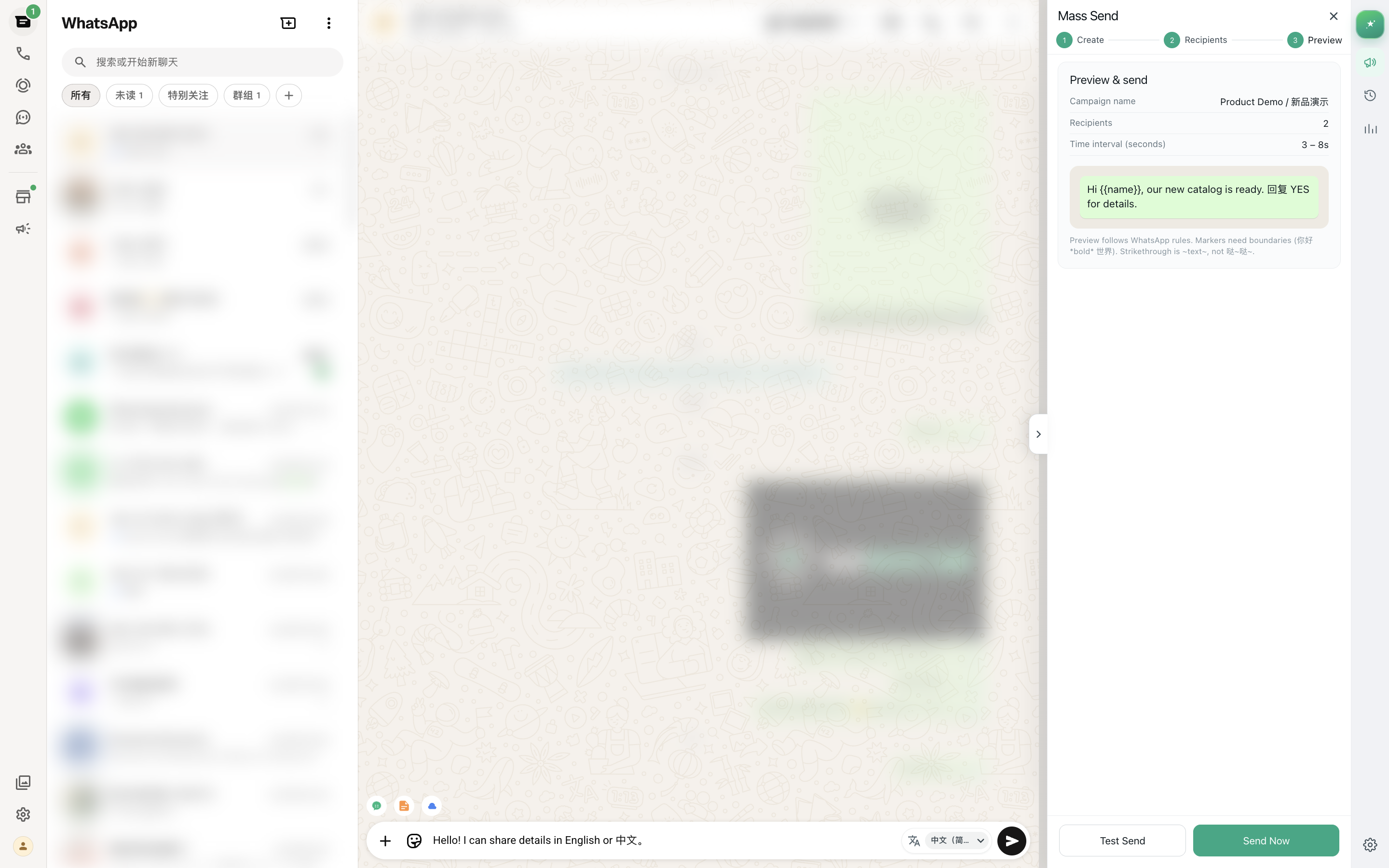
For an expected recipient list, MSG.AI can import phone numbers from a spreadsheet, personalize a message with fields such as {{name}}, attach supported media, show the final recipient preview and then process the queue from the active WhatsApp Web session.
Use the step-by-step WhatsApp bulk messaging guide for list formatting and recipient review. For a wider service workflow, see the WhatsApp Web customer-service toolkit and the product features page.
Human-controlled outreach
Prepare, personalize and review before sending
MSG.AI adds a desktop workflow inside WhatsApp Web while keeping the final recipient list visible to the operator.
Frequently asked questions
FAQ
Is a WhatsApp broadcast list the same as bulk messaging?
No. A broadcast list is a built-in mobile feature for saved contacts. “Bulk messaging” is a broader workflow category that may refer to a browser tool or the official WhatsApp Business Platform. The setup, delivery conditions, integrations and policy obligations differ.
Can I use WhatsApp broadcast lists on WhatsApp Web?
WhatsApp’s current help page says broadcast lists are not supported on Windows, Mac or WhatsApp Web. They are managed in supported mobile apps. A browser extension uses a different workflow and should not be presented as the built-in broadcast-list feature.
How many contacts can be in a WhatsApp broadcast list?
WhatsApp’s current broadcast-list help page states that each list can include up to 256 contacts. It also notes that some countries may see a monthly broadcast limit, so verify the current rules and interface for your account and location.
Do broadcast recipients need to save my number?
Yes. WhatsApp states that only people who have added the sender’s number to their phone contacts receive broadcast-list messages. A Web-based list workflow may not use that exact delivery rule, but recipients should still expect and permit the communication.
Does a random sending delay prevent a WhatsApp restriction?
No. A delay only changes the pace of a queue. It cannot make an irrelevant list compliant, replace recipient permission or guarantee that an account will avoid warnings or restrictions. List quality, message relevance and account behavior still matter.
When should a business use the WhatsApp Business Platform?
Consider the Platform when you need APIs, webhooks, CRM or support integrations, multiple-agent operations, approved message templates or programmatic messaging at scale. It requires more implementation work than a mobile list or browser extension.
Checked September 1, 2026 against current WhatsApp help and business-product pages. Product limits, regional availability, messaging policies and legal requirements can change. MSG.AI is an independent Chrome extension and is not the official WhatsApp Business Platform.