Follow-up template playbook
WhatsApp Follow-Up Messages: 16 Templates for Quotes, No-Reply Leads and Payments (2026)
Most WhatsApp sales are not lost to a "no." They are lost to silence after a price, a quote, or a sample. This guide gives you 16 WhatsApp follow-up message templates by stage, a simple timing rhythm, rules for following up after no response, and a practical way to send follow-ups from WhatsApp Web, one chat at a time or as a paced batch.
Quick answer
How do you write a WhatsApp follow-up message that gets a reply?
A good WhatsApp follow-up message is short, names the exact thing you are following up on (the quote, the sample, the invoice), adds one useful detail, and ends with a question the customer can answer in one word. Send the first follow-up about two to three days after your last message, during the customer's working hours. Send a second one about a week later with something new, then one polite closing message. After that, stop.
Context ("the quote for 500 units I sent on Monday") + one new thing (a photo, a delivery date, a smaller first order) + an easy question ("Should I hold the stock until Friday?"). Skip "Just checking in" on its own, never mention the blue ticks, and do not send the same text twice.
Below are 16 copy-ready WhatsApp follow-up message templates grouped by stage, followed by a practical workflow for sending them from WhatsApp Web. Use them only with people who contacted you or agreed to hear from you.
Timing
How often should you follow up on WhatsApp?
There is no official rule. The rhythm below is a sensible default for B2B quotes and ecommerce inquiries. Adjust it to how warm the lead is and how fast your buyers usually decide.
| Situation | First follow-up | Second follow-up | Stop or switch channel |
|---|---|---|---|
| Active chat went quiet | Next day | 3–4 days later | After a closing message |
| Quote or price list sent | 2–3 days | About 1 week | About 2–3 weeks: close the file politely |
| Invoice due or overdue | 1–2 days before due date | On or just after the due date | Move to email or a call if still unpaid |
| Order delivered | 1–3 days after delivery | Review or reorder ask about 1–2 weeks later | Do not chase further |
| Old customer, opted in to updates | When you have real news (restock, new model) | Not more than your agreed frequency | Immediately if they ask you to stop |
Read the ticks, but don't mention them. Two grey ticks usually mean the message was delivered but not read yet, so wait. Two blue ticks mean it was read (unless the customer has turned read receipts off). Silence after a read message is a signal: the next message should make the decision easier, not repeat the question.
Mind the time zone. Cross-border sellers often follow up at midnight in the buyer's country. Send during the buyer's business hours, not yours.
Copy-ready scripts
16 WhatsApp follow-up message templates by stage
Replace the {{placeholders}}, keep the message to two to four lines, and change the wording so it sounds like you. If you send a template to several customers, merge in their name and the product so each message is specific.
Stage 1: After an inquiry
1. They asked a question, you answered, then nothing
Hi {{name}}, did the details on the {{product}} answer your question?
If it helps, I can send a short video of it in use. Just reply "video".
2. They asked for a price but never said what they need
Hi {{name}}, to give you the best price on {{product}}, could you tell me
the quantity and your delivery country? A rough number is fine.
Stage 2: After a quote or price list
3. First quotation follow-up (day 2–3)
Hi {{name}}, checking in on the quote for {{quantity}} {{product}} I sent on {{day}}.
Does the price and lead time work, or should I adjust anything?
4. Second quotation follow-up with something new (about day 7)
Hi {{name}}, one update on your quote: we can ship {{product}} by {{date}}
if you confirm this week. Would you like me to reserve the stock?
5. Price objection follow-up
Hi {{name}}, if the full order is above budget, we could start with {{smaller_qty}}
units at the same unit price so you can test the market first. Want me to send that version?
Stage 3: No response
6. Follow-up after no response (one-tap question)
Hi {{name}}, quick one so I don't bother you twice. Where are you with {{product}}?
1 = still interested, 2 = later, 3 = not for now. Any number is fine.
7. Waiting on their team or boss
Hi {{name}}, I know these decisions often need a second opinion.
Would a one-page PDF with specs and prices help when you share it with your team?
8. The polite last message
Hi {{name}}, I'll close this quote for now so I'm not filling up your chat.
If timing changes, just reply here and we'll pick up where we left off.
Stage 4: Payment follow-ups
9. Friendly payment reminder (before the due date)
Hi {{name}}, a friendly reminder that invoice {{invoice_no}} for {{amount}} is due on {{due_date}}.
Payment details are in the invoice. Let me know if you need it resent.
10. Payment follow-up on the due date
Hi {{name}}, invoice {{invoice_no}} ({{amount}}) is due today.
Once it's paid we'll book shipping for {{product}} right away. Any questions on the invoice?
11. Overdue payment, firm but polite
Hi {{name}}, invoice {{invoice_no}} for {{amount}} is now {{days}} days overdue.
Could you share the expected payment date? If there's an issue, I'm happy to talk it through.
Stage 5: After delivery
12. Delivery check-in
Hi {{name}}, your order {{order_no}} shows as delivered. Did everything arrive in good condition?
If anything is wrong, send a photo here and we'll sort it out.
13. Review request (only after a positive check-in)
Glad you're happy with it, {{name}}! If you have one minute, a short review here would help us a lot:
{{review_link}}. Thank you!
14. Reorder reminder for consumables
Hi {{name}}, based on your last order, you may be running low on {{product}} soon.
Want me to prepare the same order again, or change the quantity?
Stage 6: Re-engagement (opted-in customers only)
15. Restock or back-in-stock alert
Hi {{name}}, you asked us to tell you when {{product}} is back. It's in stock again today.
Should I hold one for you? Reply STOP if you'd rather not get these updates.
16. Reviving an old customer with real news
Hi {{name}}, it's been a while since your last {{product_category}} order.
We just added {{new_item}}. Want photos and prices? A simple yes is enough.
For support-style replies (shipping questions, returns, complaints), use the separate WhatsApp customer service reply templates.
Cross-border sellers
Follow-ups in your customer's language
A follow-up in the buyer's own language is easier to answer than one they have to translate. If you sell to Spanish, Portuguese, Arabic, Indonesian or French speakers, write the template once in English, translate it, and have a native speaker check the key templates you send most often. Keep numbers, dates and currency in the format the buyer uses (for example 06/10 vs 10/06).
On WhatsApp Web, an AI translation tool can translate incoming replies and preview your outgoing follow-up before you send it. Always check product names, prices and quantities after translation. See how to translate WhatsApp messages on Web and the best WhatsApp translator extension for business.
How-to
How to send follow-up messages on WhatsApp Web
Most small teams follow up in one of two ways. Use the one that matches the situation.
Option A: One chat at a time (quotes, negotiations, overdue invoices)
- Keep a follow-up list. A simple sheet or CRM column with the customer, what you sent, the date, and the next follow-up date is enough. A WhatsApp CRM extension can add labels and reminders on top of WhatsApp Web.
- Save your templates as scripts. Put the 16 templates above into a quick-reply script library so you insert them in one click instead of retyping.
- Personalize before you send. Add the name, product and one detail from the earlier chat. An AI draft can help rephrase, but you decide what gets sent.
- Attach proof when it helps. A product photo or a short video often restarts a stalled chat. Keep them in a Google Drive media library so they're easy to attach.
Option B: A paced batch (same follow-up to many opted-in customers)
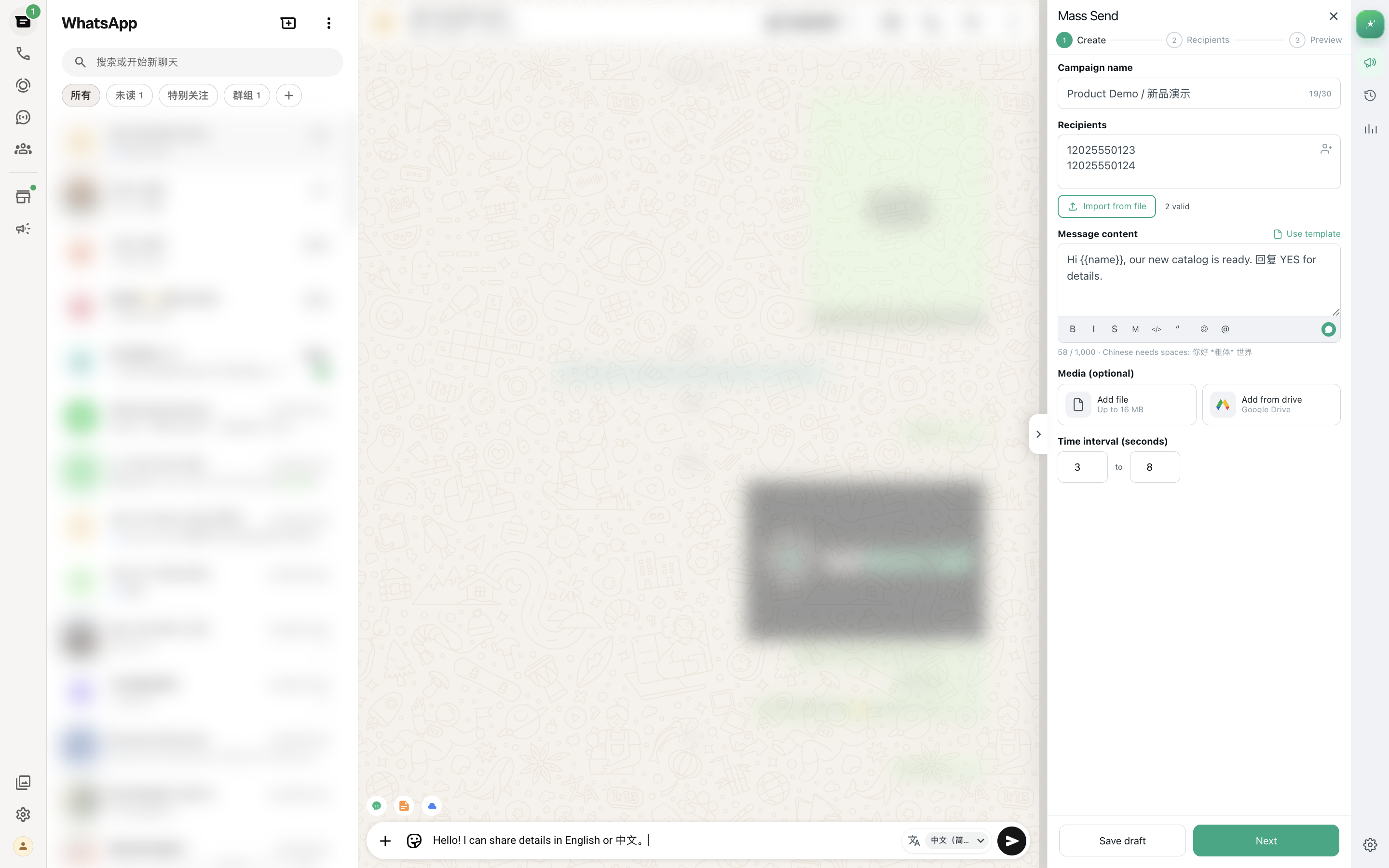
When 40 customers asked for a restock alert, or a group of buyers received the same price list, you can send one follow-up template to the whole list:
- Build the list from people who asked. Export the relevant contacts or keep them in Excel. See export WhatsApp contacts.
- Merge personal fields. Use columns like name, product and order number so each message is specific. See personalized WhatsApp messages from Excel.
- Send at a steady pace. Use random delays between messages and small batches instead of sending everything at once. See WhatsApp Web bulk message delay.
- Watch replies and stop requests. Answer replies personally, and remove anyone who asks to stop before the next batch.
Following up with people who asked about your product is normal business. Sending the same follow-up to numbers that never contacted you is spam, and frequent reports or blocks can get a number restricted. No tool can guarantee an account won't be banned.
Need a message to go out at a specific time later? That is scheduling, which is a different job. Compare options in schedule WhatsApp messages on Web.
Platform rules
Follow-up rules: WhatsApp app and Web vs the Business Platform
- WhatsApp app, Business app and WhatsApp Web: you can write to an existing chat at any time. There is no 24-hour window, but WhatsApp's Terms and anti-spam systems still apply. Customers can block or report you, and that affects your number.
- WhatsApp Business Platform (API): free-form messages are only allowed within 24 hours of the customer's last message. After that, you need a pre-approved template message to re-open the conversation, and template messages are billed by Meta's pricing rules.
- Opt-in: on any channel, marketing-style follow-ups (restock alerts, promotions, reorder reminders) should only go to people who agreed to receive them. Make it easy to opt out.
If you are deciding between these setups, read WhatsApp Business API alternative.
Avoid these
Follow-up mistakes that kill replies
- "Hi" on its own. It forces the customer to ask what you want. Put the context in the first message.
- "Did you see my message?" or pointing at the blue ticks. It sounds like a complaint, not a reason to reply.
- Repeating the same text. Each follow-up should add something: a photo, a date, a smaller option.
- Voice notes to new leads. Many buyers can't listen at work. Use text first, voice once the conversation is going.
- Following up forever. Two follow-ups plus a closing message is enough for most quotes. More than that starts to feel like pressure.
- Fake urgency. "Only 2 left!" when it isn't true damages trust the next time you message.
- Sending at the wrong hour. Check the buyer's time zone before you hit send.
Product-honest fit
Where MSG.AI fits for WhatsApp follow-ups
MSG.AI is a Chrome extension that runs inside WhatsApp Web. It is built for cross-border sellers, ecommerce support teams and multilingual small businesses. It is not the WhatsApp Business API and is not affiliated with Meta. For follow-ups, it helps the person typing:
- Script library to save your follow-up templates and insert them in one click.
- AI reply drafts from your knowledge base that you review and edit before sending.
- AI translation for incoming replies and outgoing follow-ups in other languages.
- Paced bulk sending of text, images and video for the same follow-up to many opted-in customers.
- Google Drive media for product photos and videos you attach to follow-ups.
- Exports of contacts, groups and chat history when you need a follow-up list.
- Local storage by default for workspace data in your own browser profile.
Honest limits: MSG.AI needs an open WhatsApp Web session. It is not a drip-sequence or calendar scheduler, and it does not set per-chat reminders for you, so keep your follow-up dates in a sheet or CRM. It is not a 24/7 bot or a multi-agent Business API inbox, and it cannot promise account safety.
Common questions
Frequently asked questions
How long should I wait before following up on WhatsApp?
For a quote or price list, wait about two to three days. If the chat was active and suddenly went quiet, the next day is fine. Send the second follow-up about a week later, then one closing message.
What should I say in a follow-up after no response?
Name the thing you are following up on, add one useful detail, and ask a question they can answer in one word, for example "1 = still interested, 2 = later, 3 = not for now." Don't mention the blue ticks or send "Hi" on its own.
How many times should I follow up on WhatsApp?
For most quotes, two follow-ups and one polite closing message are enough. For overdue invoices, keep following up, but move to email or a phone call if WhatsApp messages go unanswered.
Can I send the same follow-up message to many customers?
Yes, if they all asked about the product or agreed to receive updates. Personalize each message with their name and product, send at a steady pace, and stop messaging anyone who asks you to.
Is there a 24-hour limit for WhatsApp follow-ups?
Only on the WhatsApp Business Platform (API), where free-form messages are allowed within 24 hours of the customer's last message and pre-approved templates are needed after that. The WhatsApp app, Business app and WhatsApp Web have no such window, but anti-spam rules still apply.
How do I write a polite payment reminder on WhatsApp?
Include the invoice number, amount and due date, keep the tone friendly, and offer to resend the invoice. If it is overdue, ask for the expected payment date instead of repeating the demand.
Can MSG.AI send WhatsApp follow-ups automatically?
MSG.AI can send the same follow-up to a list at a paced rate while WhatsApp Web is open, and it offers scripts, AI drafts and translation for one-to-one follow-ups. It does not run drip sequences or set per-chat reminders, and it cannot guarantee your number won't be restricted.
Follow up faster from WhatsApp Web
Save the templates you just read as scripts, translate them for buyers abroad, and send paced follow-ups to customers who asked to hear from you. Install MSG.AI from the Chrome Web Store and start with your three most common follow-ups: quote, no response and payment.
Related guides: quick-reply script library, personalized messages from Excel, bulk message delay, customer service reply templates.
Frequently asked questions
FAQ
How long should I wait before following up on WhatsApp?
For a quote or price list, wait about two to three days. If the chat was active and suddenly went quiet, the next day is fine. Send the second follow-up about a week later, then one closing message.
What should I say in a follow-up after no response?
Name the thing you are following up on, add one useful detail, and ask a question they can answer in one word, for example "1 = still interested, 2 = later, 3 = not for now." Don't mention the blue ticks or send "Hi" on its own.
How many times should I follow up on WhatsApp?
For most quotes, two follow-ups and one polite closing message are enough. For overdue invoices, keep following up, but move to email or a phone call if WhatsApp messages go unanswered.
Can I send the same follow-up message to many customers?
Yes, if they all asked about the product or agreed to receive updates. Personalize each message with their name and product, send at a steady pace, and stop messaging anyone who asks you to.
Is there a 24-hour limit for WhatsApp follow-ups?
Only on the WhatsApp Business Platform (API), where free-form messages are allowed within 24 hours of the customer's last message and pre-approved templates are needed after that. The WhatsApp app, Business app and WhatsApp Web have no such window, but anti-spam rules still apply.
How do I write a polite payment reminder on WhatsApp?
Include the invoice number, amount and due date, keep the tone friendly, and offer to resend the invoice. If it is overdue, ask for the expected payment date instead of repeating the demand.
Can MSG.AI send WhatsApp follow-ups automatically?
MSG.AI can send the same follow-up to a list at a paced rate while WhatsApp Web is open, and it offers scripts, AI drafts and translation for one-to-one follow-ups. It does not run drip sequences or set per-chat reminders, and it cannot guarantee your number won't be restricted.
Last checked October 6, 2026. WhatsApp features, Business Platform messaging rules and pricing can change; check Meta's official documentation before relying on them. MSG.AI is not affiliated with Meta or WhatsApp. Timing suggestions are general guidance, not measured results.