Architecture and buying guide
WhatsApp Business App vs Platform vs Web Extension
The WhatsApp Business App, the official Business Platform and a browser extension solve different layers of the same problem. One is a mobile business app, one is API infrastructure, and one augments the browser session your team already operates.
Quick answer
WhatsApp Business App vs Platform vs Web extension: which is right?
The WhatsApp Business App is a free-to-download app for small businesses that personally manage customer conversations. The WhatsApp Business Platform is an API-based system for programmatic messaging, automation and integration at scale. A WhatsApp Web extension adds tools to an active browser session but is neither the App nor the Platform.
Choose the App when one owner or a small team needs built-in business basics. Choose the Platform when messaging must connect to software, multiple agents or automated events. Choose a Web extension when the team already works in WhatsApp Web and wants operator-controlled features such as translation, reusable scripts, list preparation, AI reply drafts or exports.
If your need is “help one person work faster in the browser,” evaluate an extension. If it is “make WhatsApp part of our backend system,” evaluate the Business Platform.
Product definitions
Three tools that should not be treated as equivalents
1. WhatsApp Business App
WhatsApp positions the Business App for small businesses that personally manage conversations. Its official Business App page highlights a business profile, product showcase, greeting and away-message features, and direct customer conversations.
2. WhatsApp Business Platform
The Platform is not another desktop chat app. It is a collection of APIs and business messaging capabilities. WhatsApp's business FAQ describes it as programmatic access for medium and large businesses and notes that direct integration requires developers or an approved Business Solution Provider.
3. WhatsApp Web extension
A browser extension runs alongside WhatsApp Web and can change the operator workflow. Depending on the product, it may add translation, templates, exports, CRM shortcuts or AI assistance. It still depends on a working browser session and should clearly disclose that it is not an official API integration.
Side-by-side
WhatsApp Business App, Platform and Web extension compared
| Factor | Business App | Business Platform | Web extension |
|---|---|---|---|
| Product type | Mobile business messaging app | APIs and business messaging infrastructure | Browser software layered onto WhatsApp Web |
| Best for | Owner-operated small businesses | Medium/large or integration-heavy operations | Small teams working actively on desktop |
| Setup | Download and configure a profile | Developer or partner implementation | Install, authorize and use with a Web session |
| Automation | Built-in greetings and away messages | Programmatic flows, templates and integrations | Varies; may assist an operator or process a local queue |
| Backend integration | Limited | Designed for CRM, support and business systems | Usually narrower, tool-specific integrations |
| Cost model | Free to download; connectivity costs may apply | Platform pricing plus implementation/provider costs | Free, subscription or license depending on vendor |
| Main dependency | Supported phone/app environment | API configuration and business operations | Active WhatsApp Web and browser compatibility |
Pricing and feature availability change. Compare the current official pricing and vendor terms at the time of purchase instead of using a static article as a quote.
Small-business baseline
Choose the WhatsApp Business App when conversation is still personal
The App fits a shop, consultant, local service or owner-operated exporter when customers expect a recognizable person to answer. It provides the lowest-complexity route to a professional business profile and common messaging conveniences.
- One owner or a very small team manages most conversations.
- A product catalog, greeting and away message cover the core need.
- Messaging does not need to be triggered by an order database or support platform.
- The business values quick setup over deep reporting and integration.
The official WhatsApp comparison guide describes the Business App as free to download and suited to smaller businesses. It also says organizations needing a multi-user business messaging solution should consider the Platform.
Operational infrastructure
Choose the WhatsApp Business Platform when systems must talk to systems
The Platform makes sense when a customer message must enter a support queue, an order event must trigger an approved update, or many agents and bots need controlled access. Its value is not merely message volume; it is the ability to make WhatsApp part of a governed business process.
The official Platform feature page distinguishes customer-initiated conversations from business-initiated messages. It states that business-initiated outreach requires customer opt-in and message templates, and it lists interactive messages, media and engagement information among the available capabilities.
Plan the operating model before implementation
Decide who owns opt-in records, template approval, agent access, escalations, retention, reporting and incident response. An API connection without those decisions is technical access, not a complete customer-messaging system.
Browser productivity
Choose a WhatsApp Web extension when the operator needs better tools
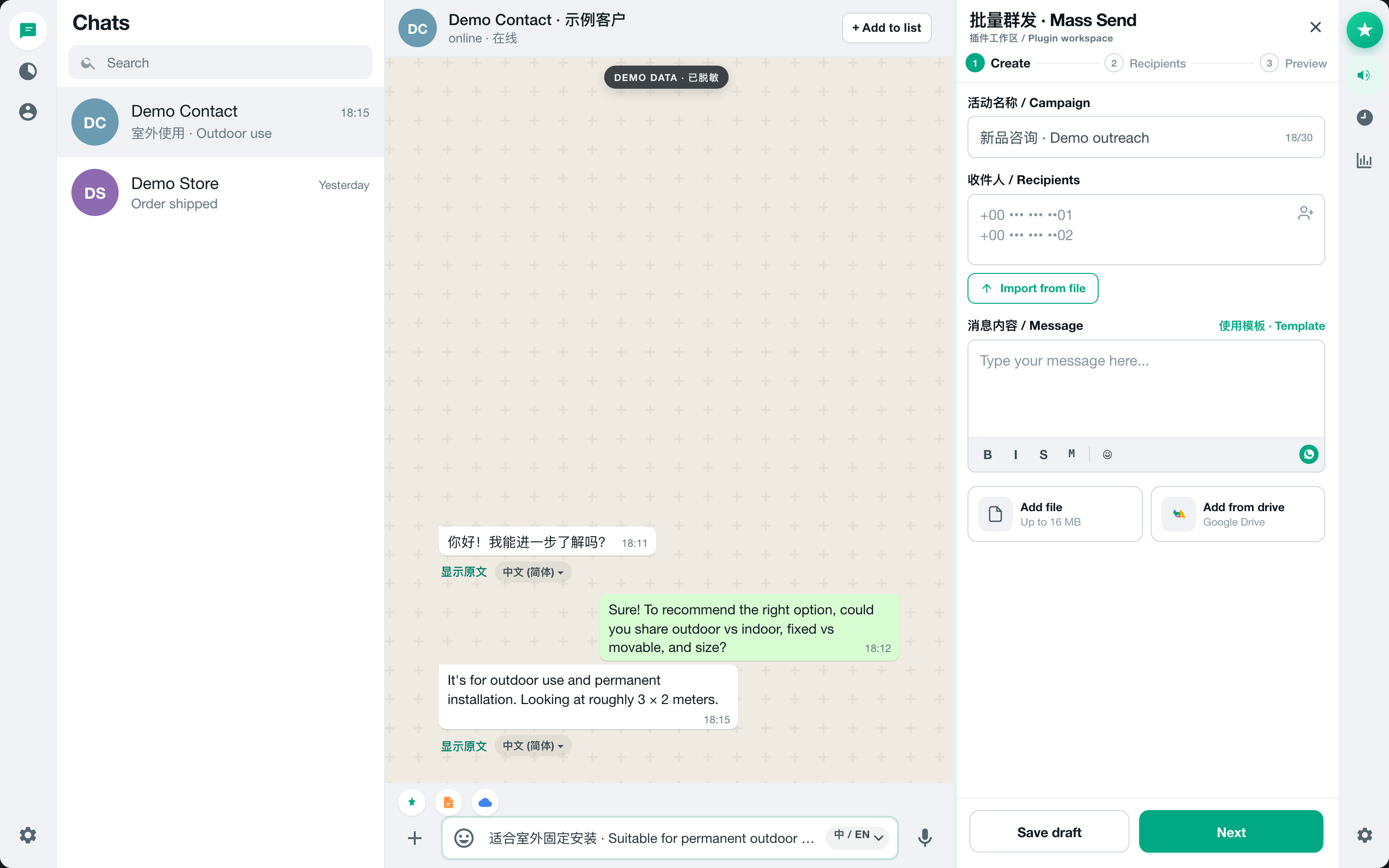
A Web extension is the middle layer for teams that are not ready to build API infrastructure but find the default browser workflow repetitive. It can shorten manual work without hiding the active chat or removing the person responsible for the final action.
MSG.AI, for example, adds bidirectional translation, knowledge-grounded AI reply drafts, reusable scripts, controlled list messaging, contact and group-member exports, chat HTML archives, and selected Google Drive workflows. The small-business customer-service guide shows how those features work together.
Evaluate an extension with four questions
- 1Truth: Does the vendor distinguish its extension from the official Business Platform?
- 2Control: Can the operator review recipients, generated replies and translated text before sending?
- 3Data: Which information stays local, which leaves the browser for a requested service, and which permissions are required?
- 4Resilience: What happens when WhatsApp Web changes its interface or a browser permission fails?
Architecture
Can a business use more than one option?
Yes, but use a hybrid because the needs are genuinely different. A small team might use the Business App for owner-managed conversations and later introduce the Platform for transactional events. An operator may use a Web extension for translation or exports while another approved system manages API-based notifications.
Do not assume products can share the same number, identity, history or workflow without configuration. Verify current WhatsApp support, account rules and vendor documentation before designing a hybrid setup. Keep one source of truth for consent, customer identity and opt-out status.
Decision framework
Choose in three steps
- 01
Map the work
Count operators, conversation types, languages, repeated tasks, system triggers and reporting needs.
- 02
Choose the lowest sufficient layer
Start with the App for personal business messaging, add an extension for browser productivity, or adopt the Platform for real backend integration.
- 03
Run a controlled pilot
Test one use case, verify data handling and recipient experience, then measure time saved, response quality and operational errors.
If the immediate problem is multilingual desktop support, start with the WhatsApp Web translation guide. If replies need verified business context, read the AI reply and knowledge-base guide.
Start at the browser layer
Add practical tools to the WhatsApp Web workflow
MSG.AI is designed for small teams that want more control and productivity without presenting a Chrome extension as the official API.
Frequently asked questions
FAQ
What is the main difference between the WhatsApp Business App and Platform?
The Business App is a downloadable app for small businesses that personally manage chats. The Business Platform is API-based infrastructure for programmatic messaging, integration and larger operations. It usually requires developer resources or an approved provider rather than a simple app installation.
Is a WhatsApp Web extension the same as the WhatsApp Business API?
No. A Web extension runs alongside an active WhatsApp Web session and adds browser-level features. The WhatsApp Business Platform provides official APIs, templates, webhooks and integration capabilities. An extension should never claim that browser access automatically becomes an official API connection.
Which option is best for a small business?
Use the Business App when one owner or a small team needs basic business messaging. Add a reputable Web extension when desktop operators need translation, scripts, AI drafting or exports. Evaluate the Platform when WhatsApp must connect to backend systems or a larger agent operation.
Can the WhatsApp Business Platform send messages first?
The official Platform supports business-initiated messages after the business has secured customer opt-in. Those messages use customizable templates and remain subject to current platform rules. Customer-initiated conversations follow a different operating path.
Does MSG.AI replace the WhatsApp Business Platform?
No. MSG.AI is a Chrome extension for an active WhatsApp Web workflow. It adds operator tools such as translation, AI reply drafts, reusable content and exports. It does not supply the APIs, webhooks or infrastructure of the official Business Platform.
Can a business combine the App, Platform and a Web extension?
Potentially, but compatibility, number sharing, identity, history and account rules must be verified for the exact setup. Use a hybrid only when each layer has a clear purpose, and maintain one reliable record for consent, opt-outs and customer identity.
Checked September 1, 2026 against current official WhatsApp business-product pages. Features, pricing, onboarding, regional availability and account compatibility can change. MSG.AI is an independent Chrome extension and is not the official WhatsApp Business Platform.