Pacing and interval guide
How to Pace WhatsApp Web Bulk Sends with Smart Delays (2026)
Delay settings control the time between messages in a bulk queue, not whether the queue is appropriate. This guide explains how intervals work, why pacing matters, recommended conservative practices, and how MSG.AI's smart delay workflow helps manage send cadence while keeping the final decision with the operator.
Quick answer
How do delay intervals work in WhatsApp Web bulk sending?
A delay interval controls the pause between individual messages in a bulk-send queue. Instead of sending all messages instantly, the tool waits a configured amount of time between each send. When randomization is enabled, the actual delay varies within a defined range—for example, between 15 and 45 seconds—so the pattern appears more natural and less mechanical.
Pacing reduces sudden spikes in sending volume and gives you time to monitor early replies, but it does not convert an unpermitted list into a safe audience or guarantee that an account will avoid restrictions. Message relevance, recipient expectations, and account history remain the primary factors in delivery quality and account health.
Delay settings control pacing, not permission. Send only to people who reasonably expect the communication, and stop immediately if replies indicate confusion or requests for removal.
The reasoning
Why message pacing matters for bulk WhatsApp campaigns
Sending hundreds of messages in rapid succession creates several operational and quality problems. Pacing addresses some of these issues, though it cannot fix fundamental consent or relevance problems.
Operational reasons for pacing
- Time to monitor early replies: If the first ten recipients reply with confusion or opt-out requests, you need time to pause the queue before the remaining hundreds are sent.
- Browser and network stability: WhatsApp Web runs in a browser session. Extremely rapid sending can strain the connection or trigger client-side rate limiting.
- Manageable reply volume: A sudden flood of simultaneous replies makes it hard to provide timely, quality responses.
- Time to correct mistakes: If you notice a typo, broken link, or wrong attachment after the first few sends, pacing gives you a window to stop and fix the campaign.
Quality signals
A paced send pattern can appear more deliberate and less like automated spam. However, this is a side effect, not a guarantee. WhatsApp's systems consider many factors beyond send cadence, including:
- Whether recipients have the sender's number saved
- How many recipients mark the message as spam or block the number
- Account age, verification status, and historical behavior
- Message content quality and link destinations
- Compliance with WhatsApp's Business Messaging Policy
Pacing helps you maintain operational control; it does not override recipient expectations or platform policy.
Technical mechanics
How delay intervals and randomization work
When you configure a bulk-send task with delays, the tool processes the queue sequentially rather than all at once. After each successful message send, the system waits for a specified interval before moving to the next recipient.
Fixed delays
A fixed delay uses the same pause between every message. For example, a 30-second delay means the tool waits exactly 30 seconds after each send:
| Message | Send time | Wait |
|---|---|---|
| Message 1 | 00:00:00 | 30 seconds |
| Message 2 | 00:00:30 | 30 seconds |
| Message 3 | 00:01:00 | 30 seconds |
| Message 4 | 00:01:30 | 30 seconds |
Fixed delays are predictable and easier to calculate, but the mechanical pattern may look less natural.
Random delays
A random delay varies each interval within a defined range. For example, a random delay between 20 and 60 seconds means each wait is different:
| Message | Send time | Wait |
|---|---|---|
| Message 1 | 00:00:00 | 37 seconds |
| Message 2 | 00:00:37 | 52 seconds |
| Message 3 | 00:01:29 | 24 seconds |
| Message 4 | 00:01:53 | 48 seconds |
Random delays produce a more varied send pattern, but they require a wider time budget and make completion times less predictable.
Calculating total queue time
Use the following formulas to estimate how long a campaign will take:
Total time ≈ (number of recipients × delay in seconds) / 60 minutes
Example: 100 recipients × 30 seconds = 3,000 seconds = 50 minutes
Total time ≈ (number of recipients × average delay in seconds) / 60 minutes
Example: 100 recipients × 40 seconds average (20–60 range) = 4,000 seconds ≈ 67 minutes
Add extra buffer time for network delays, failed sends that require retry, and manual pauses.
Conservative practices
Recommended delay ranges for different campaign sizes
The appropriate interval depends on campaign size, recipient relationship, account history, and available monitoring time. These recommendations err on the side of caution and assume an operator is actively watching the queue.
| Campaign size | Recommended delay | Approximate duration | Notes |
|---|---|---|---|
| Test (2–5 recipients) | 10–20 seconds | < 2 minutes | Short delay for quick validation |
| Small (10–50) | 20–45 seconds | 15–40 minutes | Fast enough to complete within an hour |
| Medium (50–200) | 30–90 seconds | 30–5 hours | Long enough to monitor and respond to early feedback |
| Large (200+) | 60–180 seconds | 3.5–10+ hours | Consider splitting into multiple batches across days |
These are guidelines, not guarantees. A 200-message campaign to an engaged customer list with documented opt-in may complete successfully with shorter delays. A 20-message campaign to a cold list with poor message quality can trigger restrictions even with long delays.
Start conservative, especially with new accounts
If the sending account is new, recently created, or has limited WhatsApp Web history, use longer delays and smaller batches. Build reputation gradually with high-quality, expected messages before scaling volume.
Additional pacing strategies
- Batch across multiple days: Instead of sending 500 messages in one session, split into five batches of 100 over five days.
- Time of day matters: Send during business hours when recipients are more likely to expect professional communication and replies can be handled in real time.
- Test first, always: Send to 2–5 numbers you control before starting the full queue. Verify formatting, links, media, and personalization.
- Monitor the first 10%: Watch replies closely during the first 10% of sends. If multiple recipients express confusion or opt out, pause immediately and investigate.
MSG.AI workflow
Configuring smart delays in MSG.AI
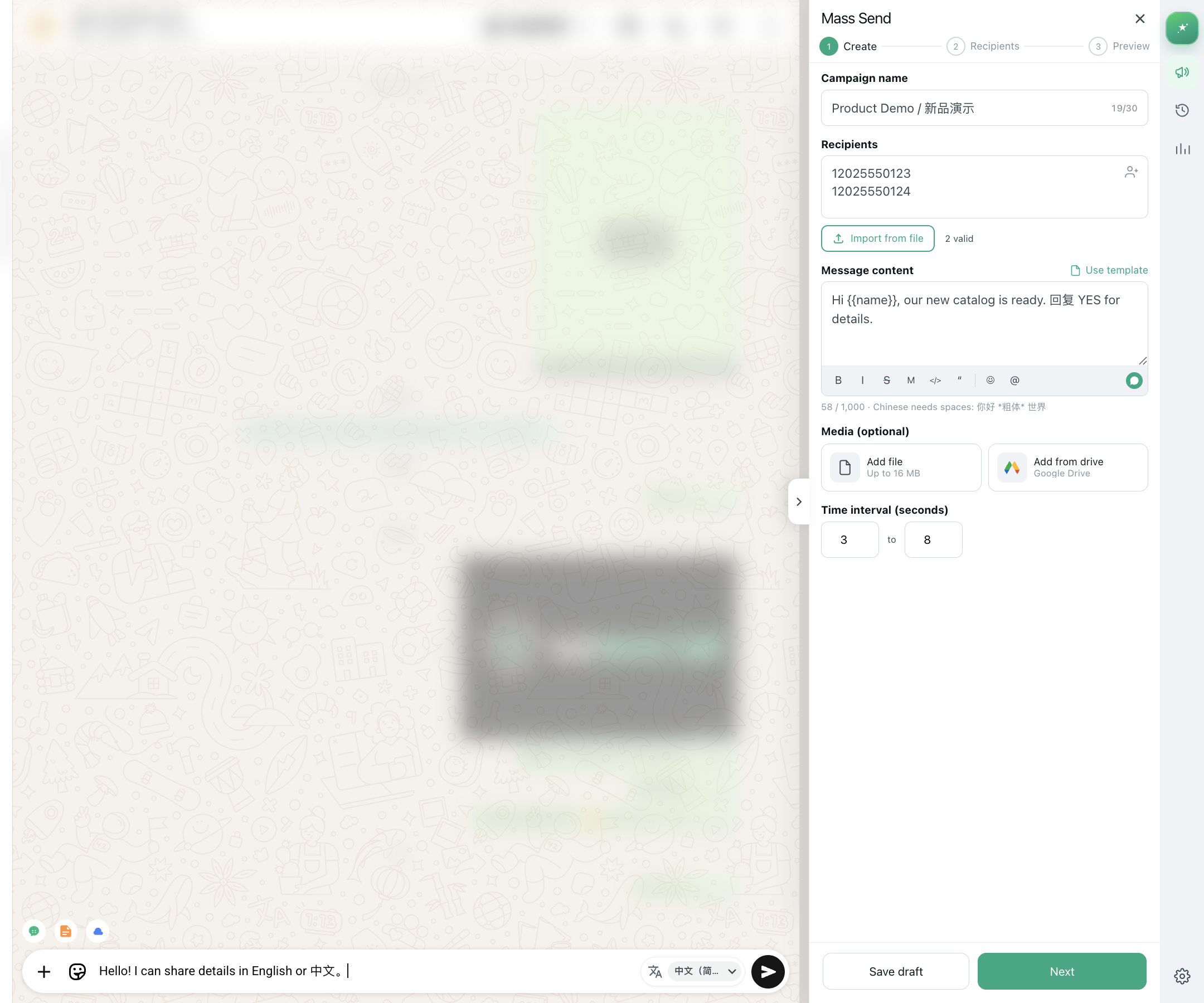
MSG.AI provides flexible delay controls in the Create step when building a mass-send campaign. You can choose between fixed or random delays, and the interface calculates estimated completion time based on recipient count.
Step-by-step: Setting up delays
-
01
Open the Create step
Install MSG.AI from the Chrome Web Store, open WhatsApp Web, and start a new Mass Send task.
-
02
Add recipients and message
Import your list, write the message, and add any media. See the bulk messaging guide for full preparation steps.
-
03
Configure delay settings
Scroll to the Interval section. Choose between fixed or random delay mode.
- Fixed delay: Enter one value in seconds (e.g., 30).
- Random delay: Enter a minimum and maximum range (e.g., 20–60 seconds).
-
04
Review estimated completion time
MSG.AI displays an approximate time to complete the campaign. If the estimate is too long, consider reducing the delay or splitting the list into smaller batches.
-
05
Test and adjust
Run a small test batch first. If the timing feels too fast or too slow, adjust the delay and test again before committing to the full list.
Delay presets (recommended starting points)
If you're unsure where to start, use these presets based on campaign size:
- Quick test (< 10 recipients): 15 seconds fixed
- Small batch (10–50): 25–45 seconds random
- Medium batch (50–150): 40–80 seconds random
- Large batch (150+): 60–120 seconds random, split into multiple sessions
Adjust based on recipient engagement, account age, and observed delivery behavior.
Active supervision
Monitor queue progress and pause if needed
Once a campaign starts, the MSG.AI History tab shows real-time progress: number sent, number remaining, success count, failure count, and current task status. Keep this view open during active campaigns.
What to watch for
- High failure rate: If more than 10% of sends fail, pause the queue and check number formatting, network connection, and WhatsApp Web login status.
- Unexpected replies: If multiple recipients reply with confusion, "Who is this?", or opt-out requests, pause immediately and review list source and message clarity.
- Account warnings: If WhatsApp displays a restriction notice or warning banner, stop all bulk sending and review the Business Messaging Policy.
- Browser instability: If the WhatsApp Web tab becomes unresponsive, slows down significantly, or disconnects, pause the task to avoid duplicate sends or data loss.
How to pause a running task
Click the Pause button in the MSG.AI History view. The task stops after the current message completes. You can resume later from the same position, adjust the delay, remove problematic recipients, or cancel the task entirely.
MSG.AI queues run in the browser and require an active, signed-in WhatsApp Web session. Closing the browser tab or signing out stops the queue. Use a dedicated browser window and avoid navigating away during active campaigns.
Reality check
What delay settings cannot do
Pacing is a useful operational control, but it has clear limits. Understanding what delays cannot accomplish helps set realistic expectations.
Delays cannot make an unpermitted list compliant
If recipients did not opt in, do not expect the message, or have no relationship with the sender, no delay pattern makes that list appropriate. Consent and relevance are prerequisites, not outcomes of pacing.
Delays cannot guarantee account safety
WhatsApp's enforcement systems consider many signals beyond send cadence. A slowly paced campaign of irrelevant, spammy, or misleading messages can still trigger restrictions. Quality, permission, and recipient behavior matter more than timing.
Delays cannot fix bad data or broken links
A paced send gives you more time to catch errors early, but it does not prevent the error. Always test first with a small batch you control before committing to a full campaign.
Delays cannot replace the Business Platform for scale
If you need to send thousands of messages daily, integrate with CRM systems, use approved templates, or handle webhook responses, a browser workflow is not the right tool. Use the official WhatsApp Business Platform instead.
Think of delays as traffic signals for your queue: they control pacing, not permission or destination quality.
Scaling up
When to move to the WhatsApp Business Platform
The official WhatsApp Business Platform is designed for operational messaging at scale. It uses approved message templates, requires customer opt-in, and provides API access for integration with business systems.
Consider the Platform when:
- Daily message volume exceeds what one person can manually supervise
- Messages are triggered by CRM events, order systems, or support tickets
- You need webhook delivery receipts, read status, and reply handling
- Multiple team members need access to one centralized messaging workflow
- Compliance, audit logs, and approved templates are required
The Platform requires setup with a Business Solution Provider or direct integration with Meta's Cloud API. It is a different infrastructure layer, not just a higher-tier extension. Evaluate it as a technology decision, not merely as a way to send faster or longer lists.
Frequently asked questions
WhatsApp Web bulk message delays: FAQ
What is the best delay for WhatsApp bulk sending?
There is no universal "best" delay. Start with 30–60 seconds for small campaigns and adjust based on recipient engagement, account age, and observed behavior. Conservative is better than aggressive. Test small batches first and monitor replies closely.
Will a random delay prevent my account from being banned?
No. Delays control pacing, not whether the campaign is appropriate. Account restrictions are driven by recipient reports, message quality, consent, account history, and compliance with WhatsApp's policies—not just send cadence.
Can I send messages faster if I use random delays?
Random delays do not enable faster overall sending. They vary the interval to make the pattern less mechanical, but the average delay still determines total campaign time. Prioritize quality and monitoring over speed.
How many WhatsApp messages can I send per day without restriction?
WhatsApp does not publish a fixed daily limit for personal or Business Web accounts. Restrictions depend on account age, verification, recipient behavior, message quality, and policy compliance. There is no safe guaranteed number. Focus on relevance, permission, and gradual volume increases.
Does MSG.AI support scheduled sending with delays?
MSG.AI supports delay intervals during active queue processing. It does not currently support scheduling a campaign to start at a future date and time. You must manually start the campaign, and it runs immediately with the configured delays between messages.
Can I change the delay while a campaign is running?
You can pause a campaign, adjust the delay setting, and then resume. The new delay applies to remaining messages in the queue. Already-sent messages are not affected.
What happens if my browser closes during a delayed campaign?
The queue stops. MSG.AI runs in the browser and requires an active WhatsApp Web session. When you reopen the browser and MSG.AI, you can resume the campaign from where it stopped, but unsent messages remain queued until you manually resume.
Should I use a fixed or random delay?
Random delays (within a range, e.g. 20–60 seconds) produce a more natural, less mechanical pattern and are generally recommended. Fixed delays are easier to calculate and predict but may appear more automated. Both are acceptable; choose based on your comfort with time estimation and preference for variability.
Ready to test paced sending?
Start with a small, expected audience
Install MSG.AI, configure conservative delays, and validate the complete workflow with a tiny test list before scaling to a full opted-in campaign.
Frequently asked questions
FAQ
What is the best delay for WhatsApp bulk sending?
There is no universal "best" delay. Start with 30–60 seconds for small campaigns and adjust based on recipient engagement, account age, and observed behavior. Conservative is better than aggressive.
Will a random delay prevent my account from being banned?
No. Delays control pacing, not whether the campaign is appropriate. Account restrictions are driven by recipient reports, message quality, consent, account history, and compliance with WhatsApp's policies—not just send cadence.
Can I send messages faster if I use random delays?
Random delays do not enable faster overall sending. They vary the interval to make the pattern less mechanical, but the average delay still determines total campaign time.
How many WhatsApp messages can I send per day without restriction?
WhatsApp does not publish a fixed daily limit. Restrictions depend on account age, verification, recipient behavior, message quality, and policy compliance. Focus on relevance, permission, and gradual volume increases.
Does MSG.AI support scheduled sending with delays?
MSG.AI supports delay intervals during active queue processing but does not currently support scheduling campaigns to start at a future date and time.
Can I change the delay while a campaign is running?
You can pause a campaign, adjust the delay setting, and then resume. The new delay applies to remaining messages. Already-sent messages are not affected.
What happens if my browser closes during a delayed campaign?
The queue stops. MSG.AI requires an active WhatsApp Web session. When you reopen the browser and MSG.AI, you can resume the campaign from where it stopped.
Should I use a fixed or random delay?
Random delays (e.g. 20–60 seconds) produce a more natural pattern and are generally recommended. Fixed delays are easier to predict. Both are acceptable; choose based on your preference.
Guidance verified against WhatsApp Business Messaging Policy and current browser extension capabilities as of September 21, 2026. MSG.AI is independently developed and not affiliated with Meta.