Post-shutdown AI options guide
ChatGPT for WhatsApp in 2026: What Still Works on WhatsApp Web (Extensions, Limits, Business Use)
Searching for ChatGPT for WhatsApp usually means one of two things: you used the old 1-800-ChatGPT number and it stopped working, or you want ChatGPT-style help writing replies to customers on WhatsApp Web. This 2026 guide explains what changed, which options still work, how to judge a ChatGPT for WhatsApp extension, and where MSG.AI fits honestly.
Quick answer
Does ChatGPT still work on WhatsApp in 2026?
No—not as a chat contact. OpenAI's official WhatsApp service (the 1-800-ChatGPT number launched in December 2024) stopped working on January 15, 2026. OpenAI said the change was "due to a policy and terms change from WhatsApp," and that more than 50 million people had chatted with ChatGPT there. WhatsApp's updated Business Solution terms bar AI model providers from distributing general-purpose AI assistants through the Business API. ChatGPT itself still works in its own iOS, Android, desktop, and web apps.
What people searching "ChatGPT for WhatsApp" can still do depends on the job. For personal questions, use the ChatGPT app or the built-in Meta AI. For business replies, the practical path is a ChatGPT for WhatsApp Web extension: a Chrome add-on that sits inside web.whatsapp.com and helps you draft, translate, and polish messages on your own number—no chatbot number and no Business API account. Task-specific customer-service bots on the official API are still allowed, but they take longer to set up.
Use the ChatGPT app for personal questions and then paste the answer. Use Meta AI if you want an assistant built into WhatsApp. Use a WhatsApp AI extension when you answer customers on WhatsApp Web and want AI drafts and translation in the chat. Use a Business API chatbot only when you need an always-on, task-specific bot with team routing and approved templates.
Timeline
What happened to ChatGPT on WhatsApp?
- December 2024: OpenAI launched 1-800-ChatGPT, so you could message ChatGPT as a WhatsApp contact. Image and voice input were added later.
- October 2025: WhatsApp added an "AI Providers" section to its Business Solution terms. It prohibits providers of LLMs, generative AI platforms, and general-purpose assistants from using the WhatsApp Business Solution when the AI is the primary service on offer. TechCrunch reported that Meta said this does not affect businesses that use AI to serve their own customers, such as a support bot.
- October 21, 2025: OpenAI said ChatGPT would leave WhatsApp after January 15, 2026. It asked users to link their phone number to a ChatGPT account to keep their chat history, because WhatsApp does not support exporting those chats.
- January 15, 2026: The new terms took effect. ChatGPT, Microsoft Copilot, and Perplexity ended their WhatsApp chatbots. Reuters reported that Italian (+39) numbers were exempted after an order from Italy's competition regulator, and EU and Brazilian regulators opened their own probes. Check current status before you rely on any regional exception.
The ban covers AI providers distributing a general-purpose chatbot through the Business API. A Chrome extension that helps you write messages in your own WhatsApp Web session is not a chatbot contact on the API. You are still the sender, and normal WhatsApp Terms still apply: consent, relevance, no spam. No extension can promise that your account won't be restricted.
Four paths compared
Four ways to use ChatGPT-style AI with WhatsApp now
Search results for "ChatGPT for WhatsApp" mix outdated chatbot-number guides, news about the shutdown, and Chrome Web Store listings. Several of those listings haven't been updated since 2023. Here is how the options that still work compare:
| Dimension | ChatGPT app + copy/paste | Meta AI in WhatsApp | AI extension on WhatsApp Web | Business API bot (task-specific) |
|---|---|---|---|---|
| Where the AI runs | Separate app or tab | Built into WhatsApp | Panel inside web.whatsapp.com | Your provider's backend |
| Sees the chat context | Only what you paste in | Depends on Meta's features | The conversation you have open (check its permissions) | Incoming API messages |
| Setup time | None | None | Minutes (install + QR login) | Days to weeks (verification, provider, templates) |
| Who sends the message | You | You | You (drafts you review) | The bot, under your business number |
| Business knowledge | Re-paste every time | Generic | Can use your saved FAQs and policies (tool-dependent) | Custom-built |
| Best fit | Occasional personal use | Casual questions | Sellers and support teams replying on WhatsApp Web | High-volume, always-on support flows |
Decision rule: If you answer customers on WhatsApp Web every day, copy/paste between tabs gets slow, and generic assistants don't know your prices, shipping rules, or return policy. A WhatsApp AI extension that drafts replies inside the chat is usually the quickest fix. For more on assistants versus bots, see AI reply assistant vs chatbot vs AI agent.
Before you install
Checklist: choosing a ChatGPT for WhatsApp extension
Use this checklist on any "ChatGPT for WhatsApp Web" listing, MSG.AI included, before you give it access to your conversations.
1. Drafts you review, not silent auto-send
Look for: AI suggestions you can edit before you send. In customer chats, one wrong price or promise can cost more than the time AI saves.
Red flag: "Fully automatic AI replies to every chat" with no review step or off switch.
2. Grounding in your own business knowledge
A generic model guesses. A useful business assistant works from your FAQs, shipping times, product specs, and refund policy. See how to build that source in the WhatsApp business knowledge base template, and how grounded replies work in AI replies with a business knowledge base.
3. Translation in both directions
Cross-border sellers often get messages in Spanish, Portuguese, Arabic, or Indonesian. Check that the extension can translate incoming messages and your outgoing replies, with a preview. Related: best WhatsApp translator extension for business.
4. API keys and data handling
Many ChatGPT-branded extensions ask you to paste your own OpenAI API key, and others send chat text to their own servers. Find out where your key is stored, which messages leave the browser, and what the vendor keeps. Prefer tools that store workspace data locally by default and explain their permissions clearly.
5. Recent updates
WhatsApp Web changes often. If a listing hasn't been updated in more than a year, it may break without warning. Check the "Updated" date and recent reviews in the Chrome Web Store.
6. Honest branding
"ChatGPT" is an OpenAI trademark. Third-party extensions are not OpenAI products unless OpenAI says so. Be careful with listings that suggest they are official, or that promise to bring back the old 1-800-ChatGPT number.
7. Features beyond chat
Business users usually need more than a reply box: quick-reply scripts, media from Google Drive, paced follow-ups, and exports. One focused toolkit can replace several single-purpose extensions.
How-to
How to set up ChatGPT-style AI replies on WhatsApp Web
This workflow fits a draft-first AI extension like MSG.AI. Adjust it to your team size and how sensitive your messages are.
Step 1: Write down the questions you answer every day
Export or skim a week of chats and list the 20 to 30 questions that keep coming up: price, minimum order, shipping time, payment methods, returns, stock. These become your knowledge base and scripts.
Step 2: Write approved answers once
Turn each question into a short, accurate answer with current numbers. Mark the answers that need a human every time, such as discounts, custom quotes, and complaints. Starter wording: customer service reply templates.
Step 3: Install the extension and open WhatsApp Web
Install from the Chrome Web Store, open web.whatsapp.com, and scan the QR code. Keep the tab open while you work. Extensions work through your logged-in Web session.
Step 4: Load your knowledge and set the tone
Add your approved answers, choose a reply tone (brief and friendly usually works best on WhatsApp), and set your default translation languages if you sell abroad.
Step 5: Draft, check, send
When a customer writes, generate a draft, check the facts and the tone, and edit before sending. Example of a grounded draft:
Hi {{name}}, thanks for asking! The {{product}} ships in 3–5 business days
to {{country}}. We accept PayPal and bank transfer. Want me to send the size chart?
Step 6: Send follow-ups at a steady pace
For customers who asked for a quote or a restock alert, send follow-ups at a steady pace instead of all at once. See bulk message delay for pacing and personalized messages from Excel for merge fields.
Step 7: Review weekly
Each week, add new questions to the knowledge base, fix drafts you often had to rewrite, and remove outdated prices. AI drafts are only as good as the material behind them.
Risk filter
Red flags when shopping for a ChatGPT WhatsApp tool
- "Official ChatGPT for WhatsApp is back": OpenAI ended the WhatsApp service on January 15, 2026. Treat claims that it is back as marketing unless OpenAI confirms them.
- Unofficial "ChatGPT numbers" you add as contacts: these are unknown third-party bots that read everything you send them.
- Auto-replies to every chat with no review step: risky for prices, promises, and refunds.
- Unclear API key or data handling: no privacy policy, no permission explanations, and your chats sent to unknown servers.
- "Guaranteed no ban" claims: no tool can promise that. Restrictions depend on reports, content, and sending patterns.
- Made-up numbers: claims like "10× more sales" or "90% of chats automated" with no source.
For a broader look at the category, see best WhatsApp Chrome extension for business and Business app vs Platform vs Web extension.
Product-honest fit
Where MSG.AI fits as a ChatGPT for WhatsApp Web alternative
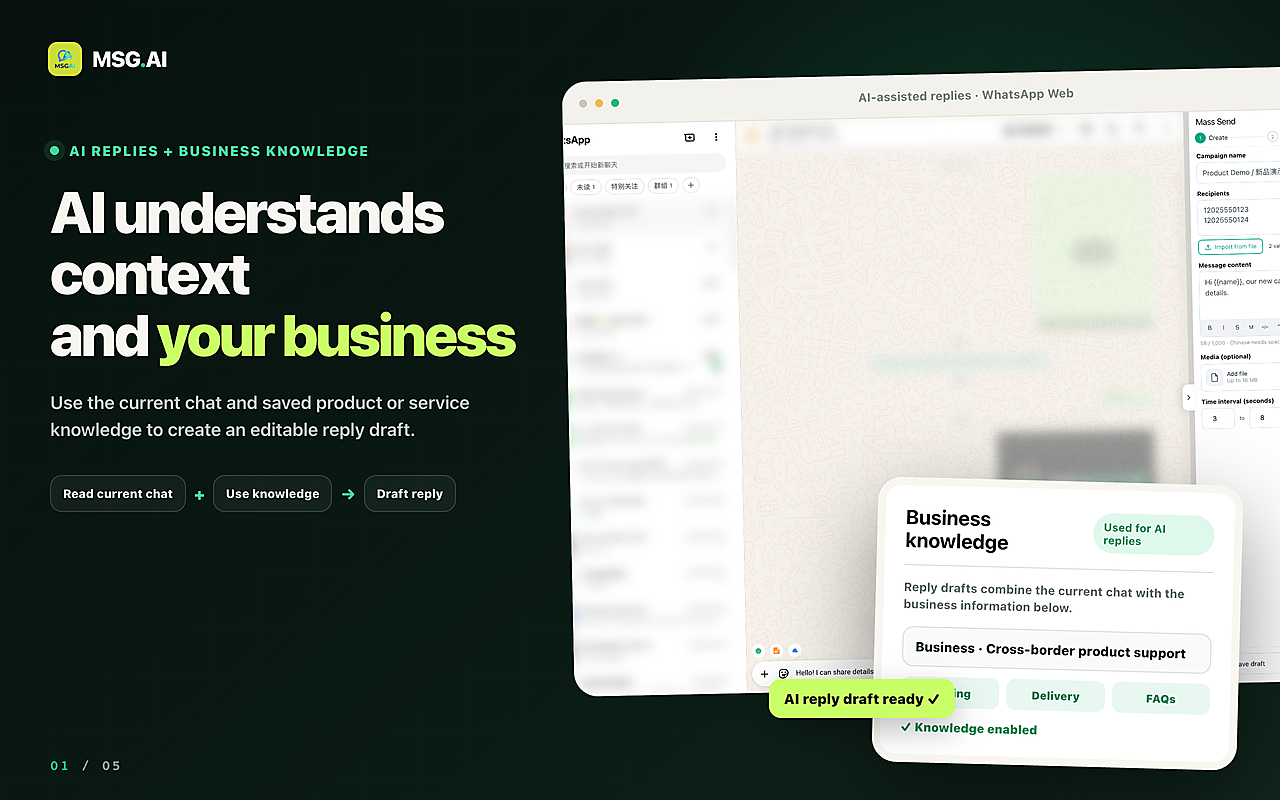
MSG.AI is a Chrome extension that runs inside WhatsApp Web. It is built for cross-border sellers, ecommerce support teams, and small businesses that work in several languages. It is not ChatGPT, not affiliated with OpenAI or Meta, and not a chatbot number. It is an AI-assisted toolkit for the person typing:
- AI reply drafts from your knowledge base that you edit before sending, so answers follow your own policies and prices.
- AI translation for incoming and outgoing messages in multilingual chats.
- Script / quick-reply library for answers you send every day.
- Paced bulk sending of text, images, and video for follow-ups and updates to customers who expect them.
- Google Drive media for product photos and videos.
- Exports of contacts, groups, and chat history when you have a legitimate need.
- Local storage by default for workspace data on your own browser profile.
Honest limits: MSG.AI needs an open WhatsApp Web session. It is not a 24/7 autonomous bot, not a general-purpose assistant for personal questions, and not a multi-agent Business API inbox. It cannot promise account safety. If you need an always-on bot with Meta-approved templates, plan a Business Platform setup instead. Compare the options in WhatsApp Business API alternative.
Common questions
Frequently asked questions
Does ChatGPT still work on WhatsApp?
No. OpenAI's WhatsApp service, including 1-800-ChatGPT, ended on January 15, 2026, after WhatsApp changed its Business Solution terms to bar general-purpose AI assistants. ChatGPT still works in its own apps and on the web.
Can I still get my old ChatGPT WhatsApp chats?
OpenAI asked users to link their WhatsApp number to a ChatGPT account before the cutoff so past conversations would appear in their ChatGPT history. It said chats would not transfer automatically after January 15, 2026, and that WhatsApp does not support exporting them. Check OpenAI's help center for your account.
Is there a ChatGPT for WhatsApp Web extension?
Yes. Several third-party Chrome extensions add ChatGPT-style AI inside WhatsApp Web, often using your own OpenAI API key or the vendor's AI backend. They are not official OpenAI products. Check permissions, data handling, review controls, and the last update date before you install one.
Are WhatsApp AI extensions affected by the chatbot ban?
The January 2026 terms target AI providers that distribute general-purpose assistants through the WhatsApp Business Solution (the API). An extension that helps you write messages in your own WhatsApp Web session works differently. You are still the sender, and you still have to follow WhatsApp's Terms on spam and consent.
Can I use AI to answer customers on WhatsApp?
Yes. Meta has said businesses that use AI to serve their own customers, such as support bots, are not the target of the ban. On WhatsApp Web, a draft-first AI extension is the lightest setup. On the API, you need a task-specific bot through a provider.
Is MSG.AI the same as ChatGPT?
No. MSG.AI is an independent Chrome extension for WhatsApp Web. It is not affiliated with OpenAI or Meta. It offers AI reply drafts from your knowledge base, AI translation, scripts, paced bulk sending, Drive media, and exports, with local storage by default.
Will an AI extension get my WhatsApp number banned?
No extension can guarantee you won't be restricted. Risk comes from spam reports, irrelevant messages, and aggressive sending patterns. Send AI drafts only to people who expect your messages, pace your follow-ups, and stop if complaints go up.
Want ChatGPT-style help inside WhatsApp Web?
ChatGPT is gone from WhatsApp as a contact, but you can still get AI help where you actually reply to customers. If you want editable AI drafts from your own knowledge base, translation, scripts, and paced follow-ups in WhatsApp Web, install MSG.AI from the Chrome Web Store. Start with your ten most common questions.
Related guides: AI reply assistant vs chatbot, AI replies with a knowledge base, translate WhatsApp messages on Web, best extension for business.
Frequently asked questions
FAQ
Does ChatGPT still work on WhatsApp?
No. OpenAI's WhatsApp service, including 1-800-ChatGPT, ended on January 15, 2026, after WhatsApp changed its Business Solution terms to bar general-purpose AI assistants. ChatGPT still works in its own apps and on the web.
Can I still get my old ChatGPT WhatsApp chats?
OpenAI asked users to link their WhatsApp number to a ChatGPT account before the cutoff so past conversations would appear in their ChatGPT history. It said chats would not transfer automatically after January 15, 2026, and that WhatsApp does not support exporting them. Check OpenAI's help center for your account.
Is there a ChatGPT for WhatsApp Web extension?
Yes. Several third-party Chrome extensions add ChatGPT-style AI inside WhatsApp Web, often using your own OpenAI API key or the vendor's AI backend. They are not official OpenAI products. Check permissions, data handling, review controls, and the last update date before you install one.
Are WhatsApp AI extensions affected by the chatbot ban?
The January 2026 terms target AI providers that distribute general-purpose assistants through the WhatsApp Business Solution (the API). An extension that helps you write messages in your own WhatsApp Web session works differently. You are still the sender, and you still have to follow WhatsApp's Terms on spam and consent.
Can I use AI to answer customers on WhatsApp?
Yes. Meta has said businesses that use AI to serve their own customers, such as support bots, are not the target of the ban. On WhatsApp Web, a draft-first AI extension is the lightest setup. On the API, you need a task-specific bot through a provider.
Is MSG.AI the same as ChatGPT?
No. MSG.AI is an independent Chrome extension for WhatsApp Web. It is not affiliated with OpenAI or Meta. It offers AI reply drafts from your knowledge base, AI translation, scripts, paced bulk sending, Drive media, and exports, with local storage by default.
Will an AI extension get my WhatsApp number banned?
No extension can guarantee you won't be restricted. Risk comes from spam reports, irrelevant messages, and aggressive sending patterns. Send AI drafts only to people who expect your messages, pace your follow-ups, and stop if complaints go up.
Last checked October 5, 2026. Platform interfaces, policies, coverage and pricing can change. ChatGPT is a trademark of OpenAI; MSG.AI is not affiliated with OpenAI or Meta. Follow the linked official sources before relying on any regional policy exception.