Greeting and away playbook
WhatsApp Welcome Message Templates: 20 Greeting and Away Message Examples (2026)
A WhatsApp welcome message is the first automated reply a customer sees when they message your business. This guide gives you 20 greeting and away message templates for ecommerce and cross-border sellers, explains how WhatsApp Business App Greeting and Away tools work versus a WhatsApp Web script library, and shows where MSG.AI fits without fake ban guarantees.
Quick answer
What is a WhatsApp welcome message?
A WhatsApp welcome message (also called a WhatsApp greeting message) is the first reply a business sends when a customer starts a chat. An away message is the automatic reply when you are offline or outside business hours. Together they set expectations: who you are, when you reply, and what the customer should do next.
Keep welcome and away messages short (two to four lines). Say the business name, set a reply-time expectation, ask one clear question or give one clear next step, and avoid stuffing them with promotions. On the WhatsApp Business app you can use native Greeting and Away tools. On WhatsApp Web, save the same wording in a script library and reply with a human (or a reviewed AI draft). Meta's Business Platform uses separate auto-reply / chatbot flows.
Below: how the three setups differ, 20 copy-ready templates (10 welcome / greeting, 10 away), setup steps, multilingual tips for cross-border sellers, and an honest note on what MSG.AI can and cannot do.
Know your setup
WhatsApp Business App Greeting vs Web scripts vs API auto-replies
People search for "WhatsApp auto reply greeting" and mean three different products. Pick the one that matches how you actually work.
| Setup | Built-in welcome / away | Best for |
|---|---|---|
| WhatsApp Business app (phone) | Native Greeting message and Away message under Tools (see WhatsApp Help Center) | Solo sellers and small teams who live on the phone |
| WhatsApp Web + Chrome extension | No phone-native Away/Greeting on the Web UI; use a script library and insert (or draft with AI) when a chat opens | Desktop support, multilingual teams, paced outbound + inbound scripts |
| WhatsApp Business Platform (API) | Programmatic auto-replies, flows and approved templates via Cloud API / a BSP | Larger ops that need 24/7 automation and CRM hooks |
Official docs: WhatsApp's Help Center covers greeting messages and away messages for the Business app. For a wider product comparison, read Business app vs Platform vs web extension.
MSG.AI does not turn on the phone-native Greeting or Away message for you. It helps on WhatsApp Web with reusable scripts, translation and AI reply drafts you review before sending. If you need true "set and forget" while the phone is closed, use the Business app Tools or the API.
Write your own
What a good WhatsApp business welcome message includes
- Business name so the customer knows they reached the right shop.
- Human touch (agent name or "our team") without sounding like a robot wall of text.
- Reply-time or hours so silence does not feel like being ignored.
- One next step: order number, product link, language preference, or "how can we help?".
- No hard sell in the first line. Save promos for opted-in marketing messages—see the marketing message templates.
Away messages swap the next step for: when you will be back, what to leave (order ID, photo, deadline), and optionally an urgent path (email or another number).
Copy-ready scripts
10 WhatsApp welcome / greeting message templates
Replace {{placeholders}}. These work as Business app Greeting text, Web scripts, or the first line of an API welcome flow. They are for people who messaged you—not for cold outreach.
General ecommerce
1. Classic WhatsApp business welcome message template
Hi {{name}}! Welcome to {{shop}}. Thanks for messaging us.
We usually reply within {{reply_time}}. How can we help today?
2. Short greeting with business hours
Hello! You've reached {{shop}}. We're online {{hours}} ({{timezone}}).
Tell us your order number or what you're looking for and we'll take it from there.
3. Named agent greeting
Hi {{name}}, this is {{agent}} from {{shop}}. Thanks for getting in touch.
What can I help you with—product question, order update, or something else?
Cross-border and multilingual
4. Language choice welcome
Welcome to {{shop}}! We support {{languages}}.
Reply EN / ES / PT / FR (or your language) and we'll continue in that language.
5. Cross-border shipping welcome
Hi {{name}}, thanks for contacting {{shop}}. We ship to {{countries}}.
Share the product link or SKU and your country, and we'll confirm price and delivery time.
6. Wholesale / B2B greeting
Hello {{name}}, welcome to {{shop}} wholesale support.
Please send your company name, target market and approximate MOQ, and we'll prepare a quote.
After purchase / support entry
7. Order-support welcome
Hi {{name}}, thanks for messaging {{shop}} support.
Please send your order number (and tracking if you have it). We'll check the status for you.
8. Returns / exchanges welcome
Hi {{name}}, you're through to {{shop}} returns.
Reply with your order number and a photo of the item. We'll explain the next steps.
9. New lead from ads or website
Hi {{name}}, thanks for reaching out from {{source}}.
Are you looking for {{product_category}}, a custom quote, or stock availability?
10. Soft catalog nudge (still service-first)
Welcome to {{shop}}! Browse bestsellers here: {{catalog_link}}
Or tell us what you need and we'll recommend 2–3 options.
For longer support conversations after the greeting, use the customer service reply templates. For quotes that go quiet, use the follow-up message templates.
When you're offline
10 WhatsApp away message templates
A good WhatsApp away message is calm, specific about return time, and tells the customer what to leave so you can answer in one reply when you return.
11. Standard after-hours away message
Thanks for messaging {{shop}}. We're currently away and back {{back_time}} ({{timezone}}).
Please leave your name, order number and question—we'll reply as soon as we're online.
12. Weekend / holiday away
Hi! {{shop}} is closed for {{holiday_or_weekend}} and returns {{date}}.
Leave your message and order ID; urgent shipping issues can email {{urgent_email}}.
13. Lunch break / short offline
Thanks for your message—{{shop}} is briefly offline until {{back_time}}.
We'll reply right after. If this is about a same-day dispatch, please include the order number.
14. Inventory / warehouse day
Hi from {{shop}}. Our team is in the warehouse today and replies may be slower until {{back_time}}.
Send the SKU or product link and quantity; we'll confirm stock when we're back at the desk.
15. Trade show / travel
Thanks for contacting {{shop}}. We're at {{event}} until {{date}} and may reply with a delay.
Leave your company, country and what you need samples of—we'll follow up with a quote.
16. Multilingual away
{{shop}} is currently away. We're back {{back_time}} ({{timezone}}).
Leave your message in {{languages}}—we'll reply in your language.
17. Payment / invoice waiting
Thanks for messaging {{shop}}. We're away until {{back_time}}.
If you're sending payment proof, please include the order number and amount in this chat.
18. High-season backlog
Hi! {{shop}} is online but reply times are {{reply_time}} during {{season}}.
Send your order number first so we can prioritise shipping and tracking questions.
19. Temporary number / coverage handoff
Thanks for reaching {{shop}}. {{agent}} is away; {{backup_agent}} covers until {{date}}.
Please resend your question here—nothing is lost.
20. Soft urgent path
{{shop}} is away until {{back_time}} ({{timezone}}). Leave your message here.
For delivery failures today only, email {{urgent_email}} with your tracking number.
How-to
How to set up WhatsApp greeting and away messages
On the WhatsApp Business app
- Open Tools (or Business tools) in the WhatsApp Business app.
- Turn on Greeting message, edit the text, and choose when it sends (usually when a customer messages you for the first time in a while).
- Turn on Away message, set your schedule / timezone, and write the offline reply.
- Test from a second phone. Re-read official Help Center pages when labels move between app versions.
On WhatsApp Web (script library workflow)
- Write one welcome and one away version per language.
- Save them in a quick-reply script library with tags like
welcome,away,en,es. - When a new chat opens, insert the script (or generate an AI draft from your knowledge base), edit, then send.
- Keep the Business app Greeting/Away on if the phone is your source of truth when Web is closed—Web scripts do not replace phone-native Away while you are offline.
On the WhatsApp Business Platform (API)
Use your BSP or Cloud API flows for first-message and outside-hours automation. Template category, opt-in and pricing rules differ from the consumer/Business app. See WhatsApp Business API alternative if you are deciding whether you need the API yet.
Cross-border sellers
Multilingual WhatsApp greeting messages
- One master + per-market copies. Translate hours, currency examples and holiday names—not just "hello".
- Ask language once. Template 4 (language choice) prevents half-English, half-machine-translated threads.
- Match timezone in the away message. "Back at 9am" without a zone confuses buyers abroad.
- Review numbers after translation. Reply times, phone numbers and order-ID formats break easily.
Workflow guides: translate WhatsApp messages on Web and best WhatsApp translator extension.
Avoid these
WhatsApp welcome and away message mistakes
- A welcome that is actually a promo blast. First reply should help; marketing needs opt-in.
- No reply-time expectation. Customers escalate when they do not know when you return.
- Away message that says "we'll reply soon" with no time. Give a clock time and timezone.
- Walls of emoji and CAPS. Harder to trust and more likely to be ignored.
- Assuming Web scripts fire while you sleep. Phone-native Away or API automation is required for true offline auto-reply.
- One English greeting for every market. Cross-border buyers often leave if the first reply is not in their language.
- Confusing greeting with chatbot. A static welcome is not a full AI agent—see AI reply assistant vs chatbot vs AI agent.
Product-honest fit
Where MSG.AI fits for WhatsApp welcome and away messages
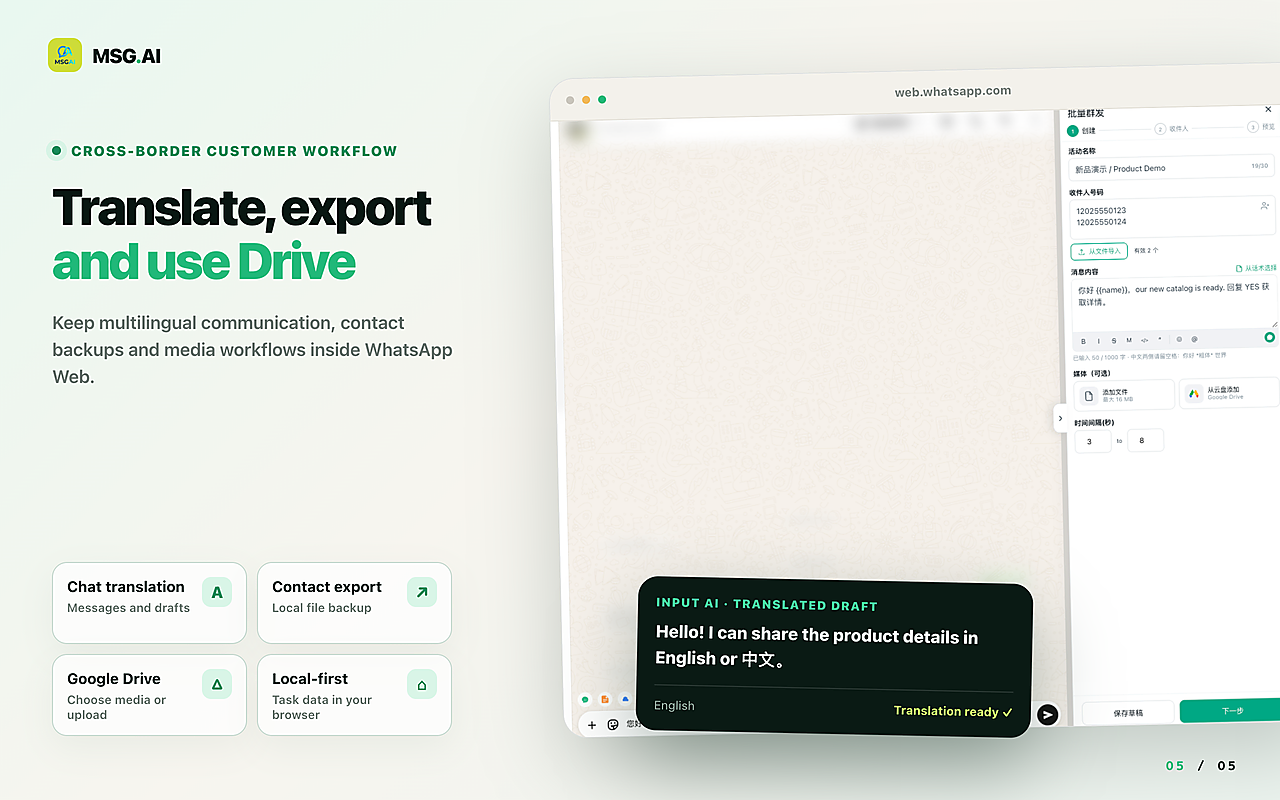
MSG.AI is a Chrome extension inside WhatsApp Web for cross-border sellers, ecommerce support and multilingual SMBs. It is not Meta's Business API and is not affiliated with Meta or WhatsApp. For greetings and away-style replies it helps with:
- Script library for welcome, greeting and away wording with folders, tags and shortcuts.
- AI translation so each market gets a natural first reply.
- Knowledge-base AI reply drafts you review before sending (useful when the "welcome" needs a real answer, not only a canned line).
- Local storage by default for scripts and settings in your browser profile.
- Exports and Drive media for the wider support workflow around those chats.
Honest limits: MSG.AI does not enable WhatsApp Business app native Greeting or Away messages, does not keep auto-replying when WhatsApp Web is closed, and does not replace Cloud API chatbots. It needs an open WhatsApp Web session. No tool can guarantee your number will never be restricted.
Common questions
Frequently asked questions
What is a WhatsApp welcome message?
It is the first automated or semi-automated reply when a customer messages your business. On the WhatsApp Business app it is often called a greeting message. On WhatsApp Web teams usually send it from a saved script.
How do I set a WhatsApp greeting message?
In the WhatsApp Business app, open Tools, enable Greeting message, edit the text and choose when it should send. Test from another phone. On WhatsApp Web, save the same text as a quick reply and insert it when a new chat opens.
What is a WhatsApp away message?
An away message is the automatic reply sent when your business is offline or outside the hours you set. It should state when you return, which timezone you use, and what the customer should leave in the chat.
Can I use auto reply greetings on WhatsApp Web?
WhatsApp Web does not provide the same phone-native Greeting and Away toggles. You can still respond fast with a script library, reviewed AI drafts, or a full Business Platform chatbot if you need true unattended automation.
Should a welcome message include promotions?
Keep the first reply service-first. Mention a catalogue link if it helps the customer self-serve, but save coupons and campaigns for people who opted in to marketing updates.
How long should a WhatsApp business welcome message be?
Two to four short lines is enough: who you are, when you reply, and one next step. Longer FAQs belong in follow-up messages or a knowledge base.
Does MSG.AI send WhatsApp away messages automatically when I'm offline?
No. MSG.AI runs inside an open WhatsApp Web session. Use the WhatsApp Business app Away message or the Business Platform for unattended offline replies; use MSG.AI for scripts, translation and reviewed drafts while you are working on Web.
Put your welcome and away messages to work
Pick one welcome and one away template, translate them for your top markets, save them as scripts, and turn on Business app Greeting/Away if the phone covers offline hours. Install MSG.AI from the Chrome Web Store to keep those scripts (plus translation and AI drafts) inside WhatsApp Web.
Related guides: quick-reply script library, customer service reply templates, AI auto-reply with a knowledge base, app vs Platform vs Web extension.
Frequently asked questions
FAQ
What is a WhatsApp welcome message?
It is the first automated or semi-automated reply when a customer messages your business. On the WhatsApp Business app it is often called a greeting message. On WhatsApp Web teams usually send it from a saved script.
How do I set a WhatsApp greeting message?
In the WhatsApp Business app, open Tools, enable Greeting message, edit the text and choose when it should send. Test from another phone. On WhatsApp Web, save the same text as a quick reply and insert it when a new chat opens.
What is a WhatsApp away message?
An away message is the automatic reply sent when your business is offline or outside the hours you set. It should state when you return, which timezone you use, and what the customer should leave in the chat.
Can I use auto reply greetings on WhatsApp Web?
WhatsApp Web does not provide the same phone-native Greeting and Away toggles. You can still respond fast with a script library, reviewed AI drafts, or a full Business Platform chatbot if you need true unattended automation.
Should a welcome message include promotions?
Keep the first reply service-first. Mention a catalogue link if it helps the customer self-serve, but save coupons and campaigns for people who opted in to marketing updates.
How long should a WhatsApp business welcome message be?
Two to four short lines is enough: who you are, when you reply, and one next step. Longer FAQs belong in follow-up messages or a knowledge base.
Does MSG.AI send WhatsApp away messages automatically when I'm offline?
No. MSG.AI runs inside an open WhatsApp Web session. Use the WhatsApp Business app Away message or the Business Platform for unattended offline replies; use MSG.AI for scripts, translation and reviewed drafts while you are working on Web.
Last checked October 9, 2026. WhatsApp Business app Tools labels, Help Center URLs and Business Platform auto-reply features change over time; verify in the current app and Meta documentation. MSG.AI is not affiliated with Meta or WhatsApp. Templates are general guidance, not measured conversion results.