Small-business workflow guide
WhatsApp Web Customer Service Tools for Small Business
Small teams rarely need more disconnected dashboards. They need a repeatable way to understand customers, answer accurately, reuse approved content and keep useful records in the WhatsApp Web workspace they already use.
The practical answer
What WhatsApp Web customer-service tools does a small business need?
Start with the work, not the longest feature list. A small business needs to understand messages, answer with accurate company information, reuse approved wording, handle media without searching multiple folders, contact opted-in customers carefully and keep useful records.
MSG.AI is a Chrome extension that adds these workflows to an active WhatsApp Web session. It is designed as an operator tool: AI creates translations and drafts, but the user reviews what will be sent.
MSG.AI works in WhatsApp Web and is not the official WhatsApp Business Platform or an unattended 24/7 chatbot. Businesses that need multi-agent routing, server-side automation or official API integrations should evaluate the WhatsApp Business Platform and authorized providers.
Feature map
The MSG.AI WhatsApp Web productivity toolkit
| Feature | Business task | Human checkpoint |
|---|---|---|
| AI translation | Read and write across languages | Compare original and outgoing preview |
| AI Reply | Create a contextual response draft | Edit before sending |
| Business knowledge base | Ground drafts in services, prices and limits | Keep facts current |
| Scripts | Reuse approved messages | Select the right scenario |
| Drive media library | Find images and videos for sending | Verify the selected asset |
| Export | Archive chats, contacts and group data | Control access and retention |
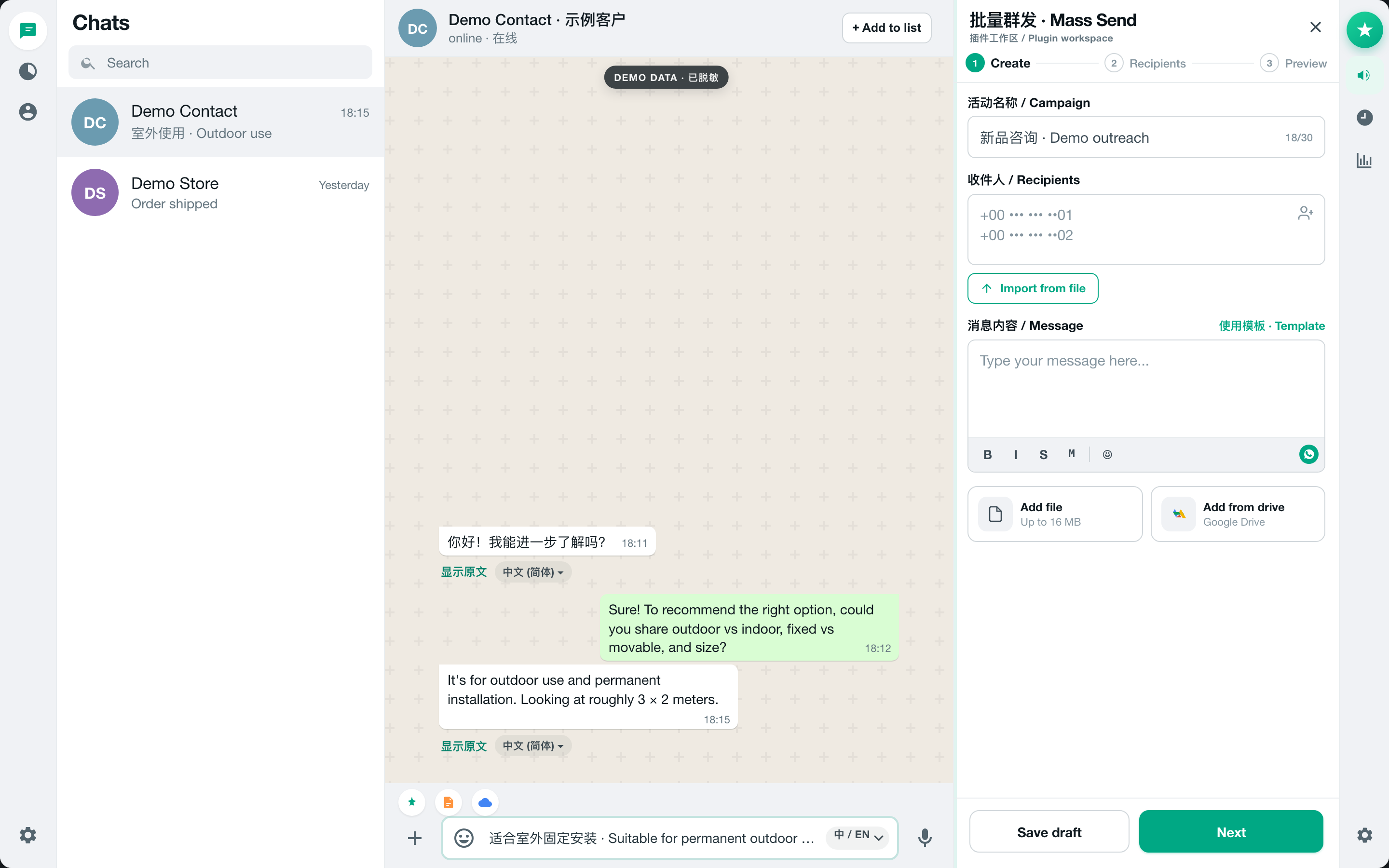
| Mass send | Send expected messages to a reviewed list | Confirm consent, recipients and preview |
Cross-border support
Translate incoming and outgoing WhatsApp messages
MSG.AI supports inline incoming translation, global Live Translate and outgoing draft translation with a target-language preview. The current selector offers 20 target languages. This keeps bilingual work inside the conversation and reduces copy-paste mistakes.
Follow the full WhatsApp Web automatic translation guide for setup, language coverage and privacy boundaries.
Answer with facts
Use AI reply drafts with a business knowledge base
Recent chat context explains what the customer is asking. The MSG.AI knowledge base adds your business name, introduction, up to 20 services and extra rules such as working hours, prices, exclusions and escalation instructions. AI Reply combines those inputs and fills an editable composer.
The knowledge base reduces unsupported guessing but does not guarantee correctness. Review the business knowledge-base and AI reply guide before using prices, delivery dates or policies in customer messages.
Reusable assets
Save scripts and organize Google Drive media
Use scripts for language that should remain stable: greetings, qualification questions, payment instructions and after-sales steps. Use AI Reply when the answer must adapt to conversation context. Keeping those functions separate prevents a creative draft from replacing an approved policy.
The Google Drive media library is for browsing, uploading and selecting images or videos used in messaging. It is optional and distinct from local task storage.
Records and handoff
Export WhatsApp chats, contacts and group members
MSG.AI can generate a styled HTML transcript for one selected chat, download it locally or upload it to Drive. Contact exports support XLSX, CSV and vCard; group members support XLSX or CSV. An exported chat is a readable archive, not a WhatsApp-restorable backup.
See the WhatsApp chat export and Google Drive archive guide for format selection and security checks.
Controlled messaging
Use bulk messaging without treating every contact as a lead
MSG.AI can import or paste recipients, personalize text, attach media, review recipients and pace a queue. These controls do not create consent and cannot guarantee that WhatsApp will not restrict an account. Send only expected, relevant messages to people you are authorized to contact.
The bulk WhatsApp messaging guide covers formatting, review and safe testing.
Selection criteria
How to choose a WhatsApp Chrome extension for business
- Confirm whether it drafts for a human or sends autonomously.
- Test the exact incoming and outgoing translation workflow.
- Check where chat text and business knowledge are processed.
- Verify export formats, limits and Drive permissions.
- Look for clear recipient review and consent guidance.
- Choose an official API solution when the business requires server-side automation, shared team routing or platform integrations.
Start small
A 30-minute WhatsApp Web customer-service setup
- 01
Add one verified service
Record the scope, price rule, timeline and exclusions.
- 02
Create three approved scripts
Prepare a greeting, a qualification question and a human handoff.
- 03
Test translation both ways
Use a chat you control and inspect the outgoing preview.
- 04
Generate one AI reply draft
Check whether it respects the knowledge-base boundary.
- 05
Export one test chat
Open the HTML and decide where approved archives should be stored.
Frequently asked questions
FAQ
What is the best WhatsApp Web tool for a small business?
The right tool depends on the workflow. MSG.AI is suited to browser-based operators who want translation, editable AI reply drafts, business knowledge, scripts, export and controlled outreach in WhatsApp Web.
Does MSG.AI require the WhatsApp Business API?
No. It works with an active WhatsApp Web session in Chrome. It is not the official Business Platform and does not replace an API solution for server-side or multi-agent automation.
Can MSG.AI answer customers automatically?
It generates an editable reply draft from recent context and optional business knowledge. A user reviews and sends the message.
Can I translate WhatsApp messages for international customers?
Yes. MSG.AI supports incoming and outgoing translation and currently exposes 20 target languages.
Can I archive customer chats and contacts?
Yes. One chat can be exported as styled HTML, while contacts and group data use XLSX, CSV or vCard depending on the data type.
Product workflow checked August 26, 2026. MSG.AI is independently developed and is not affiliated with or endorsed by WhatsApp or Meta. Features, quotas and interfaces may change.